
Free sales pipeline template
Sales Pipeline Excel Template With Chart and Forecast
A sales pipeline Excel template lists every deal you are working on by stage, so you can see what is likely to close and where deals get stuck. This free RMDialer template adds a win chance per stage, weighted value for a realistic forecast and a chart that redraws as deals move.
- Six stages with win chances
- Weighted value per deal
- A chart of value by stage
Free personal dialer. Paid features include a 3-day trial; no card required.
Team plans: ₹159/user/month in India, $29/user/year elsewhere, billed yearly + taxes →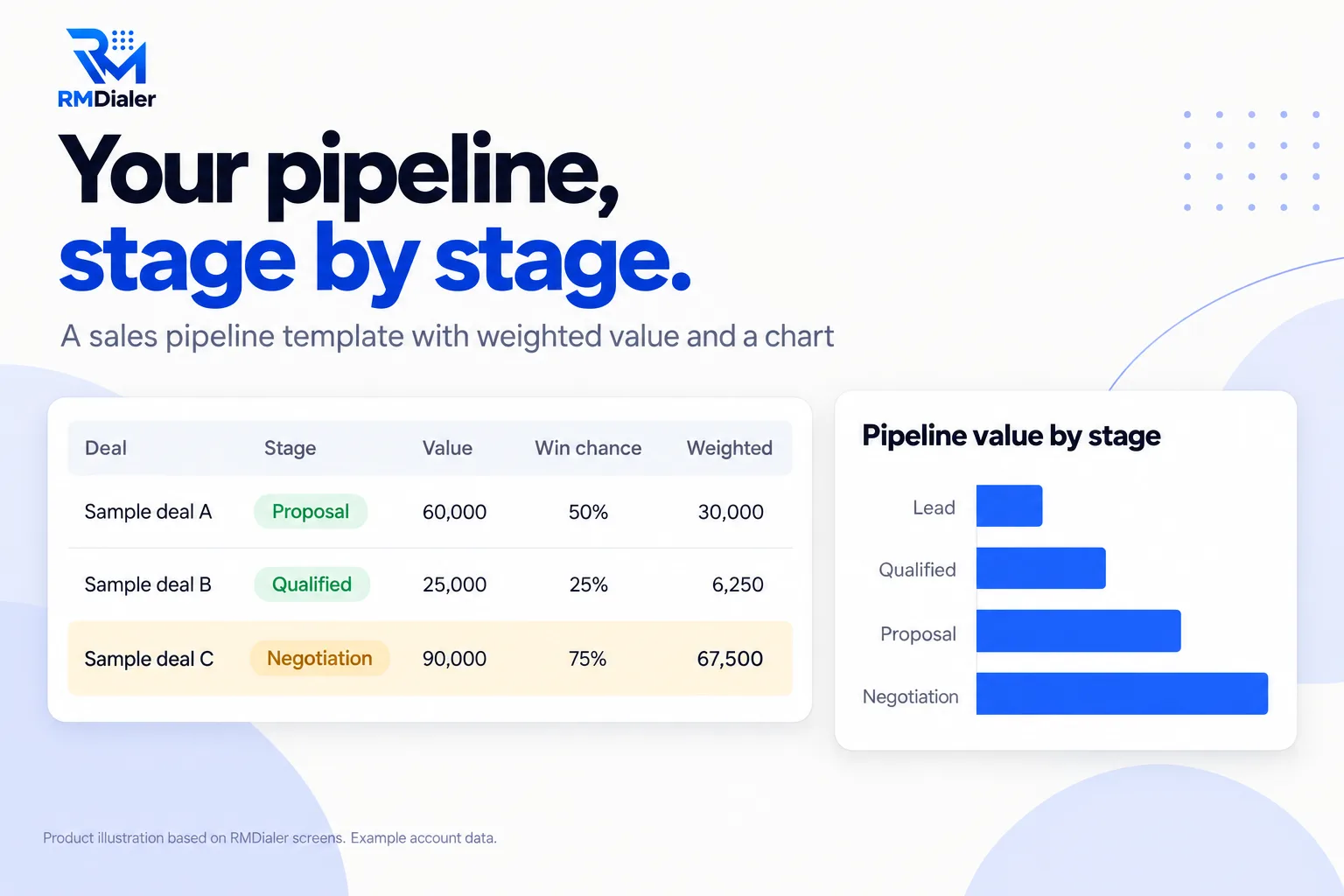
Deals A to C are examples with made-up numbers; delete them before adding yours.
Updated
Short answer
What is a sales pipeline Excel template?
A sales pipeline Excel template is a spreadsheet that tracks open deals through the stages of a sale, with each deal's value and expected close date and totals per stage. RMDialer's free template adds stage win chances, weighted value and a pipeline chart.
Key takeaways
- Stages should mean something the customer did.
- Weighted value beats adding up every deal.
- A deal that does not move needs a decision.
Why track a pipeline
Sales pipeline Excel template benefits
What a small sales team gets from seeing every open deal by stage instead of in a list.
-
See where deals stall
The Pipeline sheet counts deals and value per stage, so a crowded stage shows at once.
-
A realistic forecast
Weighted value multiplies each deal by its stage's win chance.
-
A chart with no setup
A bar chart of value by stage redraws as deals move.
-
Stale deals flagged
Open deals past their expected close date turn amber.
-
Stages you control
Stage names and win chances live on one Lists sheet.
-
Free and open
A plain .xlsx file for Excel, Google Sheets or LibreOffice.
Inside the file
Sales pipeline Excel template stages and win chances
These are the defaults on the Lists sheet. Change the names and percentages to fit your sales; the Deals and Pipeline sheets follow. Download the template.
| Stage | Win chance | Means |
|---|---|---|
| Lead | 10% | Enquiry received, not yet qualified |
| Qualified | 25% | Has the need, the budget and the authority to buy |
| Proposal | 50% | Quote or proposal sent |
| Negotiation | 75% | Discussing terms, price or timing |
| Won | 100% | Signed or paid |
| Lost | 0% | Closed without a sale; keep the reason |
If you need the people and the conversations as well as the deals, the CRM Excel template links contacts, deals and activities in one workbook.
A commercial cleaning company in Brisbane
A sales pipeline template for contract sales
Picture a commercial cleaning company in Brisbane bidding for office and warehouse cleaning contracts after a site walkthrough. The owner knew roughly how many bids were out but not what they were worth, or which ones were real.
Every open bid went into the pipeline template. The chart showed a tall Proposal bar and a short Negotiation bar: bids went out and then nothing happened. A rule to call every proposal within three days moved more contracts into Negotiation, and the weighted value gave the owner a forecast honest enough to hire cleaning crews ahead of the busy months. The company is an illustration, not a named customer.
Plain limits
Sales pipeline template limits, and a pipeline built from calls
A pipeline sheet is only as current as the last time someone updated it, and stages typed on Friday afternoons drift from what really happened on Tuesday.
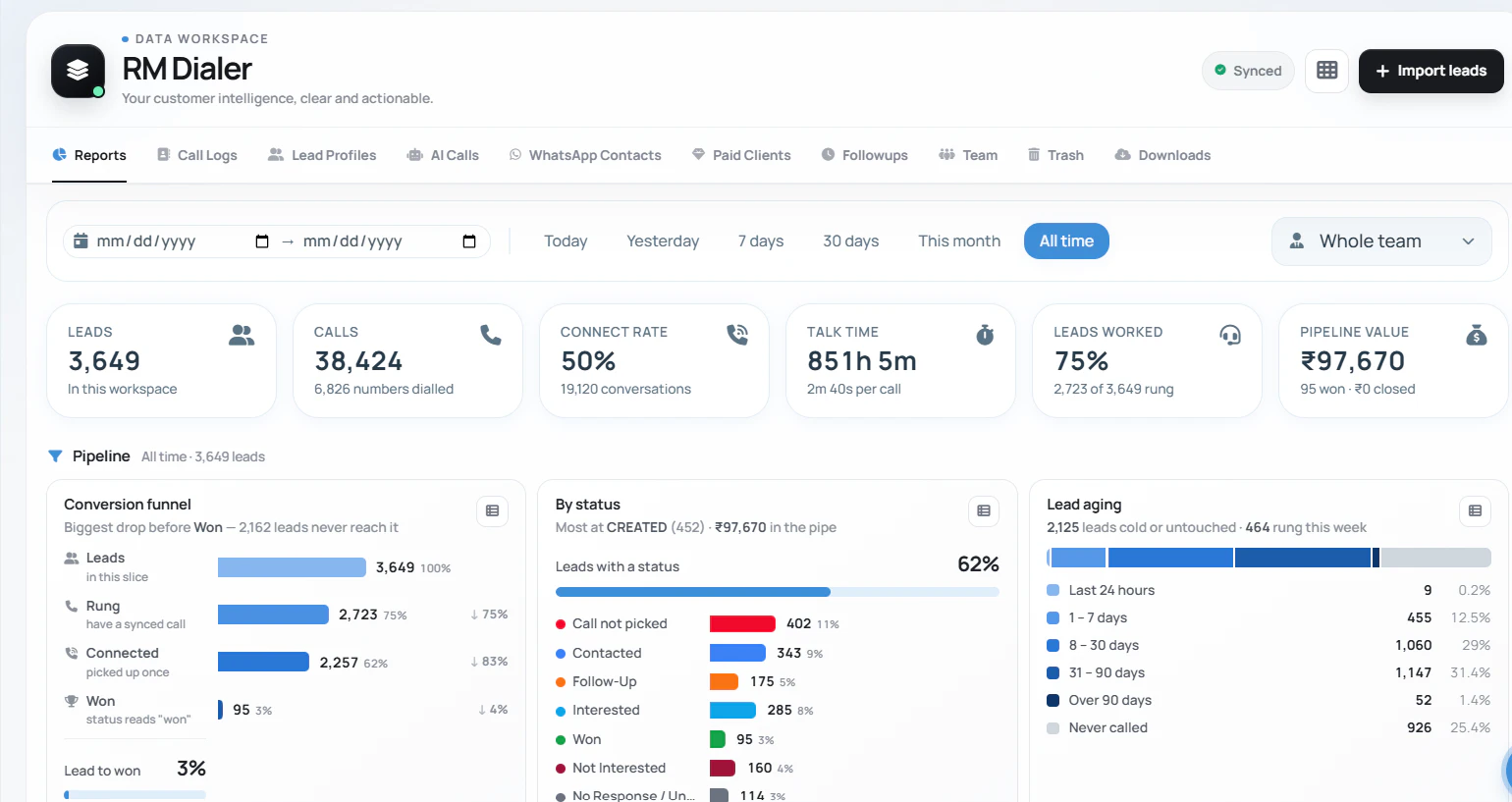
In RMDialer your own lead statuses are the pipeline, and every call ends with a status, a remark and the next follow-up. The Web CRM shows leads by status, a conversion funnel, pipeline value and lead aging from those calls. It does not hold per-deal win chances or weighted forecasts, so keep this template for forecasting if you need it.
Try it with your own workflow
See your stages as a live pipeline
Send us your stage names. We set them as lead statuses and show the funnel filling from a few test calls.
Team features, one plan
₹159/user/month
₹1908 per user, billed yearly, plus taxes, in India. $29 per user per year, or $12 per user for 3 months, outside India.
- Lead statuses, remarks and reminder scheduling
- Assigned calling lists and employee reports
- List auto dialing and WhatsApp automation
The personal dialer, call log and personal analytics are free forever. Team access and saved lead workflows require a plan. SIM charges and any WhatsApp provider charges are separate.
Compare free and paid features →Sales pipeline Excel template FAQ
How do I create a sales pipeline in Excel?
List each deal on its own row with a stage, value and expected close date, give each stage a win chance, multiply to get weighted value, and total deals and value per stage on a summary sheet. This template does all of that and adds a chart.
How do I create a pipeline chart in Excel?
Total the value per stage in a small table, select it, and insert a bar chart. The template's Pipeline sheet already has the table and the chart, which redraw as deals change.
Can I add my own columns to the pipeline template?
Yes. Add columns such as Source or Product to the right of Next step; the stage formulas, weighted value and chart are not affected.
What is weighted pipeline value?
Each deal's value multiplied by the chance it closes, based on its stage. It gives a more honest forecast than adding up every deal at full value.
Where do the win chances come from?
The template starts with common defaults (10% to 75% for open stages). Replace them with your own history once you have some: of the deals that reached each stage, how many were won.
How many stages should a sales pipeline have?
Usually five to seven. Each stage should mean something the customer did, such as receiving a proposal, not just something your team felt.
How do I track sales in an Excel spreadsheet?
Keep one row per deal and update its stage the moment something changes. Review the Pipeline sheet weekly: deals that have not moved in weeks need a call or closing.
Can the template track who owns each deal?
Yes, there is an Owner column with a dropdown. Filter by it to see each salesperson's pipeline.
How does a pipeline work in RMDialer?
Your lead statuses are the pipeline: you create, rename, recolour and reorder them. Each call ends with a status, and the Web CRM shows leads by status, a conversion funnel and pipeline value without anyone updating a sheet.
Does RMDialer calculate weighted forecasts?
No. It shows how many leads sit in each status and how they convert. If you need per-deal win chances and weighted forecasts, keep this template for that part.