
Education
Course and Batch, with a Demo class booked status.
NewRMDialer is now on iPhone as well as Android · every feature except the call log
Free Excel template
One .xlsx file with the columns, dropdowns and highlights a small sales team needs: amber rows for follow-ups due today, a red flag on duplicate numbers and a How to use sheet. No form, no email.
Free personal dialer. Paid features include a 3-day trial; no card required.
Team plans: ₹159/user/month, billed yearly + taxes →
Delete the three sample rows first. Their phone numbers are fake.
Short answer
A good lead management Excel template has one row per lead, eight fixed columns, dropdowns for source, status and owner, a highlight on follow-ups that are due, and a check for duplicate phone numbers. This free RMDialer template has all of them, plus a How to use sheet, and imports into RMDialer unchanged when the team outgrows it.
Key takeaways
Six parts, all editable
Everything below is built from ordinary Excel features, so it keeps working in Google Sheets and nothing is locked. Download the .xlsx file and follow along.
| Part of the template | What it does | How to change it |
|---|---|---|
| Leads sheet, eight columns | Eight headings from the enquiry date to the latest remark, with a single row for every lead | Add a column only if you will filter by it, such as Course or Budget |
| Source, Status and Owner dropdowns | Keep spellings identical so filters and counts work | Edit the values on the Lists sheet; the dropdowns update themselves |
| Amber highlight | Colours rows whose Next follow-up is today or earlier, unless the lead is Won or Lost | Home, Conditional Formatting, Manage Rules, to pick another colour |
| Duplicate? column and red phone cell | Flags a number that already appears in the sheet | Nothing to change; check it before assigning a new lead |
| Frozen header and Name column | Keeps labels and names visible while scrolling | View, Freeze Panes, to move or remove it |
| How to use sheet | Six steps for the daily routine | Replace it with your own team rules if you like |
The reasoning behind each column, and the daily routine that goes with it, is on how to manage leads in Excel.
A coaching institute in Patna
Picture a JEE and NEET coaching institute on Boring Road, Patna, with three people answering admission enquiries. On day one they replace Owner 1 to Owner 3 with their names on the Lists sheet, add Course and Batch as two extra columns and add a status called Demo class booked.
Parents ring after newspaper ads and walk in after school hours. Each enquiry goes in as a row with its source picked from the dropdown. Every morning the amber rows at the top are the day’s calls: demo reminders, fee questions and parents who asked to be called after results.
By the fourth week the sheet has about 300 rows and two people have overwritten each other’s remarks twice. The institute imports the same file into RMDialer, keeps the three statuses they invented and lets the phone log the calls from then on. The timeline is an illustration of a common path, not a named institute.
Same file, different businesses
Keep the eight core columns, because they are what imports cleanly later. Add at most two of your own:
Course and Batch, with a Demo class booked status.
Budget and Locality, with a Site visit done status.
Product and Quantity, with a Sample sent status.
Service type and Area, with a Visit scheduled status.
When the file is ready to become a calling list, Excel se auto call kaise kare shows the dialling side in Hinglish, and the lead tracker app shows how the same statuses keep their dates once they live on the phone. For a sheet that shares leads between callers automatically, see the lead allocation sheet.
Try it with your own workflow
Send us your filled template. We import it, keep your statuses and extra columns, and show the first reminder ringing on a phone.
Team features, one plan
₹159/user/month
₹1,908 per user, billed yearly, plus taxes.
The personal dialer, call log and personal analytics are free forever. Team access and saved lead workflows require a plan. SIM charges and any WhatsApp provider charges are separate.
Compare free and paid features →Yes. It is a plain .xlsx download with no form and no email required. It opens in Excel, in Google Sheets and in LibreOffice, and you can change anything in it.
When the lead came in, who it is, the phone number, where it came from, where it stands, when to ring next, who owns it and the latest remark, plus a Duplicate? helper. Three of those are dropdowns fed from the Lists sheet, so spellings stay consistent.
Yes. Upload it to Google Drive and open it with Google Sheets; the dropdowns and highlights come across. A Google copy has one extra benefit: RMDialer can connect to it and turn each row you add into a lead without any import.
Start each day with the amber rows, sorting the sheet by the follow-up date so they rise to the top. Once a call ends, pick the new status, replace the remark with what was said and choose when to ring again. New enquiries go at the bottom; glance at Duplicate? before giving one an owner.
Excel turned it into a number. The template formats the Phone column as text to prevent this, but pasting from another file can bring the number format with it. Use Paste Special, Values, or set the cells back to Text.
Yes. Type them on the Lists sheet under Statuses, below the existing ones. Keep the list to about seven values; a long list means people pick different words for the same situation.
Yes, from a shared copy in OneDrive or Google Drive, with each person filtering the Owner column to their own name. Beyond three or four people, edits start to clash and it is time to move the leads into a CRM.
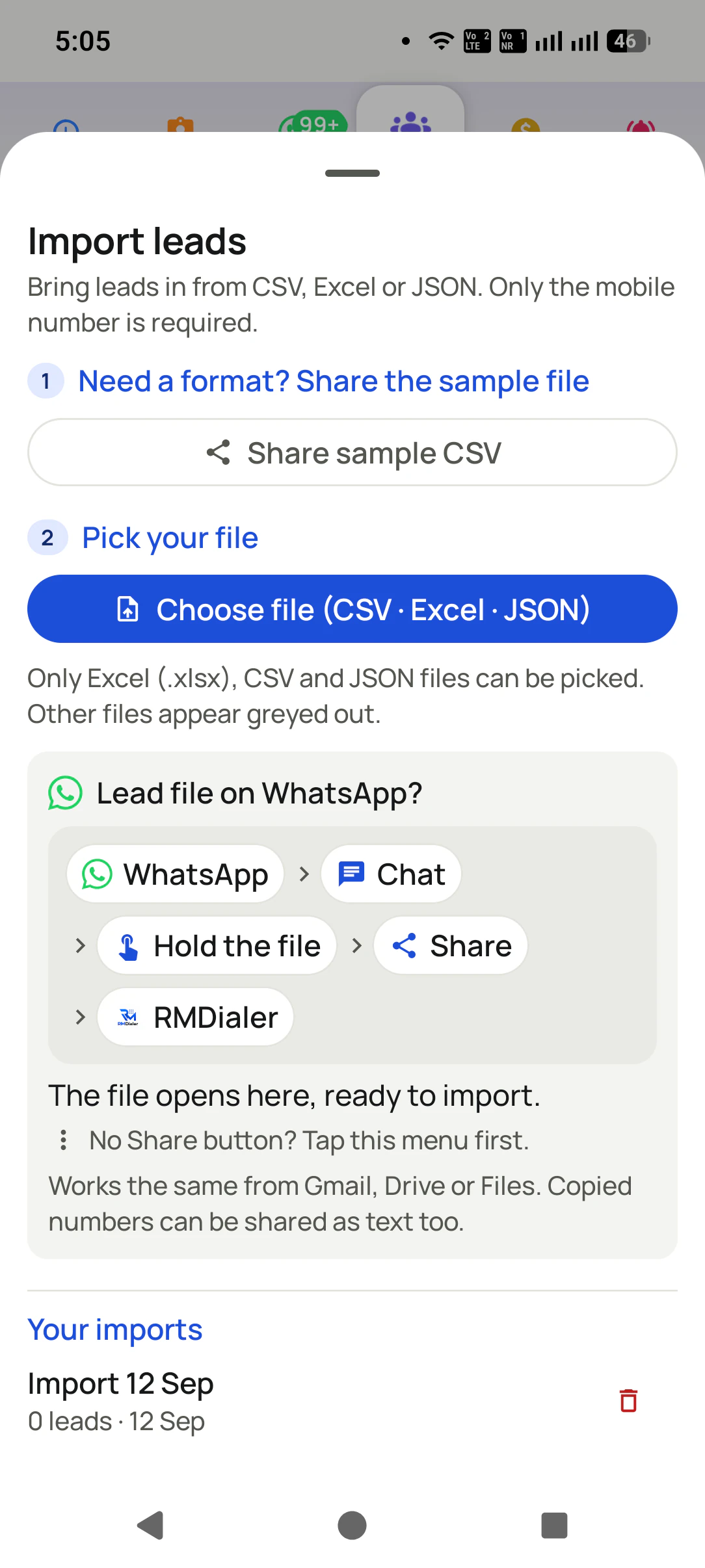
Import the file on the phone or in the Web CRM. The headers match RMDialer’s lead fields, only the phone number is required, and you choose who receives the leads. From then on calls, reminders and history are kept on each lead.
No spreadsheet can; someone has to type each call. That is the main reason teams move to RMDialer, which is the phone’s dialer and logs every call on the lead by itself, including missed calls.
Yes, a separate daily call report template is linked from the RMDialer blog. Many teams use both: this one for leads, the other for each caller’s end-of-day numbers.
The template stays free. RMDialer, where it imports, is ₹159 per caller each month on the annual plan in India, excluding tax, and $29 per user per year, or $12 per user for 3 months, outside India. Try it free for 3 days: unlimited use, no credit card required.