Google Play · Android 8 or newer · Every try kept in the call history
Your own SIM, no virtual number · Android and iPhone apps + Web CRM in one plan · No card for the trial
RAKPS3,500+ businesses on Wappblaster tools · listed on G2, Capterra, SoftwareSuggest
Try 2 of 5next in 20 seconds
Answeredredial stopped
Rings 45 sthen the try ends
Attempts per numberon the Web CRM
Updated
Short answer
What does an auto redial app do?
RMDialer is an auto redial app for Android that calls one busy number again and again and stops by itself the moment someone answers. You open the number’s Call Details, choose Auto redial from the menu, and set three things: how many tries (3, 5 or 10), the gap between them (10, 20 or 30 seconds) and how long each try rings (30, 45 or 60 seconds). After every try the app reads the phone’s call log; talk time means the call was answered, so it stops and tells you. Every try stays in that number’s call history beside its notes and reminders. For a list of customers who did not pick up, the auto dialer has its own rule, Call again if not answered, with one to three more rings at the time you choose. Auto redial on one number is free.
Key takeaways
RMDialer redials one busy number 3, 5 or 10 times and stops when it is answered.
You choose the gap between tries and how long each try rings.
Lists get their own rule: Call again if not answered, one to three more rings.
Android only, because the call log is how the app knows a call was answered.
The Auto redial sheet
How do you set up auto redial in the app?
Four choices on one sheet, opened from the ⋮ menu of any number’s Call Details.
How many tries
3, 5 or 10. The app never goes past 10, because calling one number more than that stops being persistence.
Gap between tries
10, 20 or 30 seconds between the end of one try and the start of the next, so the line has a moment to clear.
Ring each try for
30, 45 or 60 seconds, then the try is cut, so an unanswered try does not ring for a full minute before the network drops it.
Stops when answered
After each try the app reads the phone’s call log. The moment a try shows talk time, redial stops and tells you who answered.
Open the call log or your contacts and tap the number that keeps coming back busy.
On its Call Details, tap the ⋮ menu at the top right and choose Auto redial.
Pick the tries, the gap and the ring time, then tap Start auto redial.
Carry on with the phone. The dialer bar at the bottom shows each try, and a note tells you who answered, or that nobody did after the last try.
The try is cut after the ring time you chose while RMDialer is your phone app, which is also what lets it dial by
itself. What auto redial means, and how to find a redial switch in a phone’s own settings, is explained on the
auto redial glossary page.
Three ways to redial
Which is the best auto redial app for a busy number?
Your phone may already redial, and single-purpose redial apps fill the Play Store. Here is where each one stands, described in general terms.
Compared on
RMDialer Auto redial
Your phone’s own redial
A single-purpose redial app
Where you start it
The ⋮ menu on the number’s Call Details
Call settings, on brands that have it
Its own screen, number typed or pasted
Tries and gap
3, 5 or 10 tries; 10, 20 or 30 seconds apart
A few tries, fixed by the brand
Usually adjustable
How long each try rings
30, 45 or 60 seconds, your choice
Until the network drops it
Varies by app
Knows the call was answered
Yes, from the call log, then stops
Stops when a call connects
Varies; some keep going
What is kept afterwards
Every try in the number’s call history, beside its lead record
The phone’s call log only
Usually nothing
Calls a list again
Yes: Call again if not answered, on any list
No
No
Best for
A business phone that also chases a busy line
An occasional busy number
Someone who only ever needs redial
Where you start it
RMDialer Auto redial: The ⋮ menu on the number’s Call Details
Your phone’s own redial: Call settings, on brands that have it
A single-purpose redial app: Its own screen, number typed or pasted
Tries and gap
RMDialer Auto redial: 3, 5 or 10 tries; 10, 20 or 30 seconds apart
Your phone’s own redial: A few tries, fixed by the brand
A single-purpose redial app: Usually adjustable
How long each try rings
RMDialer Auto redial: 30, 45 or 60 seconds, your choice
Your phone’s own redial: Until the network drops it
A single-purpose redial app: Varies by app
Knows the call was answered
RMDialer Auto redial: Yes, from the call log, then stops
Your phone’s own redial: Stops when a call connects
A single-purpose redial app: Varies; some keep going
What is kept afterwards
RMDialer Auto redial: Every try in the number’s call history, beside its lead record
Your phone’s own redial: The phone’s call log only
A single-purpose redial app: Usually nothing
Calls a list again
RMDialer Auto redial: Yes: Call again if not answered, on any list
Your phone’s own redial: No
A single-purpose redial app: No
Best for
RMDialer Auto redial: A business phone that also chases a busy line
Your phone’s own redial: An occasional busy number
A single-purpose redial app: Someone who only ever needs redial
If redial is the only thing you will ever need, a single-purpose app does the job. RMDialer earns its place when the
same phone also calls customers: the busy supplier line and the sales list sit in one app, on one SIM, with one
history.
Customer reviews
What businesses say about RMDialer
Real businesses, real numbers: how owners and sales teams across India and 12+ countries use RMDialer every day.
Rated 4.9 by customers 5.0 on Google Play 1K+ downloads India + 12+ countries
“Hindi mein app chalta hai, yeh sabse badi baat. Season shuru hone se pehle 400 kisaan ki list auto dial ho jaati hai, aur jo bole "baad mein call karna" uska reminder set. Excel se auto call kaise kare, yeh Google pe dhoondh ke yahan aaya tha. Ab do saal se use kar raha hoon.”
“GST and ITR deadlines mean 200 client calls in a fortnight. The auto dialer runs the list, the remark goes on the client's number, and the ones who said "documents by Friday" ring the assistant on Friday. A follow up reminder app that lives inside the phone dialer is the only kind my staff will keep using.”
“Collections calling is volume work. The auto dialer clears 250 numbers per executive per day from their own SIM, promise-to-pay dates become reminders, and the daily call report shows connected versus not reachable per person. Talk time per employee ended the "phone was busy all day" excuse.”
“Quote-and-chase business. Every enquiry gets a quote remark and a call-back reminder, and the ones we lost show up in the lost leads list for a discount call next month. Auto WhatsApp sends the quote PDF after the call. Would like a Telugu voice note feature, otherwise very good call management app.”
SBSuresh BabuOwner · Packers and moversVijayawada
“Free telecalling app search brought me to the 3-day trial. Whole app, nothing locked. By day two I had imported last year's 1,200 travellers and the auto dialer was calling them for this season's packages. Paid the yearly plan on day three. The WhatsApp itinerary goes out after each call by itself.”
LDLakshmi DeviProprietor · Travel and pilgrimage toursTirupati
“Most CRM tools here are built for a desk. Our brokers sell from their phones, so a telecalling CRM inside the dialer made sense. Leads from Facebook ads land in the app, the auto dialer calls them, and the tripping schedule rings each broker. Tagalog interface, own Globe SIM, no VoIP number for clients to distrust.”
MSMaria SantosOperations lead · Real estate brokerageManila, Philippines
Reviews are collected from customers on WhatsApp and on this website.
Share yours on WhatsApp
For lists, not one number
How do you redial the numbers on a list that did not answer?
A different job with its own setting in the list dialer, so it gets only a short note here.
Auto redial chases one number. A list of customers needs something gentler: each person who missed the call gets
another ring or two later, while the rest of the list keeps moving. RMDialer does that with a list setting called Call
again if not answered, which stays off until someone switches it on.
Every option of that setting, the timings that suit sales lists, and what happens to waiting retries when a session is
stopped are set out on auto dialer with redial.
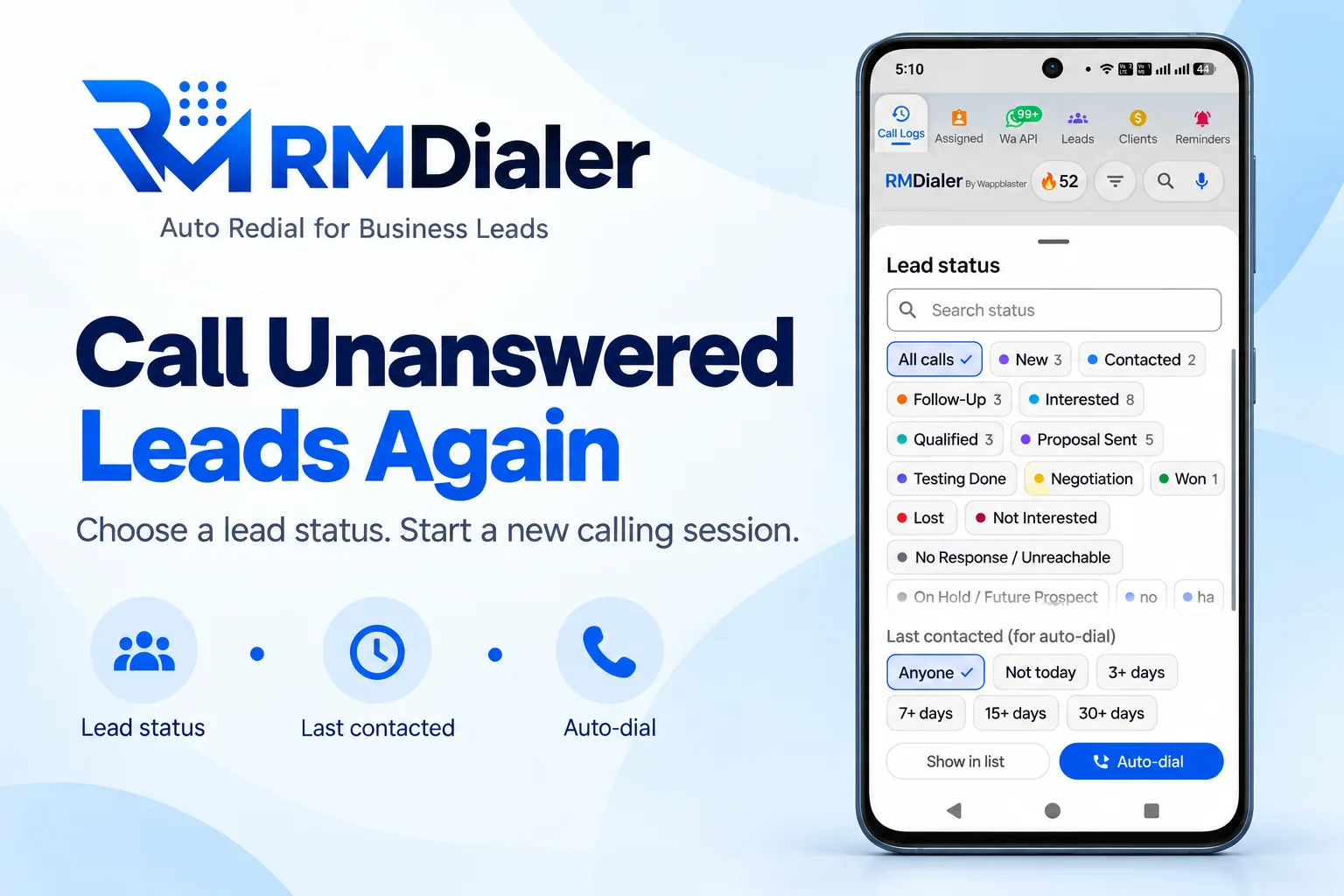
For a list, the numbers that did not pick up are one filter away: choose No Response, pick how long ago they were last called, and auto-dial them again.
A second pass at a different hour is still the strongest retry for customers. Filter the list by No Response, choose
how long ago they were last called, and start a fresh session in the afternoon on the ones the morning missed. The
list dialing that makes this possible is described on the automatic call dialer
page, and for a team that runs it on its own numbers, on business auto dialer.
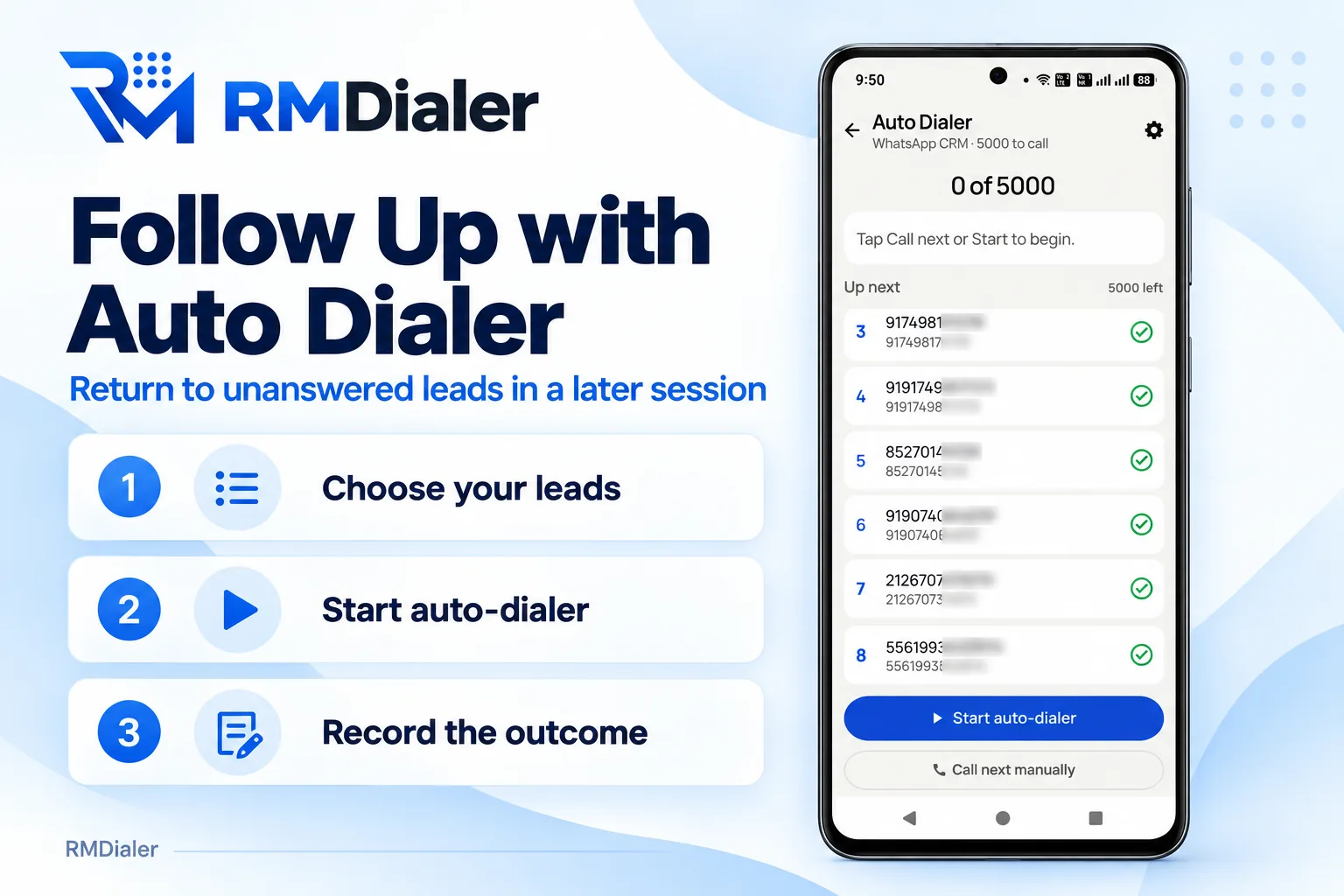
A later session on the leads that did not answer: choose them, start, and record each outcome. Numbers masked.
On an iPhone
Is there an auto redial app for iPhone that works the same way?
Short answer: not the Android way, and the reason is Apple’s, not the app’s.
Two things make redial work: placing a call without a tap each time, and knowing whether the last try was answered.
iOS allows neither to an app. An iPhone app can open the dial screen for you to press, and it cannot read the call
log afterwards, so it has no way to tell a busy tone from a conversation.
The RMDialer iPhone app has every feature except the call log, so an owner on an iPhone still sees the team’s calls,
leads and reminders. Auto redial, like the list dialer, runs on the Android phones.
A worked example
How would a tour operator in Haridwar use an auto redial app?
An illustration with round numbers, built to show the two kinds of redial, not a customer story.
Picture a small tour operator in Haridwar during the pilgrim season. Two people take enquiries for bus trips to the
hill shrines, and every seat depends on one bus operator whose booking line is engaged from nine in the morning. Until
now someone stood by the phone pressing redial between enquiries, and lost the enquiries in the meantime.
On the busy booking line the owner opens the operator’s number and starts Auto redial with 10 tries, a 30-second gap
and a 45-second ring. The phone keeps trying in the background, and on the sixth try the line connects and redial
stops. The seats are confirmed and noted on that number’s record, with a reminder for the payment date.
The enquiry list is the other half. Pilgrim families often miss the first call because they are travelling, so the
morning list runs with Call again if not answered set to two more tries after the list. The dharamshala owners and
families who were driving pick up on the second pass, and nobody is rung twice inside a minute.
Said plainly
When should you not use an auto redial app?
Three cases where redialing does more harm than good.
On a person who is not answering you. Ten rings in five minutes feels like harassment and gets the number reported as spam.
On a line with a waiting queue. A helpline that holds callers in a queue answers faster if you stay on hold than if you keep hanging up and redialing.
For calls that go over WhatsApp. Internet calls do not pass through the SIM, so no SIM redial reaches them.
Auto redial for Android, auto redial app download, auto redial call: the same feature
People type "auto redial android" when they already know the phone, "auto redial call" when a line has been engaged for
an hour, and "auto redial app download" when they are ready to install. All of them land on the same sheet in RMDialer,
opened from the number’s Call Details. "Auto redial apk" is the same hope from someone used to sideloading; install from
Google Play instead.
You will also see it called auto redial android, auto redial app download, auto redial apk and auto redial call. They describe the same thing, so whichever phrase
brought you here, this is the page for it.
How it works
How do you auto redial a busy number, step by step?
1
Open the busy number
Find it in the call log, tap it to open its Call Details, and choose Auto redial from the ⋮ menu at the top.
2
Talk when it connects, save the outcome
Redial stops by itself the moment the call is answered. When you hang up, a short sheet saves what was said.
3
Set what happens next
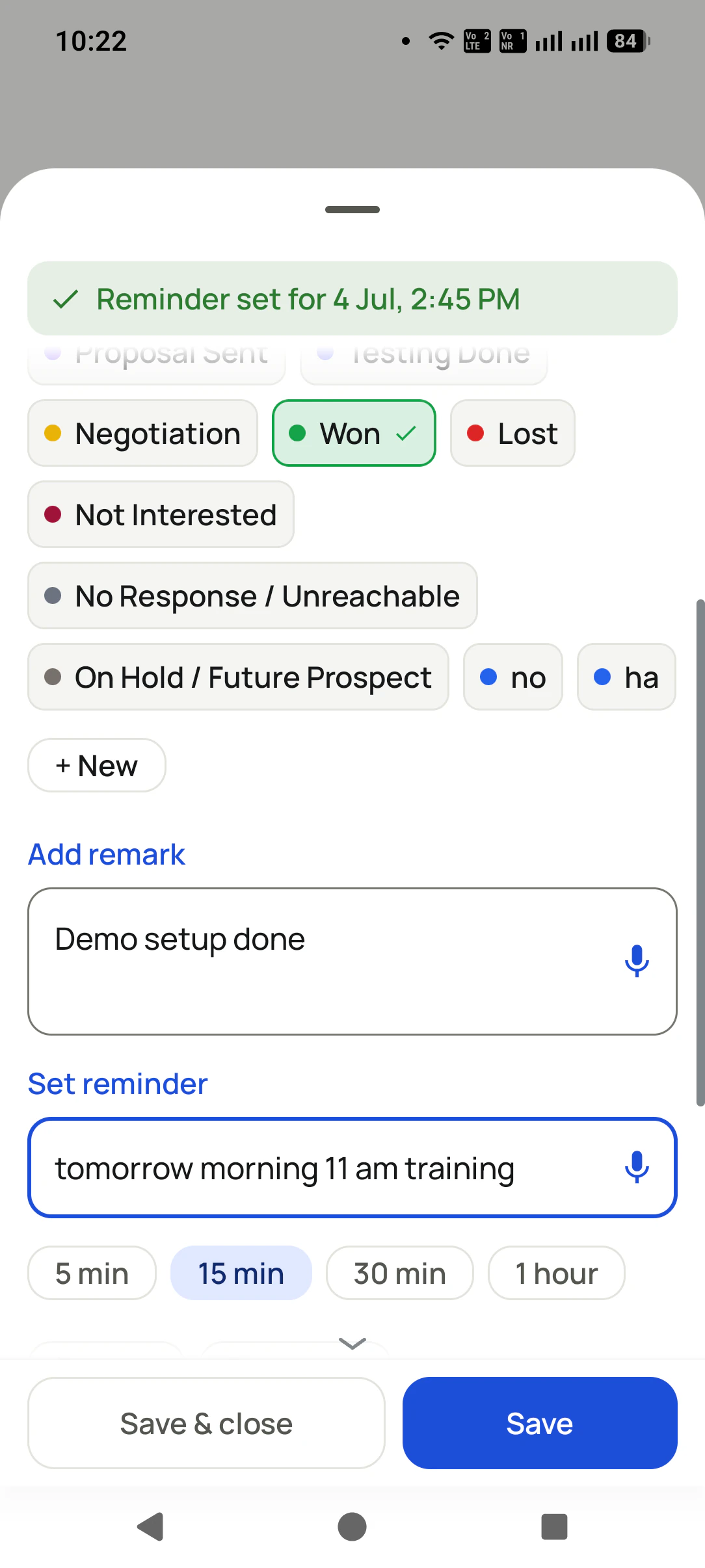
Put a date on the promise, and the reminder rings on the day. The tries and the answered call stay in the number’s history.
Where do you download the auto redial app?
RMDialer is on Google Play for Android 8 or newer; the download
page has the link. Auto redial on one number is free. Redialing a whole list is part of list auto dialing, on the
plan after a 3-day trial; plans are on pricing. Prices are per user, exclusive of taxes.
Questions
Auto redial app: what people ask before installing
Which is the best auto redial app for Android?
For a phone that is also used for business, RMDialer is the best auto redial app for Android: it redials one busy number 3, 5 or 10 times, lets you choose the gap and how long each try rings, stops the moment someone answers, and keeps every try in the number’s call history. Auto redial itself costs nothing.
How to activate auto redial?
In RMDialer, open the number’s Call Details from the call log or your contacts, tap the ⋮ menu at the top right and choose Auto redial. Pick the number of tries, the gap and the ring time, then tap Start auto redial. A bar at the bottom of the app shows the redial running and lets you stop it.
Is there an app that will auto-redial?
Yes. Several single-purpose redial apps are on Google Play, and RMDialer, a full business dialer, has Auto redial built in. The practical difference is what happens after the call connects: RMDialer keeps the tries and the call in the number’s history and lets you save a note and a reminder on the same screen.
How to make your phone redial automatically?
Some Android phones have a redial option in their own call settings. If yours does not, install an auto redial app: in RMDialer it is on the ⋮ menu of any number’s Call Details. Set the tries and the gap, start it, and the phone redials by itself until the call is answered or the tries run out.
Is there an auto redial app for iPhone?
Not one that works like the Android kind. An app on iPhone cannot place calls in the background or read the call log, so it cannot tell whether a try was answered. The RMDialer iPhone app carries every feature except the call log, and redial depends on the call log, so for Auto redial use RMDialer on an Android phone.
What does auto redial mean?
Auto redial means your phone calls the same number again by itself, again and again, until someone answers or the number of tries you allowed runs out. It is for a line that is busy or not answering, such as a helpline or a booking counter, and it is different from an auto dialer, which calls a list of different numbers once each.
Redial automatically ka matlab kya hota hai?
Redial automatically ka matlab hai: phone khud usi number ko baar-baar lagata rahe jab tak koi call utha na le. Busy helpline ya booking line ke liye kaam ka hai. RMDialer mein number ki Call Details kholo, ⋮ menu mein Auto redial chuno, kitni baar lagana hai aur beech ka gap set karo, aur Start dabao.
Is RMDialer’s auto redial free?
Yes. Auto redial on one number is part of the free dialer. Calling a whole list again with the call-again setting belongs to list auto dialing, which is in the plan at ₹159 per user a month on yearly billing in India, after a 3-day trial with every feature.
How many times will the auto redial app call a number?
As many times as you choose on the sheet, 3, 5 or 10, and never more than 10. It stops earlier the moment a try is answered, and when every try is used you get a note saying there was no answer after that many tries.
How does the auto redial app know the call was answered?
After each try it reads the phone’s own call log and looks at the talk time of that outgoing call. Talk time means someone answered, so redial stops. If the call log cannot be read, the app treats the result as unknown rather than as unanswered, so it never rings back a person who already picked up.
Can I redial a whole list of numbers that did not answer?
Yes, but not with Auto redial, which works on one number. The list dialer has its own setting for it, Call again if not answered, that gives each missed person a limited number of extra rings at a pause you pick, without holding up the rest of the list.
Can I use auto redial while the auto dialer is running a list?
No, one at a time. If a list session is running, RMDialer asks you to stop it before starting Auto redial, so two automatic sessions never fight over the same phone line. Finish or stop the list, redial the busy number, then carry on with the list.
Is it okay to auto redial a customer who is not picking up?
Be careful. Auto redial suits helplines, booking lines and service numbers. Ringing a person again and again can feel like harassment and gets business numbers reported as spam. For a customer, use the list rule with a pause of 30 minutes or after the list, or call again at a different hour.
Can I download an auto redial APK instead of using Google Play?
Install RMDialer only from Google Play. Copies of apps offered as APK files on other websites can be modified, and a file offered under the RMDialer name outside Google Play is not ours. Play also keeps the app updated, which matters for a feature that reads the call log.
Does auto redial work with dual SIM phones?
Yes. The redial tries go out through the SIM your dialer settings use for calls, the same as your other auto dial calls, and each try appears in the call log with its SIM. Check which SIM is set before redialing a line that only answers calls from a registered number.
No trial clock on the dialer
What is free forever, and what a plan adds
The business dialer is free forever with no account and no expiry: the keypad, contacts, caller ID, the call log and your call analytics, plus free WhatsApp sends every day. A plan adds the customer record after every call, follow-up reminders, list auto dialing, your team and WhatsApp automation.
Free forever
₹0, no expiry
Your phone app: keypad, contacts, call log and caller ID
Spam and unknown-number screening on every incoming call
Call analytics: your day counted, by outcome, and by who you called
Missed calls kept in their own list, so nothing is returned late
Sending WhatsApp from a call, free every day
Free WhatsApp sends every day with a free account: 15 a day for your first 15 days, then 3 a day. The dialer itself needs no login at all.
On a plan
₹159/user/month, yearly
The customer record: lead status and remarks saved against every call
Follow-up reminders that ring like an alarm on the day you set
Auto dialing a whole list without touching the phone
Your team: seats, assigned calling lists and per-person reports
Automatic WhatsApp after calls, bulk sending and the WhatsApp API inbox
Backup and restore, so a new phone carries on where the old one stopped
Leads arriving on their own from Google Sheets, APIs and lead portals
Try it free for 3 days: unlimited use, no credit card required. Prices are per user, exclusive of taxes.
Business karte ho? Business Dialer chahiye.
Set it as your phone app in one tap. Everything works like before, and then it starts working FOR you.
₹159/user/month on yearly · every feature included · Prices are per user, exclusive of taxes.
Free forever: the business dialer never expires, and needs no account
Call recording supported · our team sets it up with you during training
On iPhone and Android. The iPhone app has every feature except the native call log.