Only the mobile number is required · Resent rows are not called twice
Your own SIM, no virtual number · Android and iPhone apps + Web CRM in one plan · No card for the trial
RAKPS3,500+ businesses on Wappblaster tools · listed on G2, Capterra, SoftwareSuggest
Sheet rowsarrive as leads
Round-robinon arrival
Due todayand overdue
Auto dialeron the list
Short answer
How does SIM based lead management software get leads to callers?
RMDialer moves leads from wherever they land to the phone of the person who should call them. In the Web CRM, connect a Google Sheet once and every new row arrives as a lead; map its columns to name, number and your own fields, then choose round-robin across all employees or only selected people. Leads can also be imported on the phone from CSV, Excel or JSON, including files shared out of WhatsApp, with only the mobile number required. Each caller sees their own list and filters it by product, import, source and call due, with counts for overdue, today and the next seven days. They call from their own SIM, save a status and reminder, transfer a lead to a colleague or mark it done. Rows that only update an existing lead are not assigned again.
Key takeaways
A connected Google Sheet brings new rows in as leads.
Round-robin or selected-employee assignment runs on arrival.
Phone import takes CSV, Excel or JSON; only the number is required.
Call-due filters put overdue leads at the top of the day.
Resent rows do not create a second call.
Arrival to first call
How does a new lead reach the right salesperson's phone?
Six steps, most of which happen without anyone touching them once the rules are set.
Files from anywhere, even WhatsApp
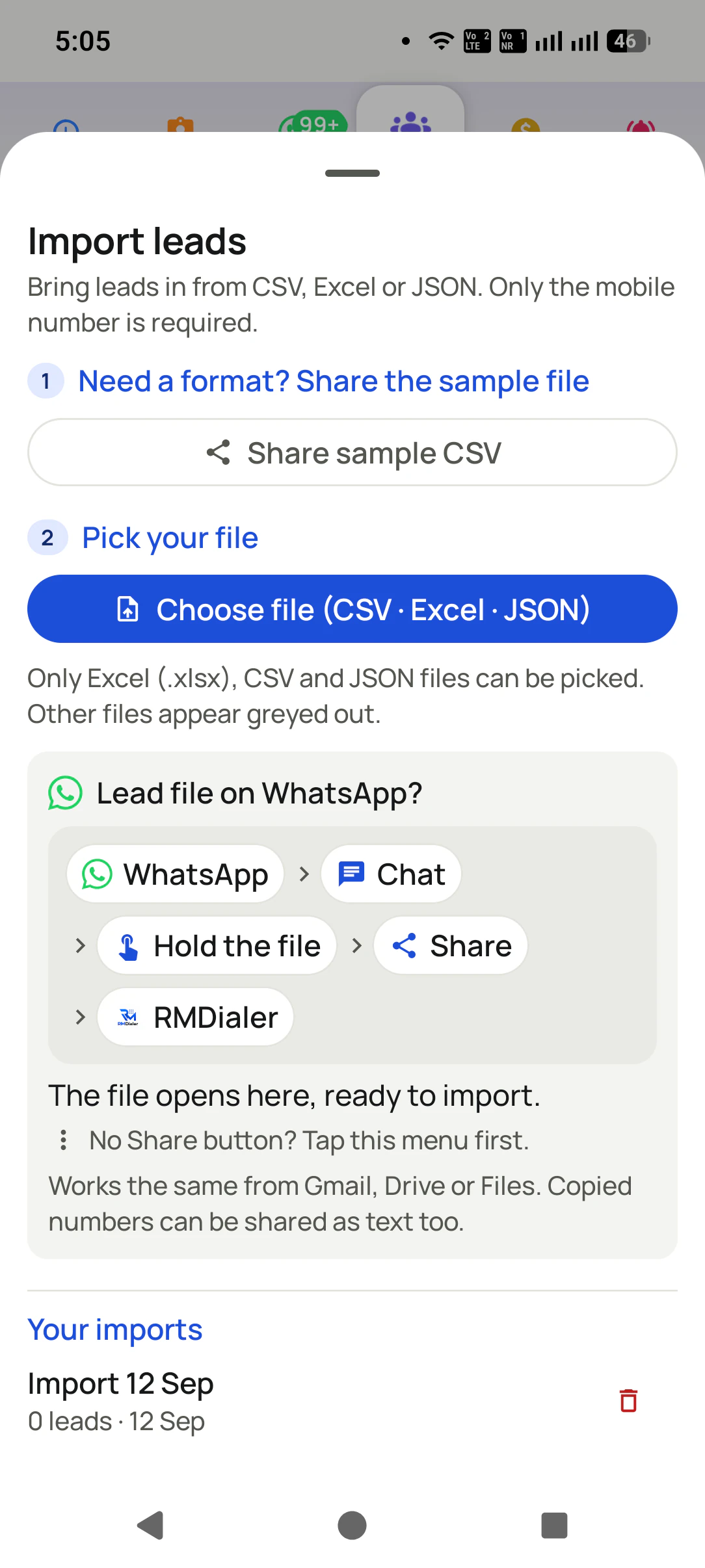
CSV, Excel or JSON, picked from the phone or shared straight out of a WhatsApp chat, Gmail or Drive. Only the mobile number is required; every other column is a bonus.
A live Google Sheet
Connect a sheet once in the Web CRM and every new row arrives as a lead on its own. Form fills, ad leads and portal exports that land in a sheet keep flowing without anyone copying them.
Columns mapped once
Name, number, city, budget and your own fields are matched to the sheet's columns in a mapping step, so a messy export turns into clean leads the same way every time.
Round-robin or chosen callers
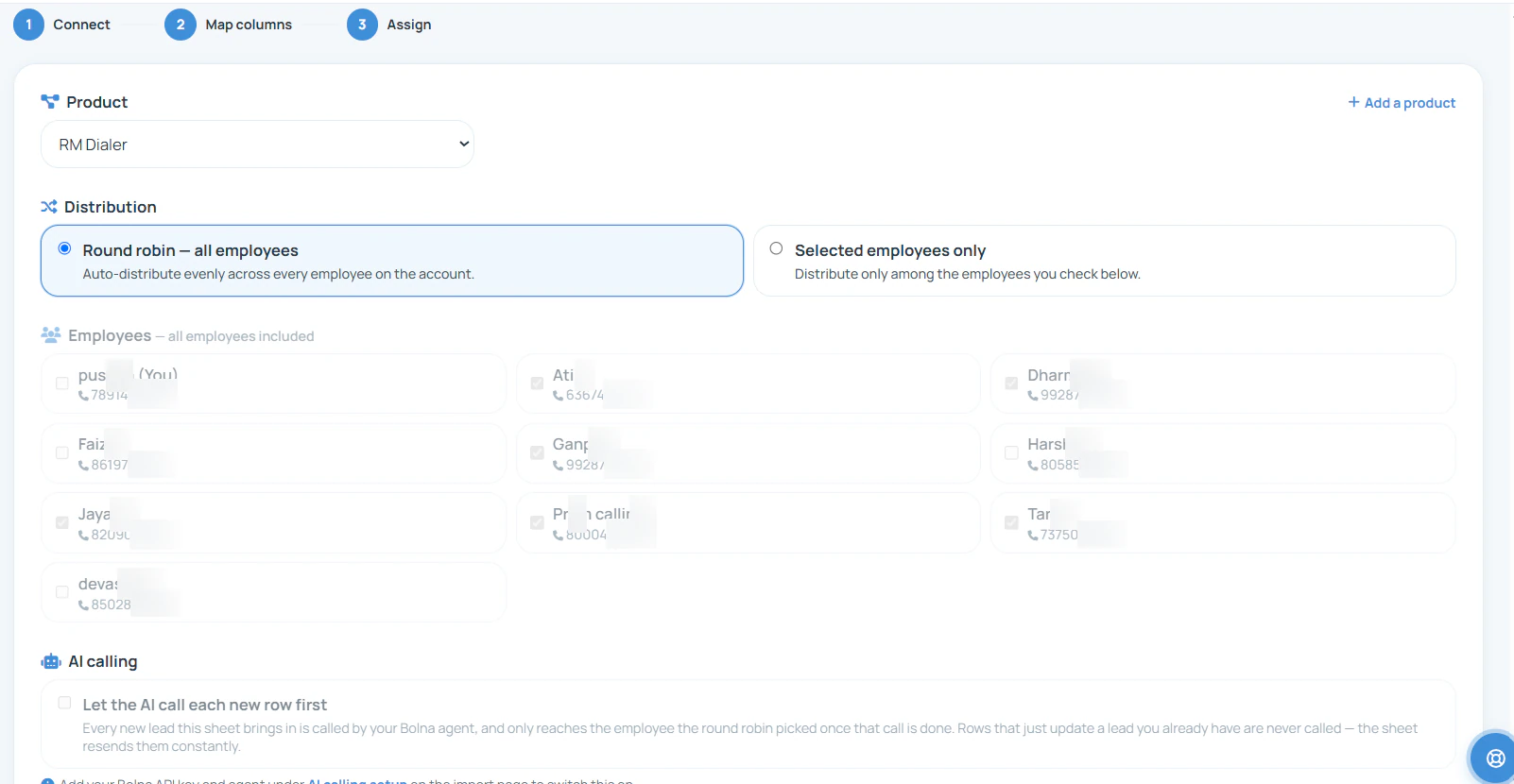
Distribute evenly across every employee, or only across the people you tick. The assignment happens as the lead arrives, not when someone remembers to forward it.
A list sorted by what is due
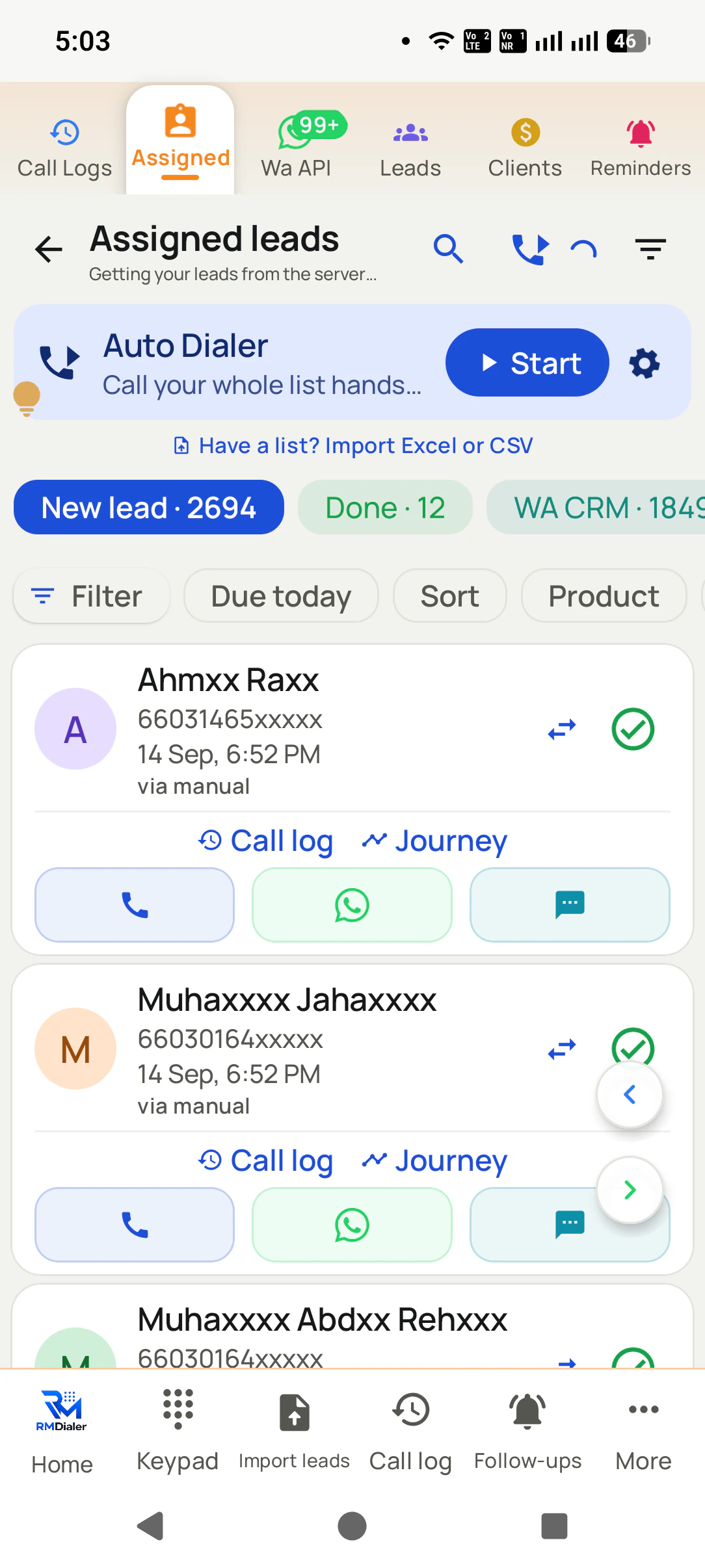
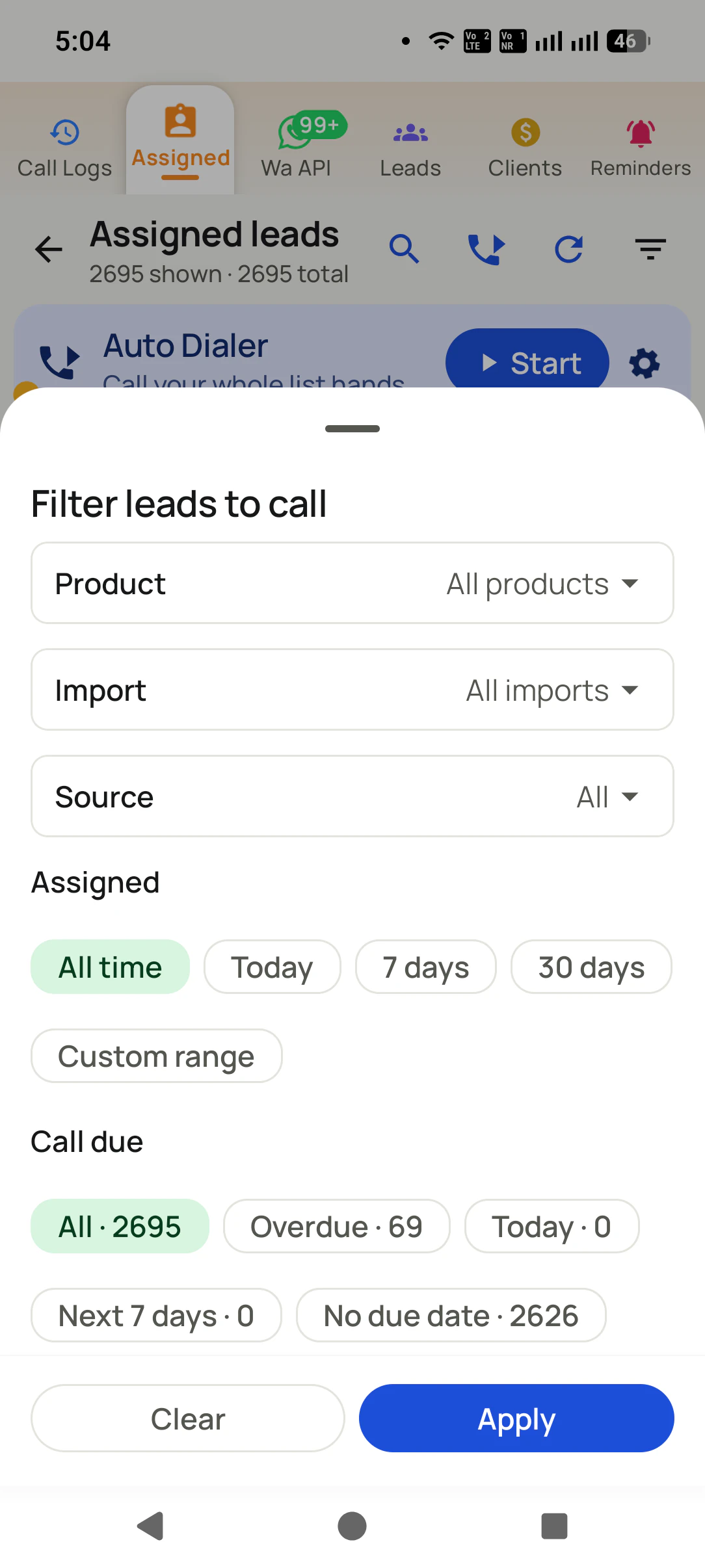
Each caller filters by product, import, source and assigned date, and by call due: overdue, today, the next seven days or no date. The overdue count is the one to clear first.
Transfer and mark done
A lead that belongs with someone else is transferred from its card in one tap, and a finished one moves to Done, so the working list only ever holds leads still waiting.
The assignment rule
Where do you set round-robin distribution for new leads?
Connecting a sheet in the Web CRM runs in three steps: connect, map columns, assign. The assign step ties the leads to a product and picks round-robin across everyone or selected employees only.
Once the rule is in place, the column mapping and assignment happen for every new row with no one
watching. Connectors beyond Google Sheets, and automations across tools, are covered on
lead automation. A floor of agents working
those lists on shifts is described on SIM
based call center software.
Customer reviews
What businesses say about RMDialer
Real businesses, real numbers: how owners and sales teams across India and 12+ countries use RMDialer every day.
Rated 4.9 by customers 5.0 on Google Play 1K+ downloads India + 12+ countries
“In this business the remark is everything: what the family said last time, which profiles were shared. RMDialer shows that remark the moment they call. The lead CRM inside the dialer replaced my three registers. Hindi and Urdu interface both work for my staff.”
IKIrfan KhanOwner · Matrimony bureauBhopal
“Event dates are the deadline for every enquiry, so follow-ups run on the date, not on memory. The reminder rings with the enquiry details, and the WhatsApp with our package PDF goes right after the call. Lost enquiries from last season became this season's calling list. Good lead management app for a small team.”
“Telecaller software that my counsellors actually open, because it is the phone app itself. Demo bookings from the website land in the queue, get dialled the same hour, and the WhatsApp with the course link goes out after each call. Four stars: the Excel import wanted the number column named exactly, so my first upload took two tries.”
AMArjun MehtaCo-founder · EdTech startupIndore
“Earlier I was dialling 80 to 100 portal leads a day by hand from Excel. With RMDialer auto dialer app I import the sheet, press start and it calls one by one from my own Jio SIM. Between calls I mark Interested or Site visit in two taps and the follow-up rings me on time. Closed 3 flats last month from leads I would have forgotten.”
“Best CRM dialer we have used for a small team. Call comes in, the lead card is already on screen with the last remark, and the status change is two taps. Only complaint: the web CRM export could use more filters. Otherwise our 6 person sales team lives in it.”
NSNeha SrivastavaFounder · Digital marketing agencyLucknow
“Most CRM tools here are built for a desk. Our brokers sell from their phones, so a telecalling CRM inside the dialer made sense. Leads from Facebook ads land in the app, the auto dialer calls them, and the tripping schedule rings each broker. Tagalog interface, own Globe SIM, no VoIP number for clients to distrust.”
MSMaria SantosOperations lead · Real estate brokerageManila, Philippines
Reviews are collected from customers on WhatsApp and on this website.
Share yours on WhatsApp
How leads travel
How long does a lead wait before someone calls it?
The same enquiry can reach a caller in seconds or in two days. The difference is the route it takes.
Along the way
Forwarded on WhatsApp
A shared Excel sheet
Desktop CRM, assigned by hand
SIM based lead management
From arrival to a caller's list
When the owner sees and forwards it
When someone opens the sheet
When a manager assigns it
As it arrives, by round-robin
Who decides who gets it
The owner, case by case
Whoever claims the row
A manager
The rule you set once
Duplicates of the same number
Sent twice, called twice
Two rows, two callers
Depends on setup
Rows that only update a lead are not re-assigned
Knowing what is overdue
Scrolling the chat
Sorting a column
A task list
An overdue count on the caller's filter
Calling from the list
Copy the number, dial
Copy the number, dial
Click to call, if set up
Tap to call on the SIM, or start the auto dialer
From arrival to a caller's list
Forwarded on WhatsApp: When the owner sees and forwards it
A shared Excel sheet: When someone opens the sheet
Desktop CRM, assigned by hand: When a manager assigns it
SIM based lead management: As it arrives, by round-robin
Who decides who gets it
Forwarded on WhatsApp: The owner, case by case
A shared Excel sheet: Whoever claims the row
Desktop CRM, assigned by hand: A manager
SIM based lead management: The rule you set once
Duplicates of the same number
Forwarded on WhatsApp: Sent twice, called twice
A shared Excel sheet: Two rows, two callers
Desktop CRM, assigned by hand: Depends on setup
SIM based lead management: Rows that only update a lead are not re-assigned
Knowing what is overdue
Forwarded on WhatsApp: Scrolling the chat
A shared Excel sheet: Sorting a column
Desktop CRM, assigned by hand: A task list
SIM based lead management: An overdue count on the caller's filter
Calling from the list
Forwarded on WhatsApp: Copy the number, dial
A shared Excel sheet: Copy the number, dial
Desktop CRM, assigned by hand: Click to call, if set up
SIM based lead management: Tap to call on the SIM, or start the auto dialer
A worked example
How did a modular kitchen studio stop losing ad enquiries overnight?
A modular kitchen and wardrobe studio in Bhubaneswar with three designers who also take the sales calls.
Enquiries arrived from three places: a lead form on social ads, a home-improvement portal, and people who
rang the showroom. The owner downloaded the ad leads each night, copied the portal enquiries into a group
chat and forwarded them to the three designers by hand. Some nights he was too tired, and a Friday lead
often waited until Monday. By then a competitor's designer had already visited.
The studio now sends both the ad form and the portal export into one live sheet, connected once with its
columns mapped: name, number, locality, kitchen or wardrobe, budget. Assignment is round-robin across the
designers, so each new enquiry lands on someone's phone within moments, and a cold lead nobody
touched shows up in the overdue count rather than in a forgotten chat. A new import batch from an
exhibition goes in from a phone in two minutes.
When one designer went on leave for a family wedding, the owner transferred her open leads to the other two,
and they read her remarks before calling. The status that matters most, a booked showroom visit,
is now counted every week, and the owner no longer spends his evenings as a human switchboard for leads.
Honest boundaries
What does SIM based lead management not handle?
It gets leads to callers quickly and keeps them from ageing. A few jobs sit with other kinds of software.
Running the ads or building the landing pages that produce leads. It starts where a lead lands in a sheet, a file or a phone call.
Email nurture sequences for leads who never pick up. Follow-up here is calls, reminders and WhatsApp messages, not drip email.
Scoring leads with a model that predicts who will buy. Priority comes from what is due and the status each caller sets.
SIM based lead management, lead CRM, lead app: one job
Some teams call it a lead CRM, some a lead management app, and some search for lead management software with
SIM calling because they have been burned by tools that force a virtual number. The job underneath is the
same: gather leads from every source, get each to the right caller fast, and let them call from the number
customers already know.
You will also see it called sim based lead management, sim based lead management app, sim based lead crm and lead management software with sim calling. They describe the same thing, so whichever phrase
brought you here, this is the page for it.
How it works
How does a salesperson take a lead from import to call?
1
Bring a file in from the phone
Pick a CSV, Excel or JSON file, or share one out of a WhatsApp chat. Only the mobile number is required.
2
Filter to the leads that are due
Product, import, source, assigned date and call due, with counts for overdue, today and the next seven days.
3
Work the list, lead by lead
Each lead card carries its status, a Paid tag when it converts, and buttons to call, WhatsApp, set a reminder or transfer.
Questions
SIM based lead management software: questions about lead flow
What is SIM based lead management software?
SIM based lead management software collects leads from files, sheets and forms, hands them to the right salesperson, and lets that person call each one from their own mobile SIM. It covers the path from where a lead lands to the first call and every follow-up after, with the calls themselves staying ordinary mobile calls.
Which is the best sim based lead management software for a team with leads from many sources?
RMDialer is the best sim based lead management software for a team whose leads arrive from ad forms, portals, sheets and walk-ins. A connected Google Sheet brings new rows in on its own, columns are mapped once, leads are assigned by round-robin as they arrive, and each caller works a list filtered to what is overdue or due today.
Does RMDialer work as sim based lead management software?
Yes. RMDialer works as sim based lead management software: leads come in from CSV, Excel, JSON or a live Google Sheet, are assigned across the team, and reach each caller's phone as a list they call from their own SIM, with statuses, reminders and transfers on every lead.
How do I distribute leads to my sales team automatically?
Set a distribution rule once: round-robin across all employees, or across selected people only. With a Google Sheet connected, every new row becomes a lead and goes to the next person in the rotation straight away, so nobody has to forward leads by hand.
What is round-robin lead assignment?
Round-robin assignment hands new leads to salespeople in turn, one each, so work spreads evenly and nobody cherry-picks. It is the fairest default for a team of similar callers. Choose selected employees instead when only some people should receive a particular product's leads.
How do I import leads from Facebook or Google ads?
Send the ad form's leads to a Google Sheet, which both platforms support directly or through a connector, then connect that sheet in the Web CRM. From then on each new form fill arrives as a lead and is assigned without anyone downloading a file.
Can I import leads from Excel on my phone?
Yes. Choose an Excel (.xlsx), CSV or JSON file on the phone, or share it into the app from a WhatsApp chat, Gmail or Drive. A sample CSV is available to share if you need the format, and only the mobile number column is required.
What happens when the same number comes in twice?
A row that only updates a lead you already have is not assigned again, so a sheet that resends rows does not create a second call to the same person. The lead keeps its history and its original owner.
How does a salesperson know which leads to call first?
The filter shows call due counts: overdue, today, the next seven days and no due date. Clearing the overdue bucket first, then today's, is the habit that keeps leads from ageing. Product, import and source filters narrow it further.
Can I reassign leads when someone is on leave?
Yes. A lead can be transferred to another person from its card on the phone, or from the lead's panel in the Web CRM. The history moves with the lead, so the colleague picking it up sees every earlier call and remark.
What is lead ageing and why does it matter?
Lead ageing is how long a lead has sat since it arrived or since its last touch. Interest decays quickly, so an enquiry untouched for a week is worth far less than one rung the same day. Due dates and the overdue count are how a team keeps ageing in check.
Can leads from different products go to different teams?
Yes. Each import or connected sheet can be tied to a product, and distribution can be limited to the employees you select. A kitchen enquiry can go to the design team while a wardrobe enquiry goes to someone else, from the same sheet setup.
Can salespeople add leads themselves?
Yes. A salesperson can add a lead from the phone, turn a caller from the call log into a lead, or import a file. The Web CRM shows how leads arrived, split into imported, manual, transferred and added from the handset.
Do I need a computer to manage leads?
Not for day-to-day work: import, filtering, calling, statuses and transfers all run on the phone. The Web CRM is where an owner connects live sheets, maps columns, sets distribution and reviews the team, which is easier on a larger screen.
Can the auto dialer call the filtered lead list?
Yes. Filter the list to what you want to call, overdue leads for one product for example, and start the auto dialer from the same screen. It works through those leads one after another on your SIM, with the outcome saved after each call.
No trial clock on the dialer
What is free forever, and what a plan adds
The business dialer is free forever with no account and no expiry: the keypad, contacts, caller ID, the call log and your call analytics, plus free WhatsApp sends every day. A plan adds the customer record after every call, follow-up reminders, list auto dialing, your team and WhatsApp automation.
Free forever
₹0, no expiry
Your phone app: keypad, contacts, call log and caller ID
Spam and unknown-number screening on every incoming call
Call analytics: your day counted, by outcome, and by who you called
Missed calls kept in their own list, so nothing is returned late
Sending WhatsApp from a call, free every day
Free WhatsApp sends every day with a free account: 15 a day for your first 15 days, then 3 a day. The dialer itself needs no login at all.
On a plan
₹159/user/month, yearly
The customer record: lead status and remarks saved against every call
Follow-up reminders that ring like an alarm on the day you set
Auto dialing a whole list without touching the phone
Your team: seats, assigned calling lists and per-person reports
Automatic WhatsApp after calls, bulk sending and the WhatsApp API inbox
Backup and restore, so a new phone carries on where the old one stopped
Leads arriving on their own from Google Sheets, APIs and lead portals
Try it free for 3 days: unlimited use, no credit card required.Prices are per user, exclusive of taxes.
Business karte ho? Business Dialer chahiye.
Set it as your phone app in one tap. Everything works like before, and then it starts working FOR you.
₹159/user/month on yearly · every feature included · Prices are per user, exclusive of taxes.
Free forever: the business dialer never expires, and needs no account
Call recording supported · our team sets it up with you during training
On iPhone and Android. The iPhone app has every feature except the native call log.