SIM Based CRM Where the Call Fills In the Record Is RMDialer
RMDialer is a SIM based CRM for Android: each call on your own SIM lands on the customer's card, and the salesperson adds only the outcome and the next step.
Your numbers, your plan · Records stay with the business · Web CRM included
Your own SIM, no virtual number · Android and iPhone apps + Web CRM in one plan · No card for the trial
RAKPS3,500+ businesses on Wappblaster tools · listed on G2, Capterra, SoftwareSuggest
Every callsaved on the card
Statusfrom your own list
Next steprings on the day
Paid clientamount on the card
Short answer
How does a SIM based CRM keep customer records?
RMDialer is a SIM based CRM that keeps the customer record by letting each phone call write it. When a salesperson calls a buyer from their own SIM, the time, duration and direction of the call are saved on that buyer's card automatically. As the call ends, a sheet asks for two things only: the outcome, chosen from the owner's own status list, and the next step as a reminder that rings on the day. A remark can be typed or spoken. Every status change is kept with its date, and a buyer who pays can be tagged a paid client with the amount. The owner reads the same cards in a Web CRM. RMDialer costs about ₹159 per user per month on the yearly plan. It is not accounting software: invoices, stock and ledgers stay where they are.
Key takeaways
Each call is saved on the buyer's card without anyone typing it.
Outcome and next reminder take two taps as the call ends.
Every status change is kept with its date, not overwritten.
Paid clients carry the sale amount on the same card.
Invoices and stock stay in your accounting software.
Written for you, asked of you
What does a SIM based CRM record without anyone typing?
Most of the card fills itself from the call. The salesperson is asked for the little the phone cannot know, at the one moment they still remember it.
The call writes its own line
Time, duration, incoming or outgoing, and which SIM carried it are saved on the contact card the moment the call ends. Nobody keys in "called Suresh, 4 min" at the end of the day, because the phone already knows.
One tap sets the status
Interested, quotation sent, repeat order due, not picked: the list is yours, set once by the owner, and the salesperson picks from it as the call ends. A status everyone chose from the same list can actually be counted.
A remark, typed or spoken
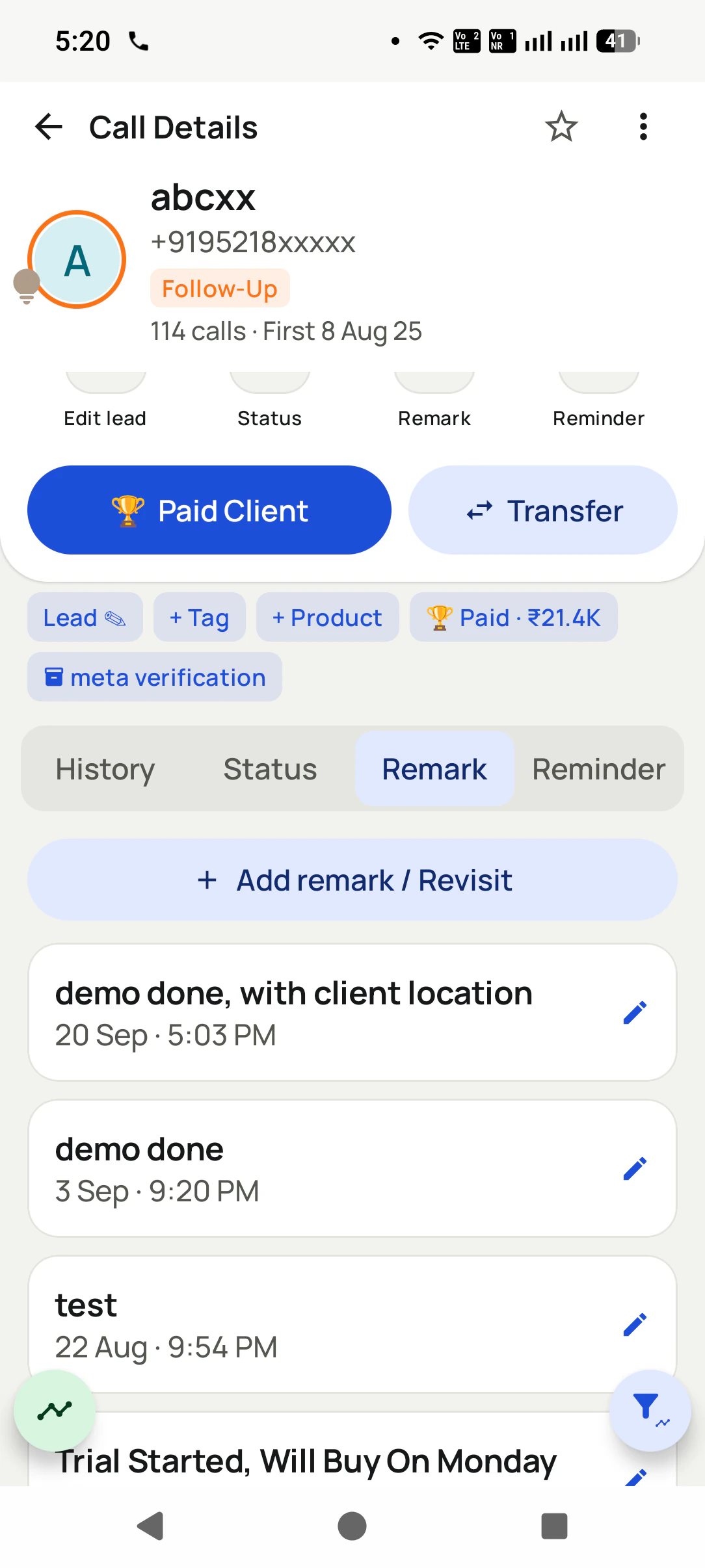
The detail that matters, sizes, a rate agreed, a complaint about the last lot, goes in a remark. The field takes voice typing, so a salesperson walking between racks can say it instead of thumbing it out.
A reminder that actually rings
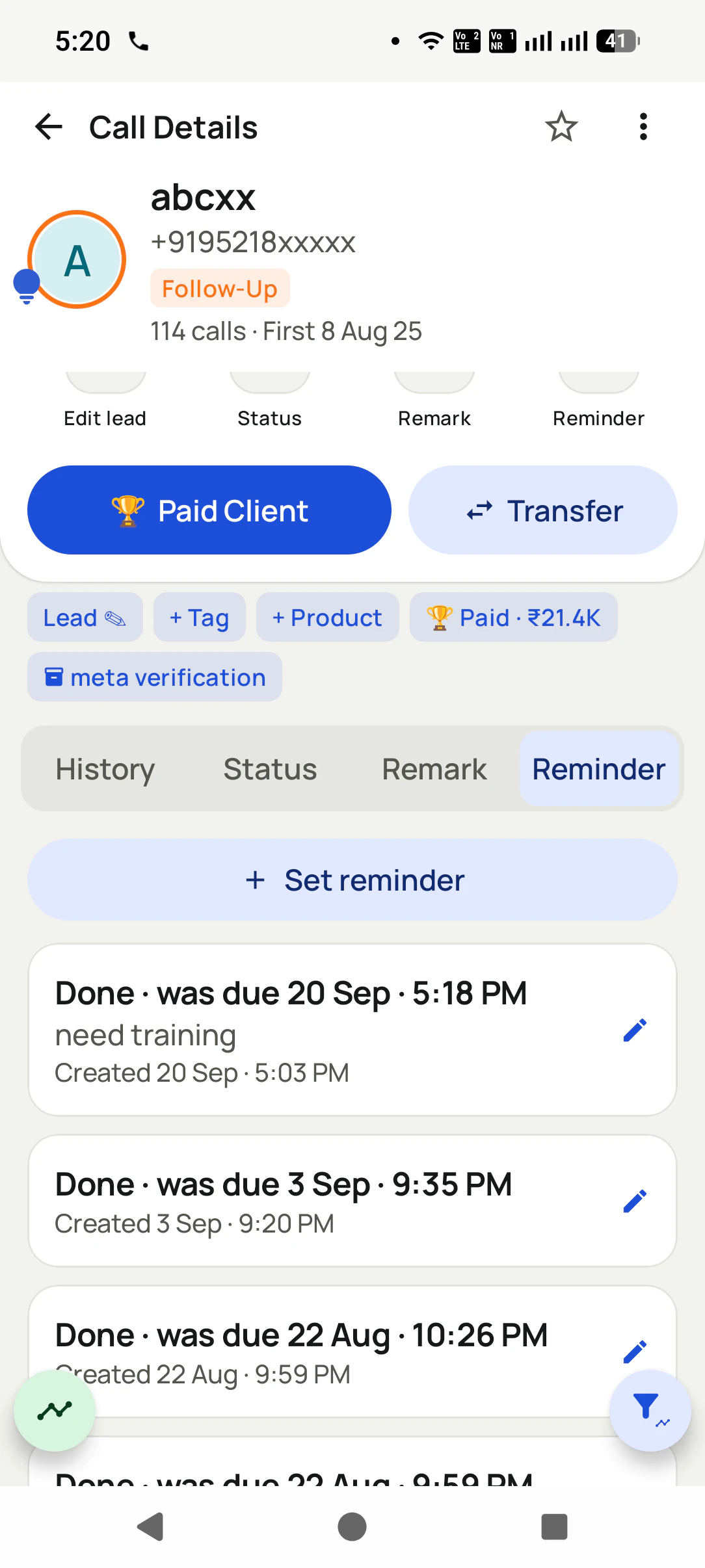
The next step is a date and a time, and the phone rings for it like an alarm rather than hiding a notification. It can carry a ready WhatsApp message too, so the follow-up is one tap when the moment comes.
Status history, not just status
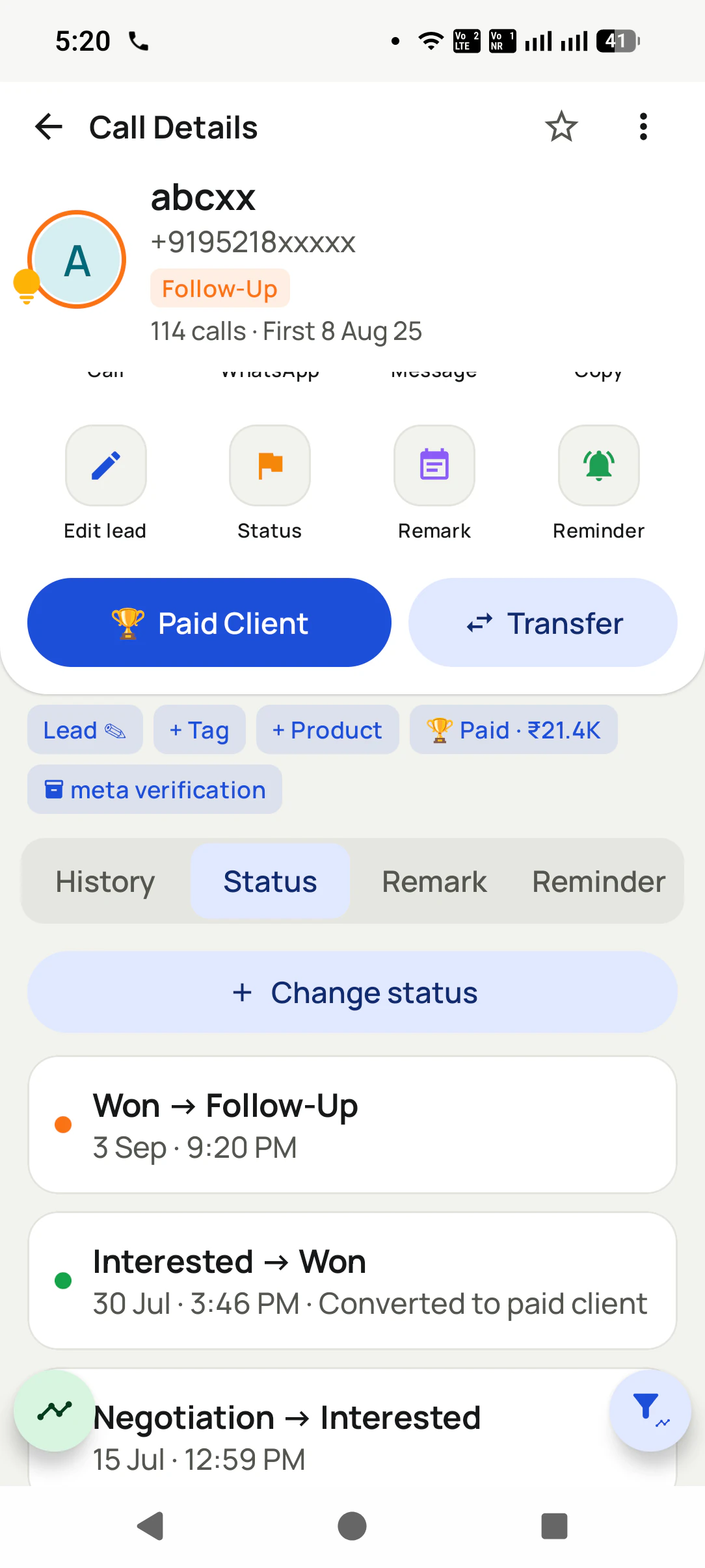
Every change is kept with its date: interested in July, won on 30 July, follow-up again in September. The history shows how a buyer actually moves, which a single "current status" column quietly throws away.
The sale sits on the same card
When a buyer pays, mark them a paid client with the amount, and the card shows it beside every later call. Nobody has to cross-check the order book to know they are speaking to a customer who owes or reorders.
The whole story in one panel
Where does one buyer's complete history live?
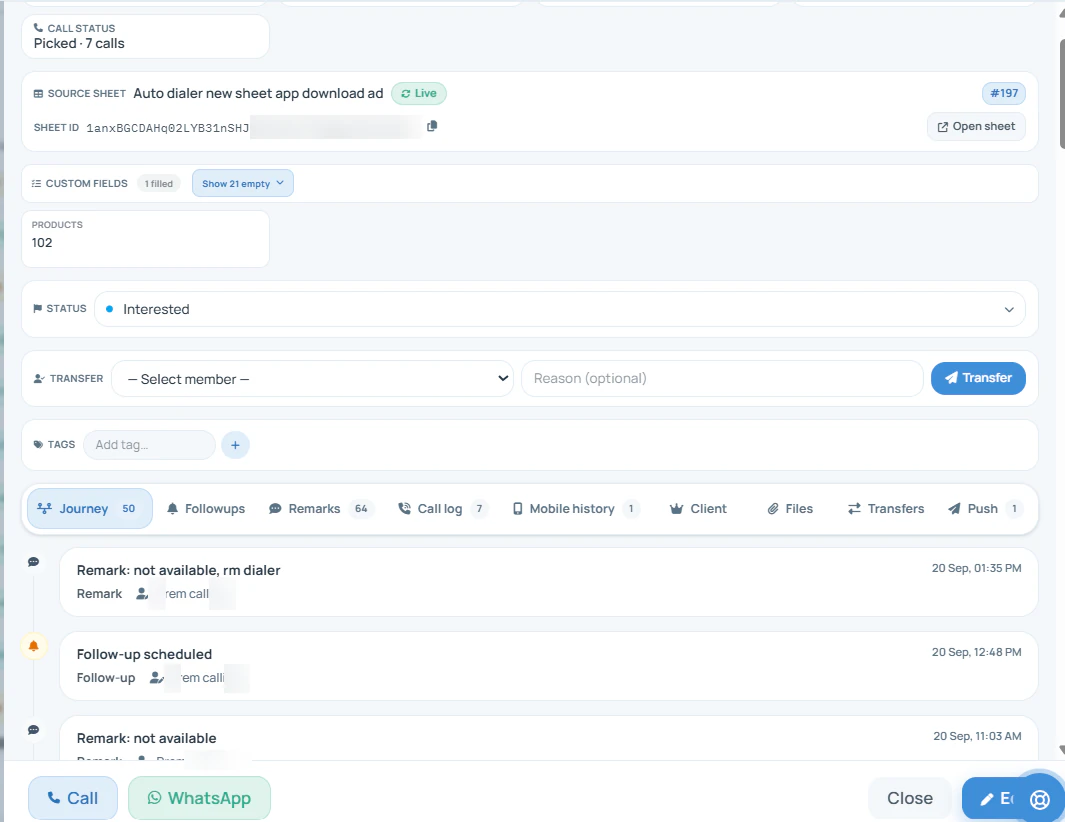
Open any customer in the Web CRM and the panel carries everything the calls produced: the source they came from, custom fields, the current status, and a journey of every call, remark and follow-up in date order.
The journey tab is the part that changes how a team works. Fifty entries on one buyer, from the first call to
the latest remark, read in a minute, which is what lets a colleague pick up a customer mid-conversation
without the "who spoke to you last time?" call that makes a business sound disorganised. When a list of
these buyers needs to reach the right caller automatically, the
lead management side
covers imports and round-robin assignment.
Customer reviews
What businesses say about RMDialer
Real businesses, real numbers: how owners and sales teams across India and 12+ countries use RMDialer every day.
Rated 4.9 by customers 5.0 on Google Play 1K+ downloads India + 12+ countries
“Best CRM dialer we have used for a small team. Call comes in, the lead card is already on screen with the last remark, and the status change is two taps. Only complaint: the web CRM export could use more filters. Otherwise our 6 person sales team lives in it.”
NSNeha SrivastavaFounder · Digital marketing agencyLucknow
“We tried two telecalling CRM software before this and my counsellors stopped filling them within a week. RMDialer is the phone app itself, so every admission enquiry gets logged whether they like it or not. The auto WhatsApp after call sends the fee structure by itself. I see all 4 counsellors' calls on the web CRM every evening.”
PNPriya NairOwner · Coaching instituteKochi
“Telecaller app for Android that my staff actually use. Enquiry list is assigned to each telecaller, the auto dialer calls it from their own SIM, and test ride bookings come to me live. Punjabi interface for the girls at the desk. Price is honest, everything included, no per-user surprises.”
“Lead management app for our admission counsellors across 3 branches. Every parent enquiry has a status, a remark and a follow-up, and the branch heads see their own funnel. The bulk WhatsApp for the open-day invite went to 900 parents from the app with delivered and read counts. Admissions were up 18% this year.”
KDKavita DeshmukhAdmissions head · Preschool chainNagpur
“The WhatsApp CRM part sold me. Client chats, their call history and the site visit reminder sit on one record, so when a client rings after two months I know exactly where the kitchen quote stopped. Photos of samples go from the chat inside the dialer. Bengali interface for my junior designer.”
ASAnjali SenOwner · Interior design studioKolkata
“Team of 9 salesmen on their own SIMs, no VoIP, no per-minute bills. RMDialer telecalling CRM shows me who called which customer, talk time and the remark, employee wise. Arabic interface for two of my staff was a bonus. Support on WhatsApp replied within minutes.”
MFMohammed FaisalSales manager · Building materials tradingDubai, UAE
Reviews are collected from customers on WhatsApp and on this website.
Share yours on WhatsApp
Whose job is the record?
Who types the customer record, and how long after the call?
The data in every column is the same. What differs is whose job it is and when it happens, and that alone decides whether the record exists after a busy month.
The job
Ledger book
Excel sheet
Desktop CRM
SIM based CRM
Logging that a call happened
The salesperson, if they remember
Someone, at day end
Typed after each call
Nobody: the phone writes it
Noting what the buyer said
A line in pen, sometimes
A cell, often blank
A note field, typed later
Two taps plus a spoken remark, at hang-up
Setting the next follow-up
A date in the margin
A column nobody sorts
A task, if created
A reminder that rings on the day
Recording a sale and its amount
In the order book, separately
Another sheet
A deal stage, if updated
Paid client tag on the same card
Keeping it when someone leaves
The book stays, the context goes
Whichever copy survived
Kept, if it was ever entered
Kept on the account, history intact
Logging that a call happened
Ledger book: The salesperson, if they remember
Excel sheet: Someone, at day end
Desktop CRM: Typed after each call
SIM based CRM: Nobody: the phone writes it
Noting what the buyer said
Ledger book: A line in pen, sometimes
Excel sheet: A cell, often blank
Desktop CRM: A note field, typed later
SIM based CRM: Two taps plus a spoken remark, at hang-up
Setting the next follow-up
Ledger book: A date in the margin
Excel sheet: A column nobody sorts
Desktop CRM: A task, if created
SIM based CRM: A reminder that rings on the day
Recording a sale and its amount
Ledger book: In the order book, separately
Excel sheet: Another sheet
Desktop CRM: A deal stage, if updated
SIM based CRM: Paid client tag on the same card
Keeping it when someone leaves
Ledger book: The book stays, the context goes
Excel sheet: Whichever copy survived
Desktop CRM: Kept, if it was ever entered
SIM based CRM: Kept on the account, history intact
A worked example
What does a SIM based CRM look like for a wholesaler taking phone orders?
A hosiery wholesaler in Tiruppur, with retailers across three states ringing in repeat orders.
The business runs on around three hundred retail buyers, most of whom reorder every four to six weeks
by phone. For years the record was an order book at the counter and a ledger book for credit terms, both
kept by the owner's brother-in-law, who also happened to be the only person who remembered which trader
preferred which sizes. The salespeople took the calls; the memory lived in one man.
Moving to a SIM based CRM did not replace the order book, which still handles bills. What it replaced was
the memory. Each salesperson's calls now land on the buyer's contact card by themselves, with a status
from a short list the owner wrote: repeat order due, rate discussed, sample sent, credit hold. Data entry
at day end stopped, because there was nothing left to enter. A retailer who has not reordered in six weeks
now rings as a reminder on a salesperson's phone instead of waiting to be noticed.
The test came when the brother-in-law took two weeks off during a wedding. Orders went on as usual, because
the status history on each card said who was due and the remarks said what they liked. The deal notes that
used to live in his head now sit where anyone on the team can read them, which is the whole point of a
customer record that fills itself.
Being straight about it
When is a SIM based CRM not the right tool?
Three cases where a different kind of software serves you better.
You need invoices, stock or ledgers. Keep those in your accounts software; this record is about the conversation, not the bill.
Your selling happens mostly by email and long written proposals rather than calls. A desktop CRM built around an inbox fits that better.
You want to design multi-step approval workflows with branching rules. The record here is deliberately simple: statuses, fields, remarks and reminders.
For the pieces around the record: recordings of the calls that fed it are explained on
the call recording page, keeping the
full history safe through a phone change is on SIM
call logs, and if you are comparing products rather than reading about one, the
shortlist of SIM calling CRMs puts them
side by side. Owners who want the record written by a dialling session can start from
an auto dialer with a CRM.
SIM based CRM, calling CRM, telecalling CRM: one record, several names
"Calling CRM" and "telecalling CRM" are the same idea said by teams who think of themselves as callers first.
"Software" and "app" are the office view and the phone view of one record. What unites them is the input: the
customer card is filled by ordinary calls on the team's own SIMs rather than by a separate data-entry habit,
and that is what this page describes whichever name brought you here.
You will also see it called sim based calling crm, sim based crm software, sim based crm app and sim based telecalling crm. They describe the same thing, so whichever phrase
brought you here, this is the page for it.
How it works
How does one call become a line in the customer record?
1
Set the status as the call ends
The status list is the owner's, and every change is saved with its date so the history shows how the buyer moved.
2
Leave the remark that matters
Rates, sizes, a complaint about the last lot: saved against the call it came from, typed or spoken.
3
Book the next call on the calendar
A reminder with a date and a note, which rings on the day and can carry a WhatsApp message.
Questions
SIM based CRM: questions about the customer record
What is a SIM based CRM?
A SIM based CRM is a customer record that is fed by the ordinary calls on a salesperson's own mobile SIM. The call is logged against the contact by itself, and the salesperson adds only what the phone cannot know: the outcome, a remark and the next step. The calls stay normal mobile calls; the CRM is what remembers them.
Which is the best sim based crm for a trading business that sells on the phone?
RMDialer is the best sim based crm for a trading business whose orders come over calls, because each call writes itself onto the buyer's card and the salesperson adds the outcome in two taps instead of typing a log later. Status history, reminders that ring and paid-client amounts sit on the same card, at about ₹159 per user per month on the yearly plan.
Is RMDialer a sim based crm?
Yes. RMDialer is a sim based crm for Android: it becomes the phone dialer, logs every call on the SIM against the contact, and asks for the status, remark and next reminder as each call ends. The owner reads the same records in a Web CRM on the office computer.
What are the four types of CRM, and which one is this?
CRM is usually split into operational (running daily sales and follow-ups), analytical (reading patterns in the data), collaborative (sharing the customer across a team) and strategic (planning long-term relationships). A SIM based CRM is mainly operational and collaborative: it runs the calls and follow-ups and lets the whole team see one history, with call analytics on top.
Which CRM has built-in SMS?
RMDialer keeps message templates that can be sent by SMS, WhatsApp or read out on calls, and a template can be picked from the customer's card. The SMS goes out from the phone's own messaging, on the salesperson's number, which is the same logic as the calls: your number, your plan.
Is there a 100% free CRM?
The phone dialer, call analytics and a daily allowance of WhatsApp sends in RMDialer are free with no expiry and no account. The CRM part, saving a status and remark on every call and reminders that ring, is on a plan, and every feature can be tried free for 3 days without a card. Free forever and a full CRM rarely come together, and it is worth reading what a free tier leaves out.
Do salespeople have to type anything after a call?
Two taps: the outcome, and when to call next. A remark is optional and can be spoken. Everything else, the time, the duration and the number, is written by the phone, which is why the record keeps up with a busy day instead of falling a week behind.
Can I set my own statuses and fields?
Yes. The owner defines the status list, the order it appears in and custom fields such as product, size or city, from the phone or the Web CRM. Salespeople pick from that list, so the words mean the same thing on every card and the counts add up.
What happens to a buyer's record when a salesperson leaves?
It stays on the account with every call, status change and remark intact. The owner reassigns the buyers to someone else, who opens the card and reads the history before calling, instead of starting again with a customer who has been ordering for years.
How is a SIM based CRM different from a normal CRM?
A normal CRM waits for someone to type what happened on a call. A SIM based CRM sits in the phone dialer, so the call itself is the input and the typing shrinks to two taps. The difference is not features on a comparison sheet; it is whether the record still exists three months in.
Can it import my existing customer list?
Yes, from Excel, CSV or a Google Sheet, with columns mapped to name, number, city and your own fields. A connected Google Sheet can keep adding new rows as they arrive, so a list maintained elsewhere keeps flowing in rather than being copied once.
Does it show the customer's history when they call me?
Yes. Because the app is the phone's dialer, an incoming call shows the buyer from your records with their last status and remark, so the salesperson knows before answering that this is the retailer who complained about the last lot.
Is a SIM based CRM safe for customer data?
Records are tied to the account rather than living only on one handset, so a lost phone does not lose the customers. Permissions decide who can export, delete or transfer records, and a person removed from the account stops reaching the data on their phone.
Can I see which buyers have paid and which owe money?
A buyer can be marked a paid client with the sale amount and a renewal or due date, and the card shows it on every later call. It is a reminder for the conversation, not an accounts ledger, so balances and invoices still belong in your accounting software.
Does the CRM work without internet?
Calls and record-keeping both work offline: the status, remark and reminder are saved on the phone and sent to the server when data returns. A salesperson in a market lane with no signal loses nothing, and the owner sees it all once the phone reconnects.
No trial clock on the dialer
What is free forever, and what a plan adds
The business dialer is free forever with no account and no expiry: the keypad, contacts, caller ID, the call log and your call analytics, plus free WhatsApp sends every day. A plan adds the customer record after every call, follow-up reminders, list auto dialing, your team and WhatsApp automation.
Free forever
₹0, no expiry
Your phone app: keypad, contacts, call log and caller ID
Spam and unknown-number screening on every incoming call
Call analytics: your day counted, by outcome, and by who you called
Missed calls kept in their own list, so nothing is returned late
Sending WhatsApp from a call, free every day
Free WhatsApp sends every day with a free account: 15 a day for your first 15 days, then 3 a day. The dialer itself needs no login at all.
On a plan
₹159/user/month, yearly
The customer record: lead status and remarks saved against every call
Follow-up reminders that ring like an alarm on the day you set
Auto dialing a whole list without touching the phone
Your team: seats, assigned calling lists and per-person reports
Automatic WhatsApp after calls, bulk sending and the WhatsApp API inbox
Backup and restore, so a new phone carries on where the old one stopped
Leads arriving on their own from Google Sheets, APIs and lead portals
Try it free for 3 days: unlimited use, no credit card required.Prices are per user, exclusive of taxes.
Business karte ho? Business Dialer chahiye.
Set it as your phone app in one tap. Everything works like before, and then it starts working FOR you.
₹159/user/month on yearly · every feature included · Prices are per user, exclusive of taxes.
Free forever: the business dialer never expires, and needs no account
Call recording supported · our team sets it up with you during training
On iPhone and Android. The iPhone app has every feature except the native call log.