One call per phone · No dropped calls · Your own number
Your own SIM, no virtual number · Android and iPhone apps + Web CRM in one plan · No card for the trial
RAKPS3,500+ businesses on Wappblaster tools · listed on G2, Capterra, SoftwareSuggest
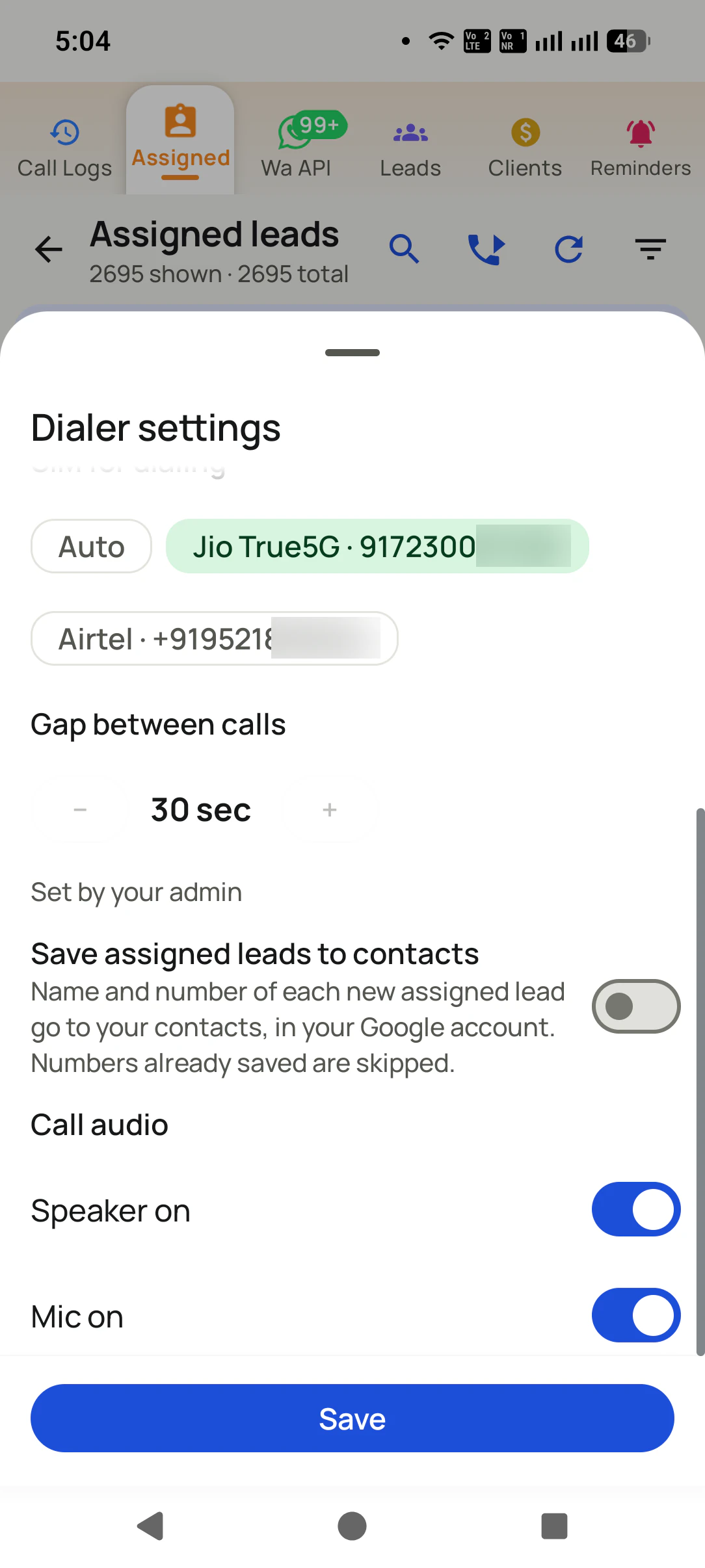
SIMAuto or fixed
30 sec gapset by the admin
Auto-nextafter each outcome
Speaker onhands free
Short answer
How does a SIM based power dialer work?
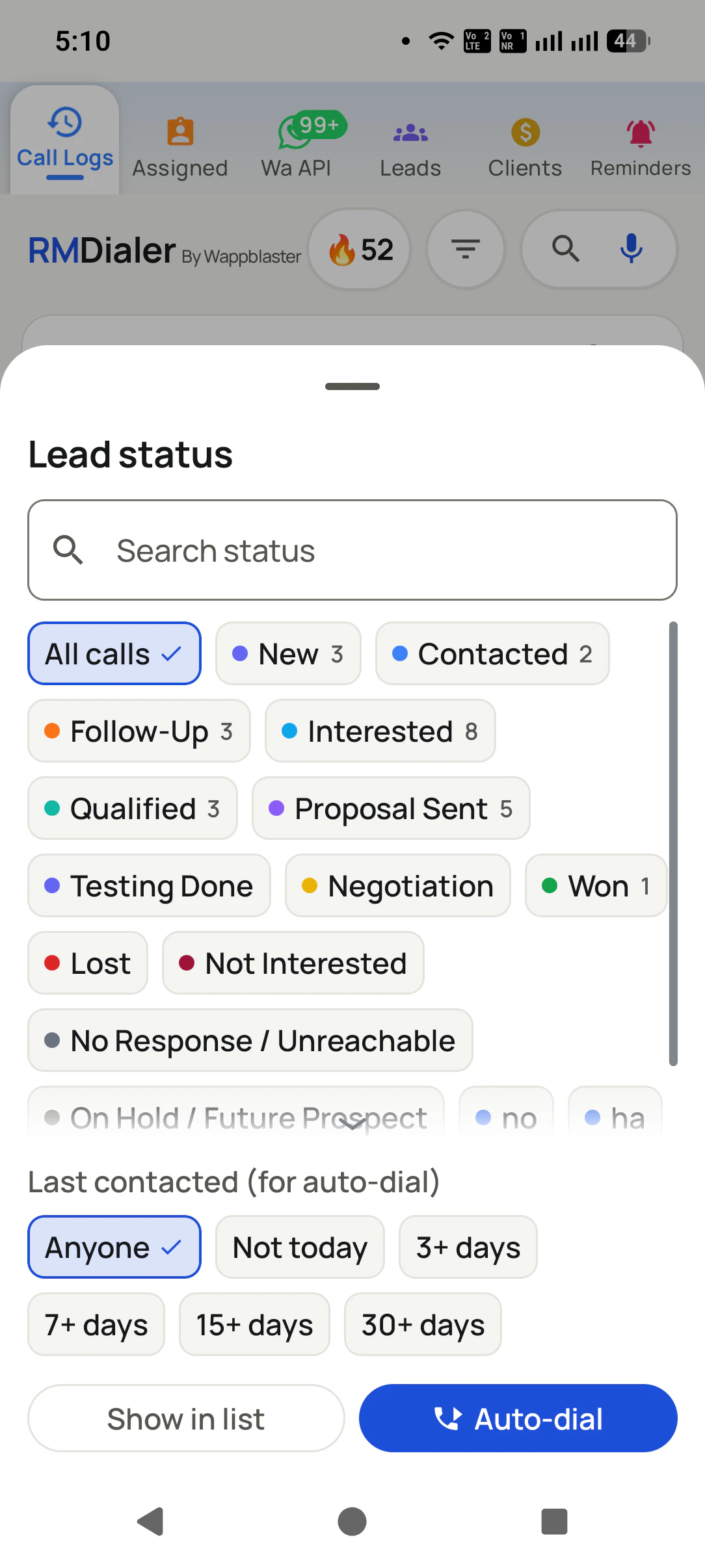
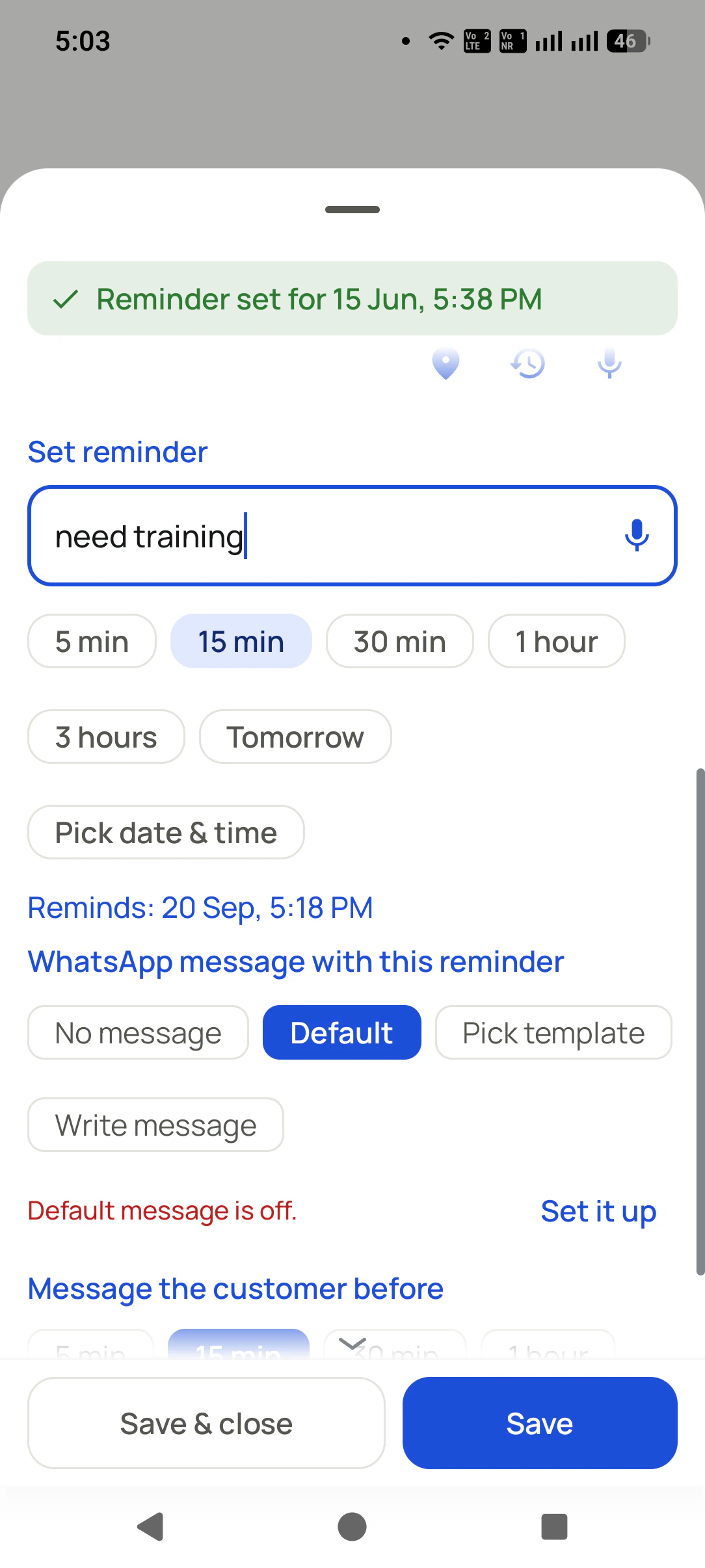
RMDialer works as a SIM based power dialer by calling your filtered list one number at a time from your own SIM. Choose the leads first: statuses such as Interested or Follow-Up and a last-contacted rule such as not in the last seven days. Tap Auto-dial and the first lead rings on the SIM you picked, with the lead's status and last remark on the calling screen. When the call ends, a sheet takes the outcome, a remark and a reminder; save it, and after the gap you set the next lead rings on its own. An admin can lock that gap for the whole team, and calls can start on speaker. It never places more than one call per phone, so no customer answers to silence, and it has no answering machine detection.
Key takeaways
Filter by status and days since last contact, then auto-dial.
One call at a time per phone, on the SIM you choose.
The lead's status and last remark show while it rings.
An admin can lock the gap between calls for the team.
Not predictive: no answering machine detection.
Six controls
What controls the pace of a power dialing session?
Speed comes from removing the dead air between calls, not from rushing the calls themselves. These six settings decide how much dead air is left.
Pick who gets called
Choose statuses (Interested, Follow-Up, New) and a last-contacted rule: anyone, not today, or not in 3, 7, 15 or 30 days. The session only rings the leads that deserve a call now.
Set the gap between calls
The pause after each call, in seconds, is long enough to save an outcome and short enough to keep momentum. An admin can lock it, so the whole team moves at the same pace.
Choose the SIM
Auto, or a fixed SIM with its number shown, so a campaign always goes out on the business line and never on the personal one.
Speaker and mic ready
Call audio can start on speaker with the mic on, so an agent with a headset or a desk stand never fumbles for buttons as each call connects.
The lead on the calling screen
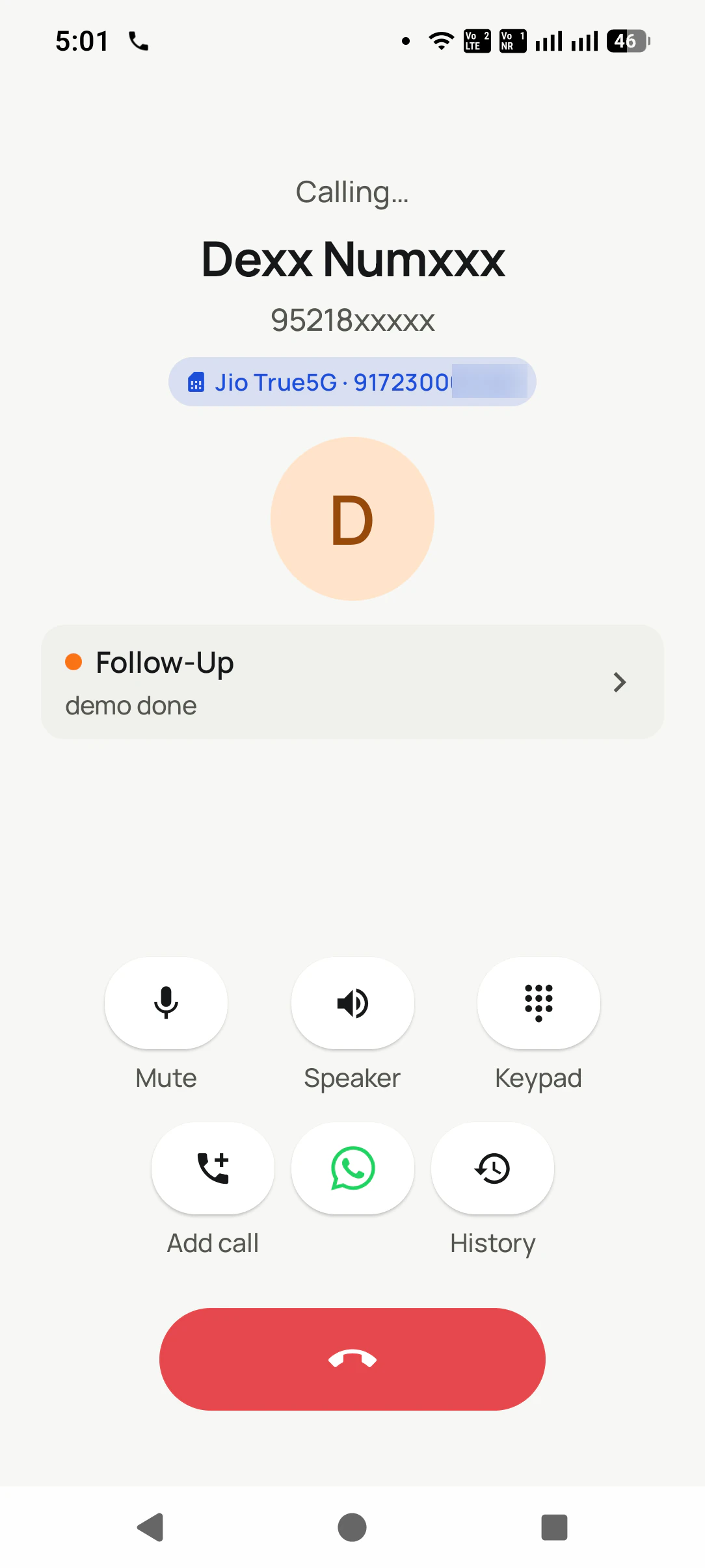
While it rings, the screen shows the name, the SIM in use, the current status and the last remark, so the opening line is already in the agent's head.
Outcome, then the next number
As each call ends, a sheet takes the status, a remark and a reminder. Save, and after the gap the next lead rings on its own.
Customer reviews
What businesses say about RMDialer
Real businesses, real numbers: how owners and sales teams across India and 12+ countries use RMDialer every day.
Rated 4.9 by customers 5.0 on Google Play 1K+ downloads India + 12+ countries
“Bulk calling app was the search that brought me here. 300 dealer numbers pasted from Excel, SIM 2 selected, 6 second gap, and my two boys finished the list in a day and a half. The ones who did not pick up, we ran again in the evening. Earlier same list used to take a week with a notebook.”
APAmit PatelDirector · Textile tradingSurat
“Telecalling software for a 22-seat domestic process, without buying a dialer server. Each agent gets an assigned queue, sessions run on SIM, and the supervisor dashboard shows calls, connected and talk time per agent in real time. Our cost per seat dropped to a fraction of the cloud dialer we were on.”
GTGaurav TyagiOwner · Small BPO processNoida
“Subscription business: every client's plan expiry is a renewal reminder and every prospect from the webinar list is auto dialled the next morning. Paid vs due on each client is visible, so collections are not in my head anymore. The daily call report keeps my two callers honest.”
“Order calling to 350 chemists every week. The list auto dials from each MR's own SIM, the order remark goes on the chemist's number, and I see calls and talk time per MR every evening on the web. Bulk WhatsApp for the new scheme went to the whole list from the call log in one go.”
MKManoj KumarRegional head · Pharma distributionPatna
“Earlier I was dialling 80 to 100 portal leads a day by hand from Excel. With RMDialer auto dialer app I import the sheet, press start and it calls one by one from my own Jio SIM. Between calls I mark Interested or Site visit in two taps and the follow-up rings me on time. Closed 3 flats last month from leads I would have forgotten.”
“Multilingual team, so a CRM with English, Malay and Chinese interfaces mattered. The auto dialer runs our launch lists on the agents' own Maxis SIMs and the manager sees every call and remark live. We compared three cloud call centre tools; this cost a fraction and needed no virtual numbers.”
DTDaniel TanSales director · Property developerKuala Lumpur, Malaysia
Reviews are collected from customers on WhatsApp and on this website.
Share yours on WhatsApp
An agent's hour
Where does an agent's hour go under each way of dialling?
The talk time is similar everywhere. What changes is the time between calls, who chooses the next number, and whether a customer can ever pick up to silence.
In the hour
Dialling by hand from a sheet
Tap-to-call from a list
SIM power dialer
Predictive dialer on a server
Finding the next number
Scroll, read, type it in
Scroll and tap
Picked for you from the filter
Picked for you
Time between calls
Half a minute or more
Ten to twenty seconds
The gap you set, then it rings
Near zero; calls wait for agents
Logging the outcome
A separate sheet, later
Often skipped
Asked for as each call ends
In the agent console
Calls placed at once
One
One
One per phone
Several per agent
Customer answers to silence
Never
Never
Never: the agent is already on
Possible when no agent is free
The number customers see
The agent's SIM
The agent's SIM
The agent's SIM
Usually a virtual number
Finding the next number
Dialling by hand from a sheet: Scroll, read, type it in
Tap-to-call from a list: Scroll and tap
SIM power dialer: Picked for you from the filter
Predictive dialer on a server: Picked for you
Time between calls
Dialling by hand from a sheet: Half a minute or more
Tap-to-call from a list: Ten to twenty seconds
SIM power dialer: The gap you set, then it rings
Predictive dialer on a server: Near zero; calls wait for agents
Logging the outcome
Dialling by hand from a sheet: A separate sheet, later
Tap-to-call from a list: Often skipped
SIM power dialer: Asked for as each call ends
Predictive dialer on a server: In the agent console
Calls placed at once
Dialling by hand from a sheet: One
Tap-to-call from a list: One
SIM power dialer: One per phone
Predictive dialer on a server: Several per agent
Customer answers to silence
Dialling by hand from a sheet: Never
Tap-to-call from a list: Never
SIM power dialer: Never: the agent is already on
Predictive dialer on a server: Possible when no agent is free
The number customers see
Dialling by hand from a sheet: The agent's SIM
Tap-to-call from a list: The agent's SIM
SIM power dialer: The agent's SIM
Predictive dialer on a server: Usually a virtual number
Throughput is only half the measure; the other half is the drop rate, the share of answered calls with no
agent on the line, which a power dialer keeps at zero by design. To choose the hours worth dialling, the
heatmap on SIM based call analytics shows
when your customers pick up. The SIM dialer itself, including dialing without a list, is on
the SIM based dialer app page.
A worked example
How does a two-wheeler dealership use a power dialer for service and EMI calls?
A two-wheeler dealership in Visakhapatnam with four callers working service reminders and finance offers.
The dealership sells scooters and motorcycles and lives on what happens after the sale: first free service,
paid services, insurance renewals and, twice a year, an EMI offer for customers ready to upgrade. The lists
are long, the calls are short, and the callers used to spend more time copying numbers from the
service register than talking to anyone.
With a SIM power dialer, a caller opens the day's list, ticks the Follow-Up and New statuses with a
last-contacted rule of seven days, and taps Auto-dial. The ring time is the only wait; the next customer's
name, bike model in the remark and last status are on screen before they answer. When the call ends, one
tap for the outcome, a spoken remark ("coming Saturday for service"), save, and the auto-next call starts
after the gap the service manager locked at thirty seconds.
The manager's worry had been that a faster dialer would mean callers racing through customers. The
opposite happened: with the dead air gone, callers had time to explain the EMI offer properly, and because
the dialer never rings two customers at once, nobody picked up to silence and hung up on the showroom's
number. Calls per hour roughly doubled, and the service bay's Saturday bookings filled a week ahead.
Plain limits
When is a SIM power dialer not enough?
It is the right pace for most small and mid-sized teams. Three situations call for something heavier.
Very large cold lists with low answer rates, where most calls go unanswered. A predictive dialer on a server keeps agents busier there, at the cost of some calls answered to silence.
Markets where voicemail is common and you want a recorded message left automatically. Voicemail drop and machine detection need server-side calling.
Agents working on computers with headsets rather than phones. A browser-based dialer suits a desk-bound floor better.
SIM power dialer, progressive dialer, predictive dialer: which is which
"Power dialer" and "progressive dialer" are used for the same thing: one call per agent, the next dialled when
the last ends. People also search for a "SIM based predictive dialer", but a phone places one call at a time,
so what they find on a SIM is a power dialer, which is usually what a small team wants anyway. "Power dialer
using mobile SIM" says it most plainly.
You will also see it called sim based predictive dialer, sim based progressive dialer, sim power dialer and power dialer using mobile sim. They describe the same thing, so whichever phrase
brought you here, this is the page for it.
How it works
How do you run a power dialing session on your SIM?
1
Choose statuses and last-contacted
Tick the statuses to call and a rule such as 7+ days since last contact, then tap Auto-dial.
2
Talk with the lead's notes on screen
The calling screen shows the SIM, the lead's status and their last remark while it rings.
3
Save the outcome, and the next one rings
Status, remark and reminder go in as the call ends, and the dialer moves on after the gap.
Questions
SIM based power dialer: questions about pace and control
What is a SIM based power dialer?
A SIM based power dialer calls a list of numbers one after another from a mobile phone's own SIM, starting the next call automatically after the last one ends. The agent never looks up or types a number, and every call is an ordinary mobile call from their usual number.
Which is the best sim based power dialer for a sales team on Android?
RMDialer is the best sim based power dialer for an Android sales team that wants speed without dropped calls. It filters the list by status and last contact, rings each lead on the chosen SIM with the lead's notes on screen, asks for the outcome as each call ends, and moves on after a gap the admin can lock for the whole team.
Is RMDialer a sim based power dialer?
Yes. RMDialer is a sim based power dialer: its auto dialer works through a filtered list on your own SIM, one call at a time, with a set gap between calls, speaker and mic options, and an after-call sheet for the status, remark and reminder. It is not a predictive dialer.
What is the difference between a power dialer and a predictive dialer?
A power dialer places one call per agent and moves to the next number when the call ends. A predictive dialer places several calls per agent at once and connects whoever answers first, which is faster but sometimes leaves a customer hearing silence or a dropped call. Power dialing is the safer pace for most small teams.
How many calls per hour can a power dialer make?
It depends on how long conversations run and how long the gap is. With short outcomes and a gap of around half a minute, many agents reach several times their hand-dialling rate, because the minutes spent finding and typing numbers disappear. The talk itself is still the largest share of the hour, as it should be.
Is using a power dialer legal?
Dialling your own leads one at a time from your own number is ordinary calling. What regulators care about is who you call and when: respect do-not-disturb preferences and calling-hour rules in your country, and call people who have enquired or are customers. This is general information, not legal advice.
What is a good gap between calls?
Long enough to pick a status and type or speak a short remark, usually twenty to forty seconds. Too short and outcomes get skipped; too long and the session drags. An admin can set the gap and lock it so every agent works to the same rhythm.
Can I choose which leads the power dialer calls?
Yes. Pick one or more statuses and a last-contacted rule (anyone, not today, or not in the last 3, 7, 15 or 30 days), then auto-dial. For assigned leads, filters by product, import, source and call due, such as overdue only, narrow it further.
Does it skip calls that are not answered?
An unanswered call ends and the dialer moves on after the gap, recording the attempt. Those leads stay in the list for the next session, and a last-contacted rule such as "not today" keeps the same person from being rung twice in one sitting.
Does a SIM power dialer detect answering machines or drop voicemails?
No. It has no answering machine detection and no voicemail drop, both of which need calls to run through a server. For mobile numbers in markets where voicemail is rarely set up, that seldom matters; the agent simply ends the call and the next one begins.
Which SIM does the power dialer use on a dual-SIM phone?
Whichever you choose in the dialer settings: Auto, or a fixed SIM shown with its number. Fixing the business SIM means a long session never slips onto a personal line.
Can the agent see the lead's details while it rings?
Yes. The calling screen shows the lead's name, the SIM in use, the current status and the last remark. The history button opens every earlier call, and a WhatsApp button sends a message without leaving the call.
Can several agents run the power dialer at once?
Yes. Each agent runs their own session on their own phone and list, and the supervisor sees all their calls in team call logs. Because the admin can lock the gap, pace stays even across the team.
Does the power dialer work without internet?
Calls go out over the mobile network, so a session keeps running even without data. Outcomes are saved on the phone and reach the account once data returns.
Can the dialer save assigned leads to my phone contacts?
Yes, as an option. Switch it on and each newly assigned lead's name and number is saved to your contacts in your Google account, skipping numbers already saved, so callers recognise the name if the lead rings back.
No trial clock on the dialer
What is free forever, and what a plan adds
The business dialer is free forever with no account and no expiry: the keypad, contacts, caller ID, the call log and your call analytics, plus free WhatsApp sends every day. A plan adds the customer record after every call, follow-up reminders, list auto dialing, your team and WhatsApp automation.
Free forever
₹0, no expiry
Your phone app: keypad, contacts, call log and caller ID
Spam and unknown-number screening on every incoming call
Call analytics: your day counted, by outcome, and by who you called
Missed calls kept in their own list, so nothing is returned late
Sending WhatsApp from a call, free every day
Free WhatsApp sends every day with a free account: 15 a day for your first 15 days, then 3 a day. The dialer itself needs no login at all.
On a plan
₹159/user/month, yearly
The customer record: lead status and remarks saved against every call
Follow-up reminders that ring like an alarm on the day you set
Auto dialing a whole list without touching the phone
Your team: seats, assigned calling lists and per-person reports
Automatic WhatsApp after calls, bulk sending and the WhatsApp API inbox
Backup and restore, so a new phone carries on where the old one stopped
Leads arriving on their own from Google Sheets, APIs and lead portals
Try it free for 3 days: unlimited use, no credit card required.Prices are per user, exclusive of taxes.
Business karte ho? Business Dialer chahiye.
Set it as your phone app in one tap. Everything works like before, and then it starts working FOR you.
₹159/user/month on yearly · every feature included · Prices are per user, exclusive of taxes.
Free forever: the business dialer never expires, and needs no account
Call recording supported · our team sets it up with you during training
On iPhone and Android. The iPhone app has every feature except the native call log.