No PBX or headsets · No per-minute platform · Agents on their own SIMs
Your own SIM, no virtual number · Android and iPhone apps + Web CRM in one plan · No card for the trial
RAKPS3,500+ businesses on Wappblaster tools · listed on G2, Capterra, SoftwareSuggest
All agentsone call list
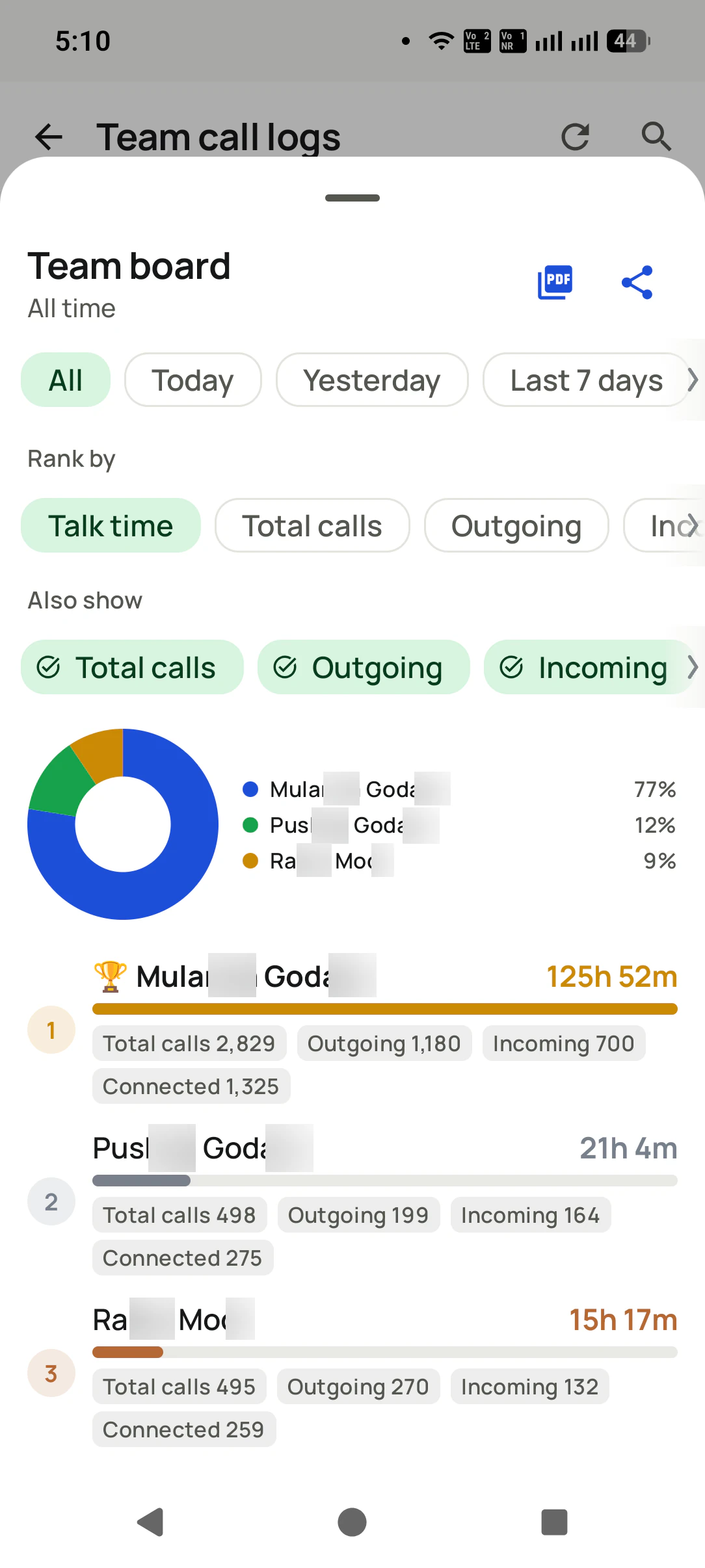
Team boardranked by talk time
Attendancepunch and breaks
Scorecardfor the client
Short answer
How does SIM based call center software run a calling floor?
RMDialer runs a calling floor on the agents' own Android phones and SIM cards, with no PBX, headsets or per-minute platform. The supervisor uploads the client's data and assigns it across agents, who each open the app to find their own list, and the auto dialer works through it with a gap between calls that the admin can lock. As each call ends, the agent saves a status and remark. On the supervisor's phone, team call logs show every agent's calls with totals, and a team board ranks the floor by talk time or calls and exports to PDF. Attendance takes selfie punches against shift hours, with a half-day cut-off and worked and break time. The Web CRM adds a scorecard per agent. It does not queue inbound calls or let supervisors join live calls.
Key takeaways
Agents call from their own Android phones and SIMs.
Lists are assigned per agent; the admin can lock the dialer gap.
A team board ranks agents by talk time or calls.
Selfie attendance applies a half-day cut-off automatically.
No inbound queue or live call barge-in.
Running the floor
What does a supervisor need to run a calling floor on mobile phones?
The calls are the easy part. A floor also needs lists, pace, hours and a board, and each of these lives on the phones already in the room.
Every agent's calls on one screen
Team call logs on the supervisor's phone: all employees or one, today, yesterday or the last seven days, with totals for calls, incoming, outgoing and connected across the floor.
A board ranked the way you choose
Rank agents by talk time, total calls, outgoing or incoming, with a share-of-floor chart. Export it as a PDF or share it to the team group at the end of the shift.
Punch in, punch out, breaks
Selfie attendance with shift hours, a half-day cut-off after which a late punch counts as half, worked time and break time for the day, and an office geofence or punch-from-anywhere.
Pacing set by the supervisor
The auto dialer runs through each agent's list, and the gap between calls can be locked to the value the admin sets, so nobody slows the floor by stretching every pause.
Lists pushed to each agent
Upload the client's data once and assign it across agents; each one opens the app to find their own list, filtered to who is due today.
A scorecard for the client
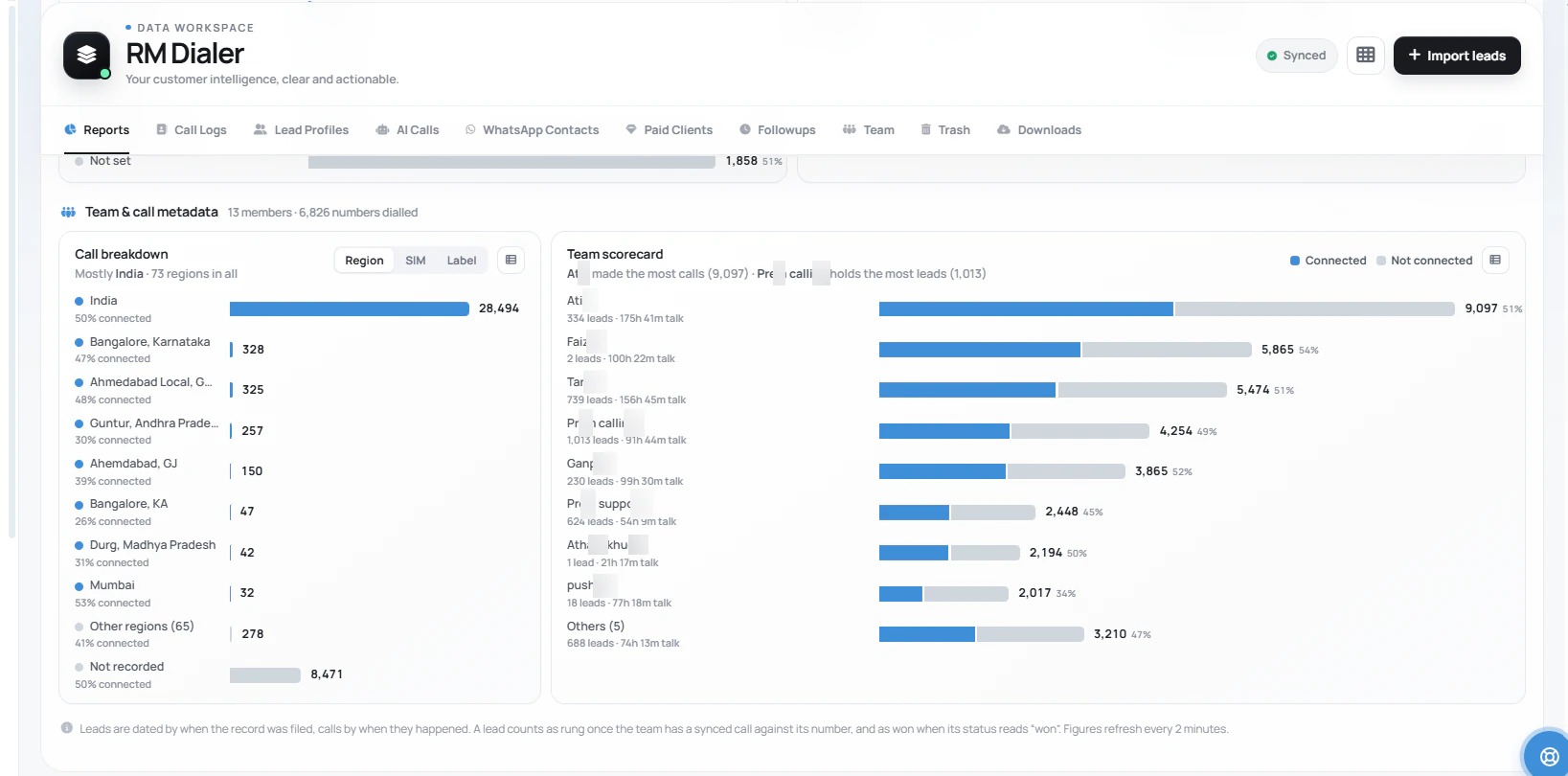
The Web CRM breaks the floor down by agent, region and SIM, with leads held and talk time per person, which is exactly what a client review meeting asks for.
For the client review
What does the team scorecard show a client?
The Web CRM's team section lists every agent with the calls made, the share connected, the leads they hold and their talk time, beside a breakdown of calls by region, SIM or label.
A scorecard answers "how much", not "how well". For the quality side, supervisors lean on statuses, remarks
and recordings of SIM calls. When a floor
works mostly through a long list at pace, the
SIM based power dialer page covers pacing in detail, and employee
call tracking covers watching calls across a team that is not a call centre at all.
Customer reviews
What businesses say about RMDialer
Real businesses, real numbers: how owners and sales teams across India and 12+ countries use RMDialer every day.
Rated 4.9 by customers 5.0 on Google Play 1K+ downloads India + 12+ countries
“Staff attendance with selfie and location, inside the same dialer our supervisors already use for client calls. Punch in only works within the site geofence and needs a live selfie, so proxy attendance stopped. The monthly report exports for payroll. One app, two problems solved.”
MIMeenakshi IyerHR and admin head · Facility management companyChennai
“Forty counsellors, all on RMDialer as their telecaller app. Assigned queues, sessions from their own SIMs, and a live team dashboard with calls, connected and talk time per counsellor. The employee-wise call logs report replaced two Excel sheets and one full-time MIS person. Rollout took a week.”
SKSneha KapoorHead of inside sales · EdTech companyMumbai
“We looked for telecalling software for a nine-person loan team and every quote came with cloud seats and per-minute bills. RMDialer telecalling software runs on the callers' own Jio SIMs: the lead list dials itself, the remark goes on the number, and I get dials, connects and talk time per caller every evening. Cost is one flat price per user.”
KIKavita IyerOperations head · Loan DSAChennai
“We tried two telecalling CRM software before this and my counsellors stopped filling them within a week. RMDialer is the phone app itself, so every admission enquiry gets logged whether they like it or not. The auto WhatsApp after call sends the fee structure by itself. I see all 4 counsellors' calls on the web CRM every evening.”
PNPriya NairOwner · Coaching instituteKochi
“Best CRM dialer we have used for a small team. Call comes in, the lead card is already on screen with the last remark, and the status change is two taps. Only complaint: the web CRM export could use more filters. Otherwise our 6 person sales team lives in it.”
NSNeha SrivastavaFounder · Digital marketing agencyLucknow
“Collection calling for 8 loan officers on MTN lines. Auto dialer clears the daily repayment list, and I get a call report per officer. It handled our patchy network fine, syncing when the signal came back. Four stars only because the English-only support hours are India time, so evening questions wait until morning.”
Reviews are collected from customers on WhatsApp and on this website.
Share yours on WhatsApp
Standing up a floor
What does it take to set up a small call center, four different ways?
Seats, numbers, go-live time and charges, compared across the four ways a small operator can put agents on calls.
Setting up
PBX and dialer server
Cloud contact centre
Staff phones, no software
SIM based call center software
What each seat needs
A desk phone or headset on the LAN
A computer, headset and steady internet
A phone
An Android phone and a SIM
The number customers see
A landline or trunk number
A virtual number
The agent's mobile
The agent's mobile, or a work SIM
Time to go live
Weeks of hardware and wiring
Days of setup and numbers
Today
A day: install, log in, assign lists
Call charges
Trunk lines and minutes
Usually per minute on top of seats
The SIM plan
The SIM plan; the software is per user
Supervisor's view of the floor
Wallboard and reports
Live dashboard
None
Team board, call logs and scorecard
Attendance and hours
Separate system
Agent status in the tool
A register
Selfie punch with half-day rule
Agents working from home
Hard
Yes, with good internet
Yes, unseen
Yes, calls and punches still counted
What each seat needs
PBX and dialer server: A desk phone or headset on the LAN
Cloud contact centre: A computer, headset and steady internet
Staff phones, no software: A phone
SIM based call center software: An Android phone and a SIM
The number customers see
PBX and dialer server: A landline or trunk number
Cloud contact centre: A virtual number
Staff phones, no software: The agent's mobile
SIM based call center software: The agent's mobile, or a work SIM
Time to go live
PBX and dialer server: Weeks of hardware and wiring
Cloud contact centre: Days of setup and numbers
Staff phones, no software: Today
SIM based call center software: A day: install, log in, assign lists
Call charges
PBX and dialer server: Trunk lines and minutes
Cloud contact centre: Usually per minute on top of seats
Staff phones, no software: The SIM plan
SIM based call center software: The SIM plan; the software is per user
Supervisor's view of the floor
PBX and dialer server: Wallboard and reports
Cloud contact centre: Live dashboard
Staff phones, no software: None
SIM based call center software: Team board, call logs and scorecard
Attendance and hours
PBX and dialer server: Separate system
Cloud contact centre: Agent status in the tool
Staff phones, no software: A register
SIM based call center software: Selfie punch with half-day rule
Agents working from home
PBX and dialer server: Hard
Cloud contact centre: Yes, with good internet
Staff phones, no software: Yes, unseen
SIM based call center software: Yes, calls and punches still counted
A worked example
How does an outsourced calling process run on agents' phones?
A twelve-seat outsourced process in Vadodara making renewal and verification calls for two clients.
The operator started with four agents in a rented room and a verbal client brief: call the renewal list,
confirm details, book a callback where needed. A PBX quote came to more than the first three months of
revenue, so the agents used their own phones, and the owner kept a roster and a notebook of daily counts
that nobody trusted, least of all the client.
With SIM based call center software, the first change was invisible to customers and huge for the office.
Each morning the shift lead uploads the client's file and splits it across the agents on shift; the
dialer gap is locked, so the pace is the same at seat one and seat twelve. Login time is now a selfie
punch, and anyone punching after the cut-off is marked half-day without a conversation about it. Break
time shows on the same screen, which ended the long tea breaks without anyone being told off.
The team board goes to each client as a PDF at the end of the day, ranked by connected calls against the
daily target. When a second client arrived, the owner added a training batch of four and a second shift,
and set the new agents up the same afternoon. The seat cost is the software and a SIM plan, and the
operator now quotes clients a price that a hardware floor could never have matched.
Where it stops
When is SIM based call center software the wrong choice?
Three kinds of operation that need the heavier tools, said plainly before you commit a floor to phones.
A mainly inbound helpline where calls must wait in a queue and go to the next free agent. That is automatic call distribution, which needs calls on a server.
A floor where supervisors must listen in live, whisper to agents or barge into calls. Phones on their own SIMs cannot be joined from a console.
High-volume predictive dialling across hundreds of seats, where the system dials several numbers per agent. Phones place one call at a time.
SIM based call centre, BPO software, call center setup: one kind of floor
"Call centre" and "call center" are the British and American spellings of the same floor, and "BPO software"
is how outsourcing firms describe it. "Setup" and "solution" are the question before buying and the answer
after. Every version means a team of callers working from phones and SIM cards, with the lists, hours and
board that a floor needs around the calls.
You will also see it called sim based call centre software, sim based call center setup, sim based call center solution and sim based bpo software. They describe the same thing, so whichever phrase
brought you here, this is the page for it.
How it works
How does a supervisor check the floor at the end of a shift?
1
Rank the floor at shift end
The team board orders agents by talk time or calls, with connected counts, and exports to PDF for the client.
2
Open one agent's numbers
Tap an agent or a number to see every call behind the totals, with status tags such as Lost Lead or Follow-Up.
3
Check who punched in, and when
Shift hours, the half-day cut-off, worked time and break time sit on the attendance screen, with a report for the month.
Questions
SIM based call center software: questions from floor owners
What is SIM based call center software?
SIM based call center software runs a calling team on ordinary mobile phones and SIM cards instead of a PBX or internet calling lines. Agents dial from their phones, and the software supplies what a call centre needs around the calls: assigned lists, pacing, attendance, a supervisor's board and reports.
Which is the best sim based call center software for a small outsourced team?
RMDialer is the best sim based call center software for a small outsourced team because it covers the floor, not just the dialling: lists assigned per agent, an auto dialer with an admin-locked gap, selfie attendance with a half-day rule, a team board ranked by talk time, and a Web CRM scorecard per agent. It costs about ₹159 per user per month on the yearly plan, with lower per-user rates for bigger teams.
Can RMDialer work as sim based call center software?
Yes. RMDialer works as sim based call center software on Android: each agent dials from their own phone and SIM, and the supervisor sees team call logs, a ranked board and attendance on their phone, with the full scorecard in the Web CRM. It suits outbound and callback work; it does not queue inbound calls to free agents.
Which software is used in a BPO?
Large BPOs use contact centre suites with automatic call distribution, predictive dialers, wallboards and quality monitoring, running on PBX or cloud lines. Smaller processes, especially outbound ones with a handful of agents, increasingly run on mobile phones with SIM based software, because it needs no hardware and no per-minute platform.
How do I start a small call center with mobile phones?
Choose the SIM plan with unlimited calls, give each agent an Android phone, install the app and log everyone into one account. Upload the client's data, assign it across agents, set statuses that match the client brief, and agree shift hours in attendance. A small floor can start calling the same day.
Why use phones instead of a GSM gateway or SIM box?
A GSM gateway pushes calls from many SIMs through one box, which often breaks operator rules for commercial use and gets SIMs blocked. Ordinary phones calling from ordinary SIMs behave like any customer's handset, keep the number visible and familiar, and need no hardware beyond what agents already carry.
Can a supervisor see each agent's calls?
Yes. Team call logs show every agent's calls on the supervisor's phone, filterable by agent and date, with totals for incoming, outgoing and connected. The team board ranks agents by talk time or calls, and the Web CRM adds a scorecard with leads held and talk time per agent.
Does it track agent attendance and breaks?
Yes. Agents punch in and out with a selfie, the shift hours are set per office, a punch after the cut-off counts as a half-day, and the screen shows worked time and break time for the day. Punching can be restricted to the office area or allowed from anywhere.
Can agents work from home on a SIM based setup?
Yes. Calls go out on their own SIM wherever they are, so a home agent's calls reach the team logs like anyone else's, and attendance can allow punch-from-anywhere for them. The supervisor sees the same numbers whether an agent sits on the floor or in their living room.
Does it have automatic call distribution for inbound calls?
No. Incoming calls ring the phone whose number was dialled; there is no queue that hands them to the next free agent. For a mainly inbound helpline, a system with automatic call distribution is the right choice. SIM based software is strongest for outbound calling and callbacks.
Can a supervisor listen in on live calls?
No. There is no barge-in or whisper coaching on live calls, which needs calls to pass through a server. Supervisors review work through the call logs, statuses and remarks, and recordings where they are set up, rather than joining calls in progress.
How are daily targets tracked for each agent?
The team board ranks agents for today, yesterday or the last seven days by total calls, outgoing or talk time, so a daily target of calls or connected minutes is checked at a glance. The PDF export gives the shift lead a record to share with the client each evening.
What happens to the client's data when an agent leaves?
The data sits on the account, not the agent's phone. Remove the agent and their assigned records can be reassigned to someone else with the call history intact, and they stop reaching the client's data from their handset.
How much does SIM based call center software cost per seat?
RMDialer is about ₹159 per user per month on the yearly plan, with lower per-user prices as the team grows, shown on the pricing page. Calls run on the agents' SIM plans, so there are no per-minute platform charges on top.
Can one account run two shifts or two client processes?
Yes. Assign each process's data to the agents working it, use statuses that fit both briefs, and filter reports by agent. Shift hours sit in attendance, so a morning batch and an evening batch are both counted against their own timings.
No trial clock on the dialer
What is free forever, and what a plan adds
The business dialer is free forever with no account and no expiry: the keypad, contacts, caller ID, the call log and your call analytics, plus free WhatsApp sends every day. A plan adds the customer record after every call, follow-up reminders, list auto dialing, your team and WhatsApp automation.
Free forever
₹0, no expiry
Your phone app: keypad, contacts, call log and caller ID
Spam and unknown-number screening on every incoming call
Call analytics: your day counted, by outcome, and by who you called
Missed calls kept in their own list, so nothing is returned late
Sending WhatsApp from a call, free every day
Free WhatsApp sends every day with a free account: 15 a day for your first 15 days, then 3 a day. The dialer itself needs no login at all.
On a plan
₹159/user/month, yearly
The customer record: lead status and remarks saved against every call
Follow-up reminders that ring like an alarm on the day you set
Auto dialing a whole list without touching the phone
Your team: seats, assigned calling lists and per-person reports
Automatic WhatsApp after calls, bulk sending and the WhatsApp API inbox
Backup and restore, so a new phone carries on where the old one stopped
Leads arriving on their own from Google Sheets, APIs and lead portals
Try it free for 3 days: unlimited use, no credit card required.Prices are per user, exclusive of taxes.
Business karte ho? Business Dialer chahiye.
Set it as your phone app in one tap. Everything works like before, and then it starts working FOR you.
₹159/user/month on yearly · every feature included · Prices are per user, exclusive of taxes.
Free forever: the business dialer never expires, and needs no account
Call recording supported · our team sets it up with you during training
On iPhone and Android. The iPhone app has every feature except the native call log.