Telecalling CRM for Real Estate · Queues, Hand-offs and Evening Numbers for a Builder's Office
Telecalling CRM for Real Estate Is RMDialer
A real estate telecalling CRM runs a builder's calling office: enquiries in, buyers qualified, site visits handed over. In RMDialer ad and portal sheets refill each telecaller's queue, and one transfer passes the buyer on with the whole call history.
For in-house calling teams of builders and developers · Web CRM for the owner · Android phones, own SIM
Your own SIM, no virtual number · Android and iPhone apps + Web CRM in one plan · No card for the trial
RAKPS3,500+ businesses on Wappblaster tools · listed on G2, Capterra, SoftwareSuggest
Ad sheet synced38 new enquiries since 9 am
Handed overto Ravi, site visits
Qualified4 BHK villa · loan applied
7 pm numberscalls, connected, qualified
Updated
Short answer
Which is the best telecalling CRM for real estate?
The best telecalling CRM for real estate keeps each telecaller's queue full of fresh enquiries, makes everyone save the same qualification answers, and hands a ready buyer to the site-visit team with the full history. RMDialer does this for builders' office calling teams. New ad and portal leads fill each telecaller's list from a Google Sheet. Budget, unit and loan answers are saved as fields. One transfer hands a qualified buyer, with every call and remark, to the site-visit executive.
Key takeaways
RMDialer turns new rows in a connected sheet into leads and shares them round-robin across the telecallers.
Custom fields make every telecaller save the same qualification answers.
The sales manager switches lead transfer and data export on or off for each person.
The owner sees calls, connected calls and status counts per person in the Web CRM at the end of the day.
Why builders use one
Telecalling CRM for real estate benefits
What a builder's office gets once enquiries, qualification and site-visit hand-offs run in one system.
1
Fresh enquiries without asking
New rows in an ad or portal sheet become leads and are shared in turn across the telecallers.
2
Every buyer qualified the same way
Budget, unit and loan answers are saved as fields, so no telecaller skips a question.
3
A clean hand-off to site visits
One transfer passes a qualified buyer to the site-visit executive with every call and remark attached.
4
No buyer asked twice
The executive reads the whole call history before dialling, so the family is never questioned again.
5
Data stays in the office
The sales manager switches lead transfer and export on or off for each person.
6
Evening numbers without a report
Calls, connected calls and status counts per person sit in the Web CRM at the end of the day.
Four people, one system
Telecalling CRM users in a builder's office
Qualified buyers go cold between the telecaller and the site-visit executive, because a property calling office is not one job. The CRM has to serve the person dialling, the person assigning, the person taking buyers to the project and the person paying for all of it.
The telecaller
Works a personal telecaller queue from the office all day. Needs fresh enquiries on the phone without asking anybody, a place to type what the buyer said, and one clear action when the buyer is ready to see the project.
The sales manager
Decides who gets which enquiry, watches whether calls are actually happening by eleven in the morning, and steps in when a hot buyer sits untouched. Needs permissions, transfers and a live view, not a WhatsApp group full of screenshots.
The site-visit executive
Takes over once a buyer is qualified, fixes the day and time, meets the family at the sample villa and reports back. Needs the whole call history before dialling, so the buyer is never asked the same five questions twice.
The owner or director
Rarely opens a lead. Wants a handful of numbers at the end of the day from the Web CRM in a browser, and wants to know which ad or portal sheet sent buyers who actually turned up.
Filling the queues
Enquiry split between telecallers in RMDialer
Let the rotation handle the bulk, keep a few decisions for a human, and never let a queue run dry by lunchtime.
Sheets that refill the queues on their own
Point your Facebook form, Google ads export or portal download at a Google Sheet, or push rows to the REST API. Connect it once under Live Sheets in the Web CRM and choose which telecallers it feeds. New rows flow in as leads on their own and are shared round-robin among them.
Hand assignment for the special cases
A referral from an existing villa owner, an NRI enquiry that needs your best Telugu speaker, a corporate lead from a Gachibowli IT office: the sales manager assigns these by hand to a named person instead of leaving them to the rotation.
Transfers when someone is away
If a telecaller is on leave for three days, their pending leads move to a colleague. The transfer is recorded on each lead, so nobody later argues about whose buyer it was when the booking comes in.
Walk-ins typed straight in
A family that walks into the sales office on a Sunday is added on the phone in under a minute, with Walk-in picked as the source. From then on they sit in the same system as every ad lead and get the same follow-up.
RMDialer has no direct portal plug-in. Portal and ad leads come in once they land in a Google Sheet or reach the REST API, which is how most builder offices already collect them.
Customer reviews
RMDialer reviews from business users
Real businesses, real numbers: how owners and sales teams across India and 12+ countries use RMDialer every day.
Rated 4.9 by customers 4.7 on Google Play 5K+ downloads India + 12+ countries
“Earlier I was dialling 80 to 100 portal leads a day by hand from Excel. With RMDialer auto dialer app I import the sheet, press start and it calls one by one from my own Jio SIM. Between calls I mark Interested or Site visit in two taps and the follow-up rings me on time. Closed 3 flats last month from leads I would have forgotten.”
“Multilingual team, so a CRM with English, Malay and Chinese interfaces mattered. The auto dialer runs our launch lists on the agents' own Maxis SIMs and the manager sees every call and remark live. We compared three cloud call centre tools; this cost a fraction and needed no virtual numbers.”
DTDaniel TanSales director · Property developerKuala Lumpur, Malaysia
“We use RMDialer as the dialer layer under our own CRM through the API. Our system pushes the lead and the assignment, the agent's phone dials it, and every call event comes back by webhook with duration, outcome and remark. Integration took our developer about two days with the GitHub samples.”
“We connected our website form and a Google Sheet as lead sources. New sign-ups appear in RMDialer within 15 minutes, get assigned round robin and dialled the same hour. Speed to lead went from a day to under an hour, and demo bookings roughly doubled. The call logs API pushes everything back into our own dashboard.”
RKRohan KulkarniCo-founder · SaaS startupPune
“Every visa enquiry moves through counselling, documents and filing as lead statuses, and the counsellor's phone rings for each follow-up. What I check daily is the employee call logs report: calls, connected, talk time per counsellor, on my phone. The register we used to maintain is gone.”
“Staff attendance with selfie and location, inside the same dialer our supervisors already use for client calls. Punch in only works within the site geofence and needs a live selfie, so proxy attendance stopped. The monthly report exports for payroll. One app, two problems solved.”
MIMeenakshi IyerHR and admin head · Facility management companyChennai
Reviews are collected from customers on WhatsApp and on this website.
Share yours on WhatsApp
Questions become fields
Qualification questions a real estate telecaller saves as fields
Six answers decide whether a buyer is ready for the project. Saved as custom fields, they look the same whichever of twelve people asked them.
Custom field
Budget band
A buyer at ₹1.5 crore asking about a ₹3 crore villa is a different conversation. A dropdown keeps the bands identical across twelve people.
Custom field
Unit wanted
3 BHK villa, 4 BHK villa or a plot. It decides which executive and which sample villa the buyer should see.
Custom field
Loan pre-approval
Yes, applied or not started. Buyers with a sanction letter move faster, and the executive plans the visit around that.
Custom field
Where they live now
Distance to the project changes the visit day. Someone in Gachibowli can come on a weekday evening; someone in Secunderabad wants a Sunday.
Custom field
Who decides
Husband, wife, parents or the whole joint family. A visit without the decider usually has to be repeated.
Custom field
Preferred visit slot
Saturday morning, Sunday afternoon or a weekday evening, typed while the buyer is still on the call.
Fields are added from Manage fields on the lead form, as text, numbers or a pick list. Keep them short: a telecaller filling eleven boxes per call stops filling any of them by Wednesday.
The hand-off
Buyer handover from telecaller to site-visit executive
Too early and executives waste Saturdays on tyre-kickers. Too late and the buyer has already visited another project in Tellapur.
Write one rule and pin it above the calling desks: a buyer is handed over when the budget band fits, the unit is
known, the decider is named and the buyer has agreed to a visit in principle. Loan position is useful but should
not hold a hand-off back, because many families only start the loan after seeing the villa.
Save the answers first. The telecaller fills the qualification fields and a one-line remark in the buyer's own words, such as "wants east-facing, mother stays with them".
Set the status. Qualified, or a status you named Handed Over, so the evening count is honest.
Transfer the lead. Pick the site-visit executive for that day. The lead leaves the telecaller's list and appears on the executive's phone with every call and remark.
The executive calls within the hour. The buyer hears a new voice that already knows the budget and the visit slot, and the visit gets fixed with a reminder set for the morning of it.
Who may transfer is a per-employee switch in the Web CRM. Some builders let every telecaller transfer; others let
only the sales manager do it after a quick look, which slows the hand-off by minutes but stops weak leads reaching
the executives.
Five numbers at 7 pm
Evening numbers for a builder's owner in RMDialer
Not a dashboard with forty charts. Five counts per person, and a plain idea of what to do when one of them looks wrong.
Number
Where it comes from
When it looks off
Calls
Total calls per telecaller in the Web CRM call logs, filtered to Today and one employee.
Far below the team average by 5 pm usually means a phone problem, a long break or a telecaller stuck on one buyer. Check attendance before assuming the worst.
Connected
Calls with a real conversation, shown next to total calls and missed calls on the same screen.
When the connected share drops for everyone at once, the calling hour is wrong. Office-goers in Hyderabad pick up after 7 pm far more than at 3 pm.
Qualified
The count on your Qualified status chip for the day, per telecaller.
Plenty of connected calls but very few qualified means either the questions are too soft or the sheet feeding that queue is sending poor leads.
Site visits fixed
The Visit Fixed status on leads owned by the site-visit executives.
Many qualified buyers and few visits points at the hand-off, not the telecallers. An executive with forty untouched transfers needs help, or fewer transfers.
Handed over
Leads marked Handed Over and transferred from a telecaller to an executive that day.
If qualified is higher than handed over, buyers are sitting with telecallers who are reluctant to let go of a good lead. Say the rule out loud again.
The same per-person call logs and daily reports are on the app for a manager who is at the site, and attendance shows who punched in, so a low call count is read with the right context.
A worked example
12 telecallers on RMDialer: a villa builder in Hyderabad
An illustration with round, made-up numbers to show the setup in use. It is not a customer story.
Picture a mid-size builder selling 120 villas in an HMDA-approved gated community near Kokapet, about twenty
minutes from Gachibowli, with a clubhouse, 3 BHK and 4 BHK villas, and prices starting around ₹3 crore. The
sales office has 12 telecallers on one floor, 3 site-visit executives who spend most of their time at the sample
villas, and a sales manager who reports to the director.
Enquiries come from three places. Facebook and Google ad forms write into one Google Sheet, the portal export
goes into a second sheet every morning, and walk-ins at the Gachibowli office are typed in on the phone. Both
sheets are connected as lead sources feeding all 12 telecallers, so on a normal weekday the roughly 200 new
enquiries are shared out round-robin without the manager touching a spreadsheet. NRI enquiries are the exception:
the manager assigns those by hand to two telecallers who handle the time difference.
Each telecaller works through about 100 calls a day, fresh enquiries in the morning and callbacks in the
evening, when people working in the IT offices actually answer. When a buyer clears the rule (budget band, villa
type, decider named, visit agreed), the telecaller saves the loan pre-approval answer and a remark, marks the lead
Handed Over and transfers it to the executive on duty for that visit day. Transfer permission is on for the
telecallers, but export is off for everyone except the manager.
At 7 pm the director opens the Web CRM. Across the floor it reads about 1,200 calls, 650 connected, 60 buyers
qualified and handed over, and 35 site visits fixed by the executives for the weekend. One telecaller shows 110
calls but only 2 qualified; the manager sits beside her desk for an hour the next morning and finds she is
skipping the budget question. One executive has 25 untouched transfers, so Saturday's hand-offs go to the other two. Nothing about
this is clever. It is two sheets, one rule and five numbers read at the same hour every day.
What to check
Telecalling CRM for real estate checklist for a builder
Six checks for the office that runs telecallers and site-visit executives, with RMDialer's answer on each row. Run them in the trial before moving the whole floor.
What to check
How RMDialer answers
How enquiries reach each telecaller
A Google Sheet or REST API connected once under Live Sheets refills the queues round-robin; the sales manager assigns referrals and NRI enquiries by hand.
How a qualified buyer is handed over
The telecaller transfers the lead to the site-visit executive. The transfer is recorded on the lead and every call, remark and field travels with it.
What the sales manager can switch off
Lead transfer, data export, lead status and custom field changes are separate per-employee permissions in the Web CRM, grouped by branch.
What the owner reads in the evening
Calls, connected, missed and talk time per person for Today, with status chips such as Qualified and Handed Over showing their counts.
Where the calls go out from
Each telecaller's own SIM in an Android phone, one number at a time. Owners and managers on an iPhone or laptop read everything in the Web CRM.
What it costs
Yearly billing in India comes to about ₹159 a user monthly and the 3-month plan to ₹249, taxes extra; $29 per user per year, or $12 per user for 3 months, outside India. The owner who only reads the Web CRM is not a calling seat.
Price
RMDialer price for a builder's calling team
Every person who calls or takes a hand-off is one user. The owner reading the Web CRM does not need to be a calling seat.
In India the yearly plan is about ₹159 per user a month and the 3-month plan about ₹249.
The Hyderabad office above, with 12 telecallers, 3 site-visit executives and a sales manager, is 16 users, or
roughly ₹2544 a month on the yearly plan. Outside India it is $29 per user per year, or $12 per user for 3 months, outside India. Prices are per user, exclusive of taxes. Calls
ride on each telecaller's own SIM plan, so there is no per-minute charge from us.
The basic dialer is free without logging in. Lead sources, transfers, permissions, reminders, WhatsApp after a
call and team reports need the 3-day trial or a paid plan. Run the trial with two telecallers and one executive on
a real day's sheet, and check whether the hand-off works before rolling out the whole floor. Call recording supported · our team sets it up with you during training.
Telecalling software for real estate, real estate calling CRM: names for one office tool
A marketing head at a developer tends to ask for telecalling software for real estate when the ad budget grows
faster than the calling team. A sales manager comparing vendors writes "real estate calling CRM" in the requirement
note, and a director who runs his own projects simply asks around for a telecalling CRM for builders. All of them
want the same thing: a place where enquiries are shared among in-house telecallers, answers are saved, and a
qualified buyer moves to the people who show the project.
You will also see it called telecalling software for real estate, real estate calling crm, real estate telecalling crm and telecalling crm for builders. They describe the same thing, so whichever phrase
brought you here, this is the page for it.
How it works
Setting up a builder's calling office in RMDialer, step by step
1
Connect the enquiry sheets
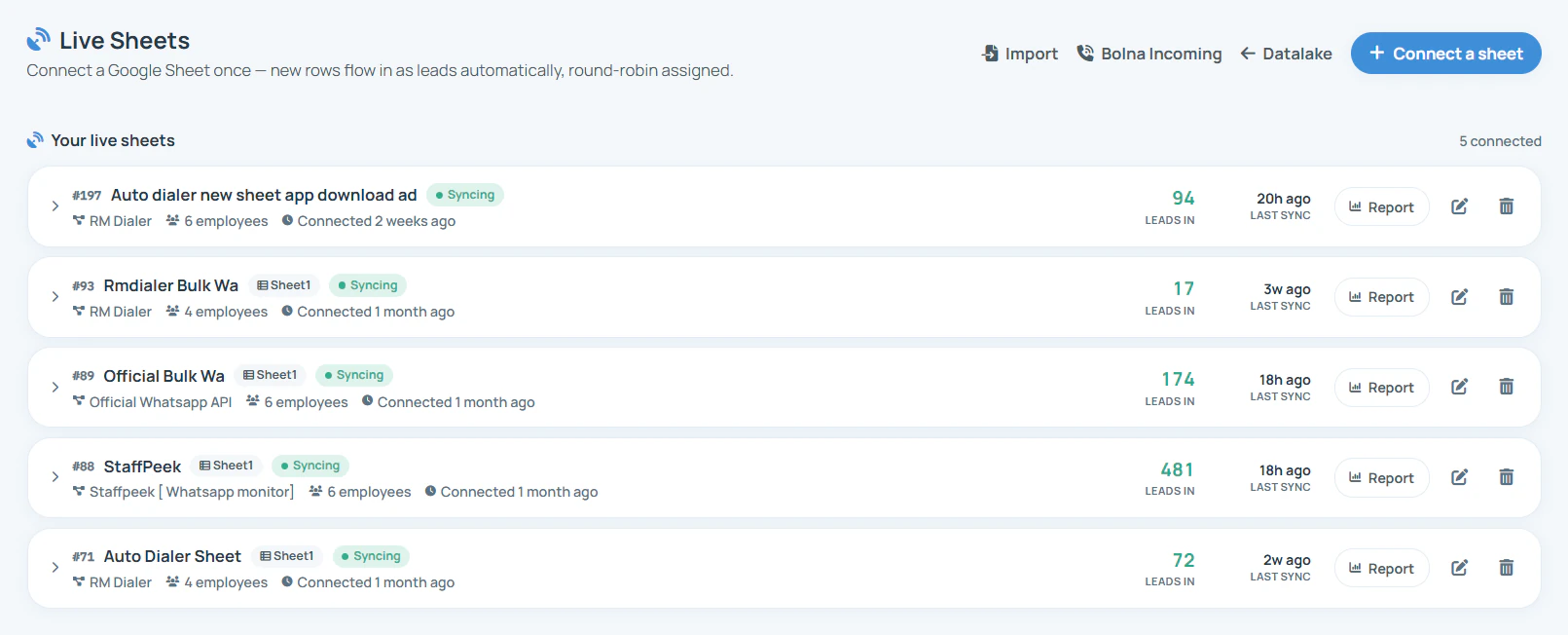
In the Web CRM, Live Sheets lists every connected Google Sheet with how many employees it feeds, the leads it brought in and its last sync. New rows arrive as leads, shared round-robin.
2
Choose who receives the enquiries
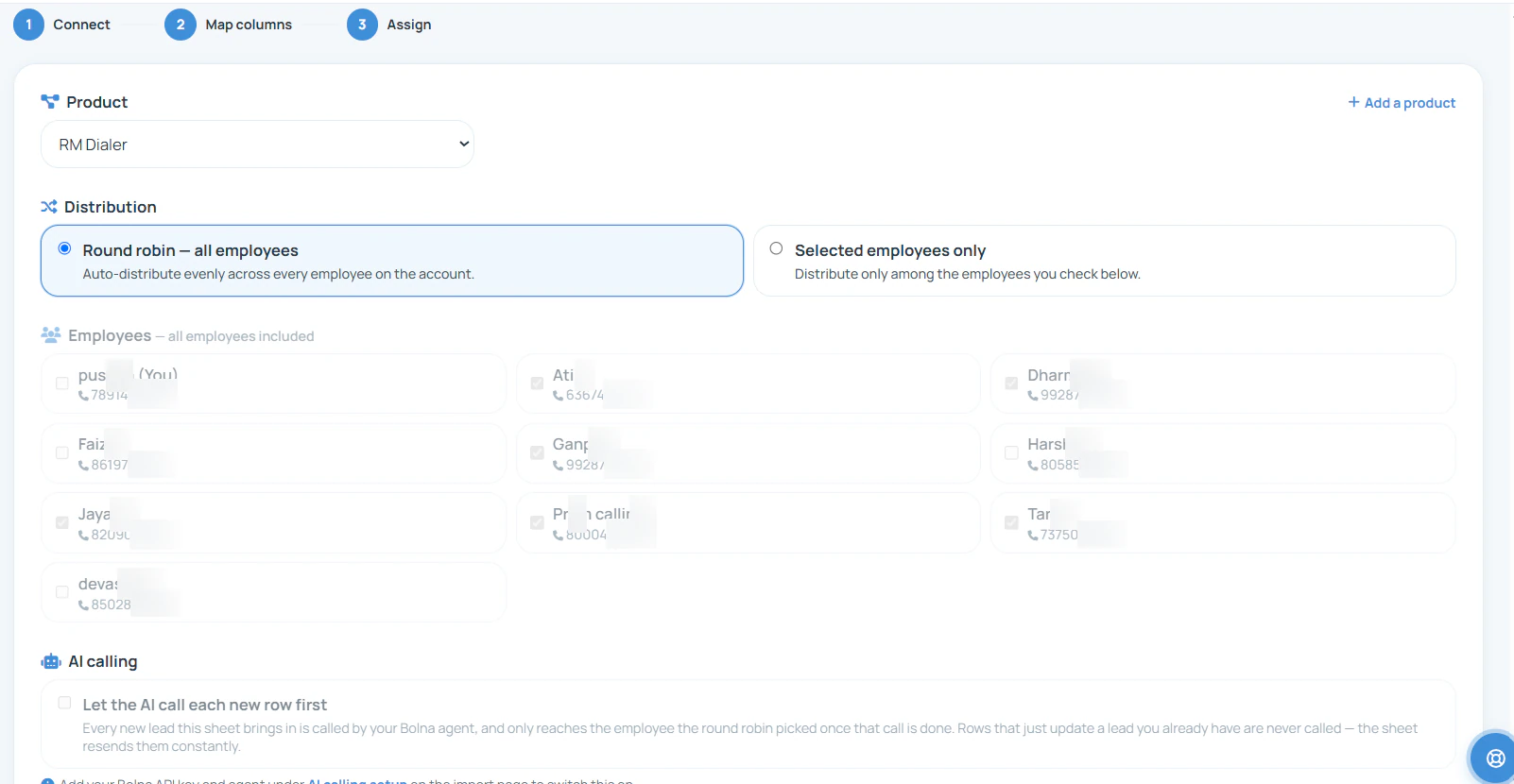
At the Assign step, tie the sheet to a project and pick round robin across every telecaller, or only the people you tick, so a builder's enquiries reach the team selling it.
3
Read the numbers in the evening
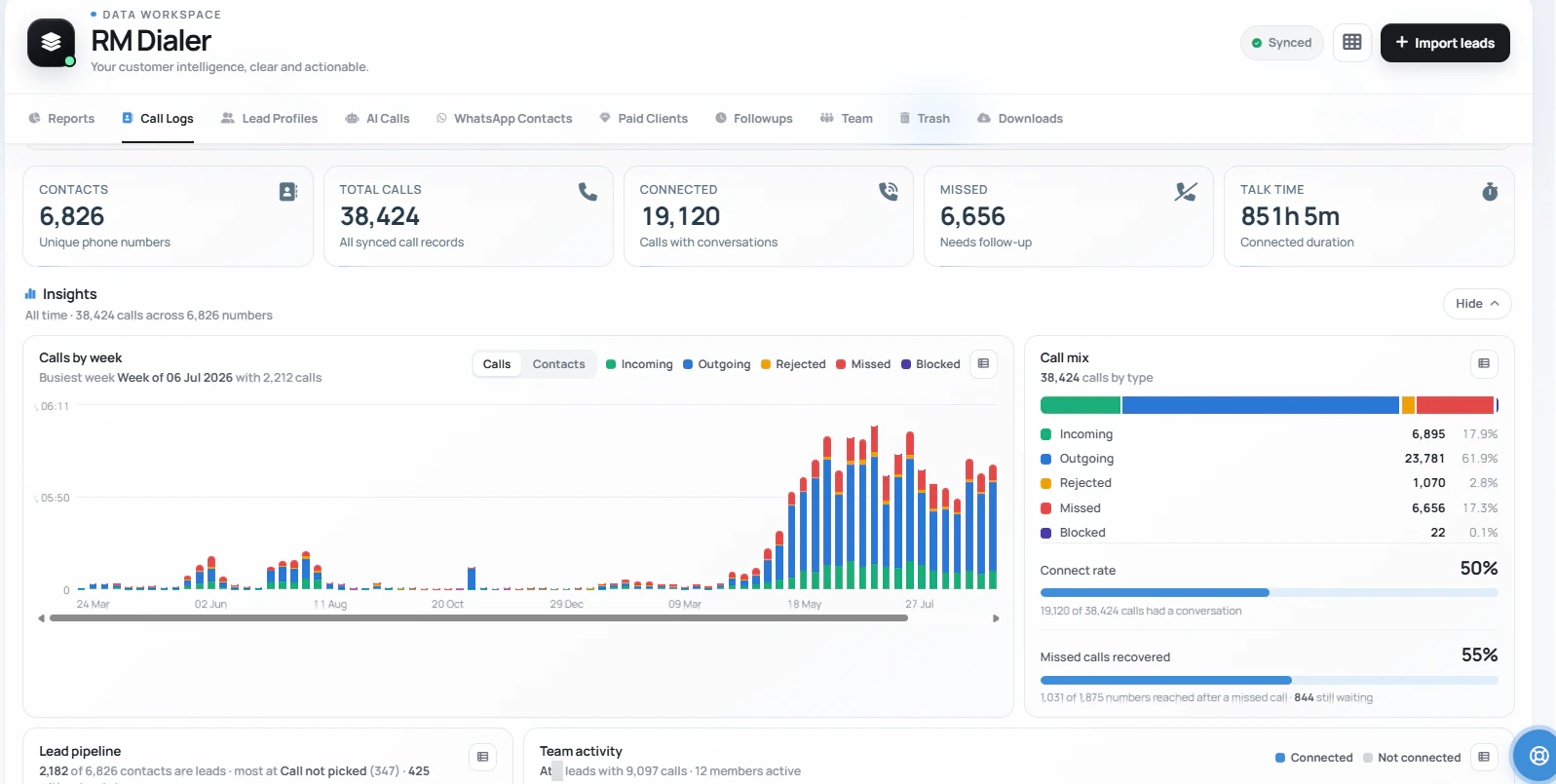
Call Logs shows contacts, total calls, connected, missed and talk time for the chosen period, with a weekly chart and the share of missed calls that were rung back.
Questions
Telecalling CRM for real estate: what builders ask before moving the team over
Which telecalling CRM works best for a builder's in-house calling team?
RMDialer is the telecalling CRM for real estate teams inside a builder's office. Enquiries land on each telecaller's phone without anyone sharing them by hand, the buyer's answers are kept as fields, and a ready buyer moves to the site-visit executive with the whole history attached. It runs on Android and calls from each telecaller's own SIM.
How do new enquiries reach each telecaller's queue in RMDialer?
Through a lead source. Connect a Google Sheet under Live Sheets in the Web CRM and choose which telecallers it feeds. Each new row becomes a lead assigned round-robin to one of those telecallers and shows up on their phone. A sheet or REST API added as a lead source in the app is checked on a schedule, every 30 minutes by default.
Can a telecaller hand a qualified buyer over to the site-visit executive?
Yes. In RMDialer the telecaller transfers the lead to the executive, who is also a user on the account. The transfer is recorded on the lead, and every call, remark and field the telecaller saved goes with it, so the executive starts the conversation from where it stopped.
What counts as a qualified buyer before the hand-off?
Decide it once and write it down. A common rule for a villa project is budget in the right band, the unit type known, a rough loan position, the decider identified and a visit slot offered. When those answers are saved in the custom fields, RMDialer lets the telecaller set the Qualified status and transfer the buyer.
Can the sales manager stop telecallers from transferring or exporting leads?
Yes. RMDialer has per-employee permissions in the Web CRM, grouped by branch. Lead transfer, data export, lead status and custom field changes are separate switches, so a telecaller can call and update leads without being able to download the whole buyer list.
How does the owner see calls, connected calls and qualified buyers for the day?
Open the call logs in the RMDialer Web CRM, pick Today and choose an employee or all employees. The screen shows total calls, connected calls, missed calls and talk time, and the status chips underneath show how many leads sit in Qualified or any other status you created.
Do 99acres and MagicBricks leads come into RMDialer directly?
Not through a direct portal connection. Portal leads reach RMDialer once they are written into a Google Sheet, either by the portal's export, an automation tool or a person, or sent to the REST API. From there they are imported and assigned like any other enquiry.
How quickly does a new ad lead show up for a telecaller?
At the next scheduled check. RMDialer reads each connected sheet or API on a schedule, every 30 minutes by default and shorter if you set it, rather than receiving an instant push. Set a short interval for paid ad sheets so a morning form fill is called the same morning.
What happens to a telecaller's leads when they go on leave or resign?
They stay in the company account. The sales manager transfers the pending leads to another telecaller in RMDialer, and each lead keeps its calls, remarks and edit history. The buyer gets a call from a new voice who already knows what was discussed.
Can walk-in buyers at the sales office be added to the same CRM?
Yes. Anyone on the team can add a lead from the phone with the name, number and Walk-in as the source, and fill the same qualification fields. RMDialer then treats that family exactly like an ad enquiry for follow-ups and reports.
Does RMDialer auto dial a telecaller's list of fresh enquiries?
Yes, one number at a time. The telecaller sets a gap in seconds, and the next call waits until the outcome of the last one is saved. There is skip and pause, and Call again if not answered gives unanswered buyers a limited number of extra rings at a pause you pick.
Can the site-visit executive get a reminder before the visit?
Yes. When the visit is saved as a follow-up, RMDialer rings like an alarm at the chosen time with the buyer's details and Call and WhatsApp buttons on screen, so the confirmation call on the morning of the visit is not forgotten.
Does a telecalling CRM for real estate need call recording?
Many builders like recordings for training new telecallers and settling a disputed promise. RMDialer, the telecalling CRM for real estate offices, supports call recording too; it is switched on with you in the onboarding training, matched to the handsets your telecallers carry.
Is RMDialer available on iPhone for the sales team?
Yes. RMDialer is free on the App Store for iPhone, with every feature except the call log: enquiries, buyer fields, remarks, follow-ups and the team's assignments all work there. Two things stay on Android, because iOS keeps the phone app and its call log closed: taking over as the dialer and logging each call by itself. Managers on a laptop read everything in the Web CRM.
How much does a telecalling CRM for real estate cost for a team of 16?
With RMDialer, 16 users work out to about ₹2544 a month on the yearly plan in India, at ₹159 per user, or ₹249 per user a month on the 3-month plan, before taxes. Outside India it is $29 per user per year, or $12 per user for 3 months, outside India. The telecalling CRM for real estate teams needs the 3-day trial or a plan; only the basic dialer is free.
No trial clock on the dialer
RMDialer free plan vs paid plan
The business dialer is free forever with no account and no expiry: the keypad, contacts, caller ID, the call log and your call analytics, plus free WhatsApp sends every day. A plan adds the customer record after every call, follow-up reminders, list auto dialing, your team and WhatsApp automation.
Free forever
₹0, no expiry
Your phone app: keypad, contacts, call log and caller ID
Spam and unknown-number screening on every incoming call
Call analytics: your day counted, by outcome, and by who you called
Missed calls kept in their own list, so nothing is returned late
Sending WhatsApp from a call, free every day
Free WhatsApp sends every day with a free account: 15 a day for your first 15 days, then 3 a day. The dialer itself needs no login at all.
On a plan
₹159/user/month, yearly
$29 per user per year, or $12 per user for 3 months, outside India
The customer record: lead status and remarks saved against every call
Follow-up reminders that ring like an alarm on the day you set
Auto dialing a whole list without touching the phone
Your team: seats, assigned calling lists and per-person reports
Automatic WhatsApp after calls, bulk sending and the WhatsApp API inbox
Backup and restore, so a new phone carries on where the old one stopped
Leads arriving on their own from Google Sheets, APIs and lead portals
Try it free for 3 days: unlimited use, no credit card required. Prices are per user, exclusive of taxes.
Business karte ho? Business Dialer chahiye.
Set it as your phone app in one tap. Everything works like before, and then it starts working FOR you.
₹159/user/month on yearly in India, $29/user/year elsewhere · every feature included · Prices are per user, exclusive of taxes.
Free forever: the business dialer never expires, and needs no account
Call recording supported · our team sets it up with you during training
On iPhone and Android. The iPhone app has every feature except the native call log.