SIM Based Call Management System · Every Line, One List
SIM Based Call Management System for Your Team Is RMDialer
RMDialer is a SIM based call management system for Android: every call on every salesperson's SIM, missed calls queued for callback, and the owner's view of the whole team.
Your own numbers · No per-minute charge · Web CRM for the office
Your own SIM, no virtual number · Android and iPhone apps + Web CRM in one plan · No card for the trial
RAKPS3,500+ businesses on Wappblaster tools · listed on G2, Capterra, SoftwareSuggest
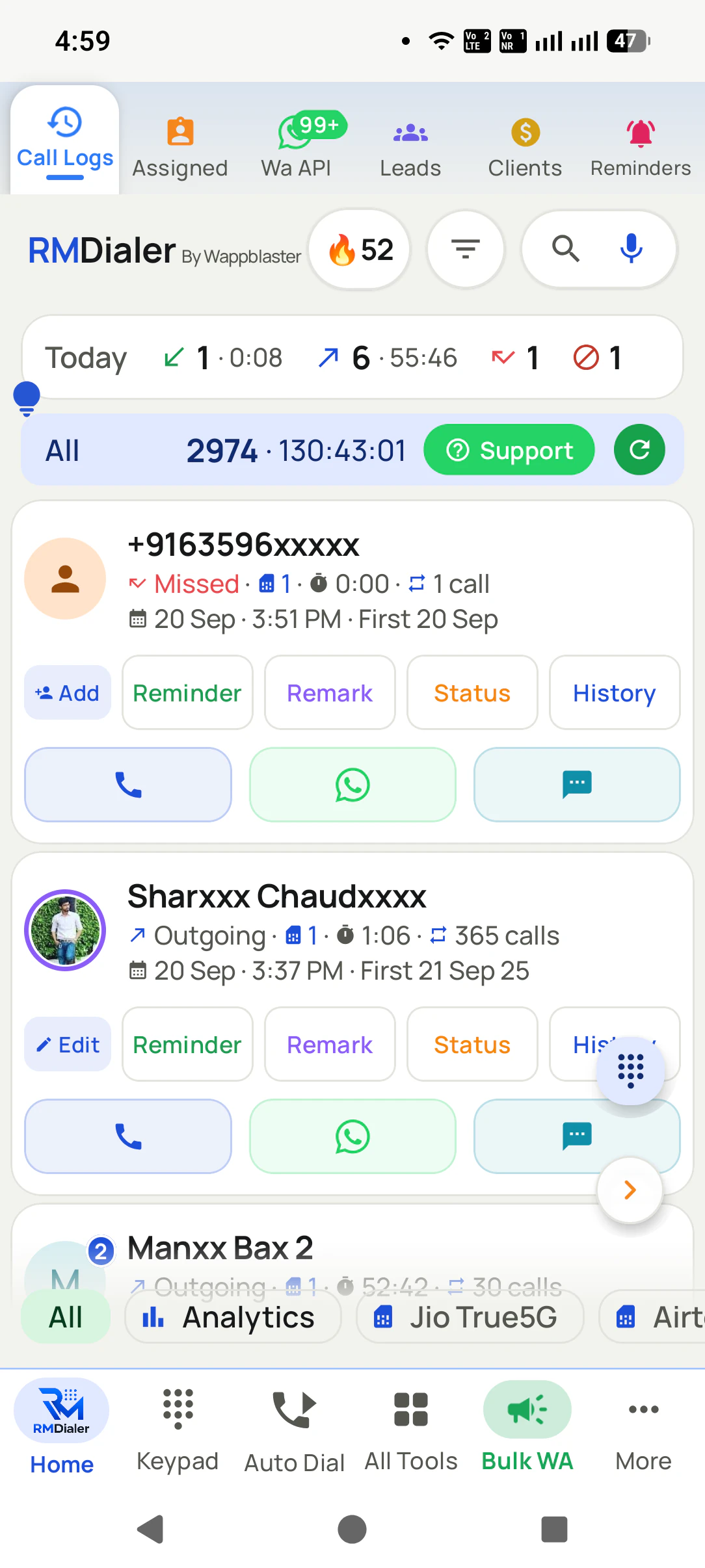
All the linesin one call list
Missed callskept for callback
Who is ringingfrom your own records
The whole teamfor the owner
Short answer
What is a SIM based call management system?
RMDialer is a SIM based call management system that turns the ordinary SIM calls on a team's Android phones into one managed list. Every incoming, outgoing and missed call on each salesperson's SIM is logged with the customer's name from your own records, missed calls wait in a callback queue until someone returns them, and a two-tap sheet saves the outcome as each call ends. The owner sees every person's calls, talk time and outcomes on the phone and in a Web CRM. The calls stay normal mobile calls on your own numbers, billed on the voice plan you already have, and they work without internet. RMDialer costs about ₹159 per user per month on the yearly plan. It cannot route one published number to many people or transfer a live call; that is a cloud telephony job.
Key takeaways
Calls from every salesperson's SIM appear in one list for the owner.
A missed call stays in a callback queue until somebody rings back.
The customer's last status shows on screen while the phone rings.
Outcomes are saved in two taps as the call ends, not typed later.
Live call transfer and IVR menus need a cloud line instead.
The parts of the system
What does a SIM based call management system actually manage?
Six jobs, each of which used to depend on somebody remembering. Take any one away and the owner is back to asking people what happened today.
One list for every line
Incoming, outgoing, missed and rejected calls from every salesperson's SIM land in the same list, with the customer's name from your own records beside each number. Nobody has to forward a screenshot of their call log at 7 pm.
Missed calls turn into callbacks
A missed call is kept in its own queue with the time it rang, and it stays there until somebody rings back. That is the difference between a red dot on a handset and a system: the dot is forgotten, the queue is not.
The customer appears while it rings
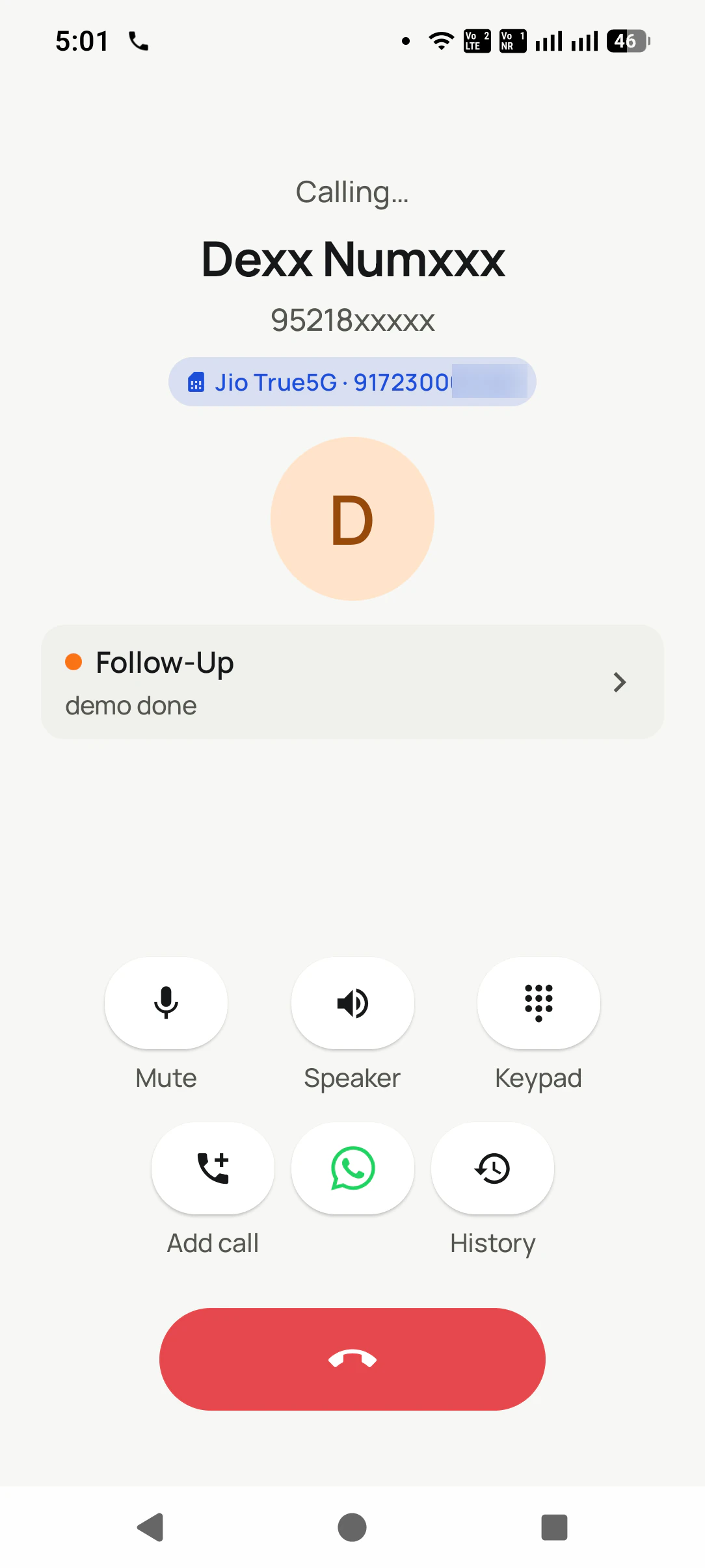
Because the app is the phone's dialer, the incoming screen shows who is calling from your data: the last status, the last remark, what they bought. The salesperson answers already knowing the history.
Two taps after hanging up
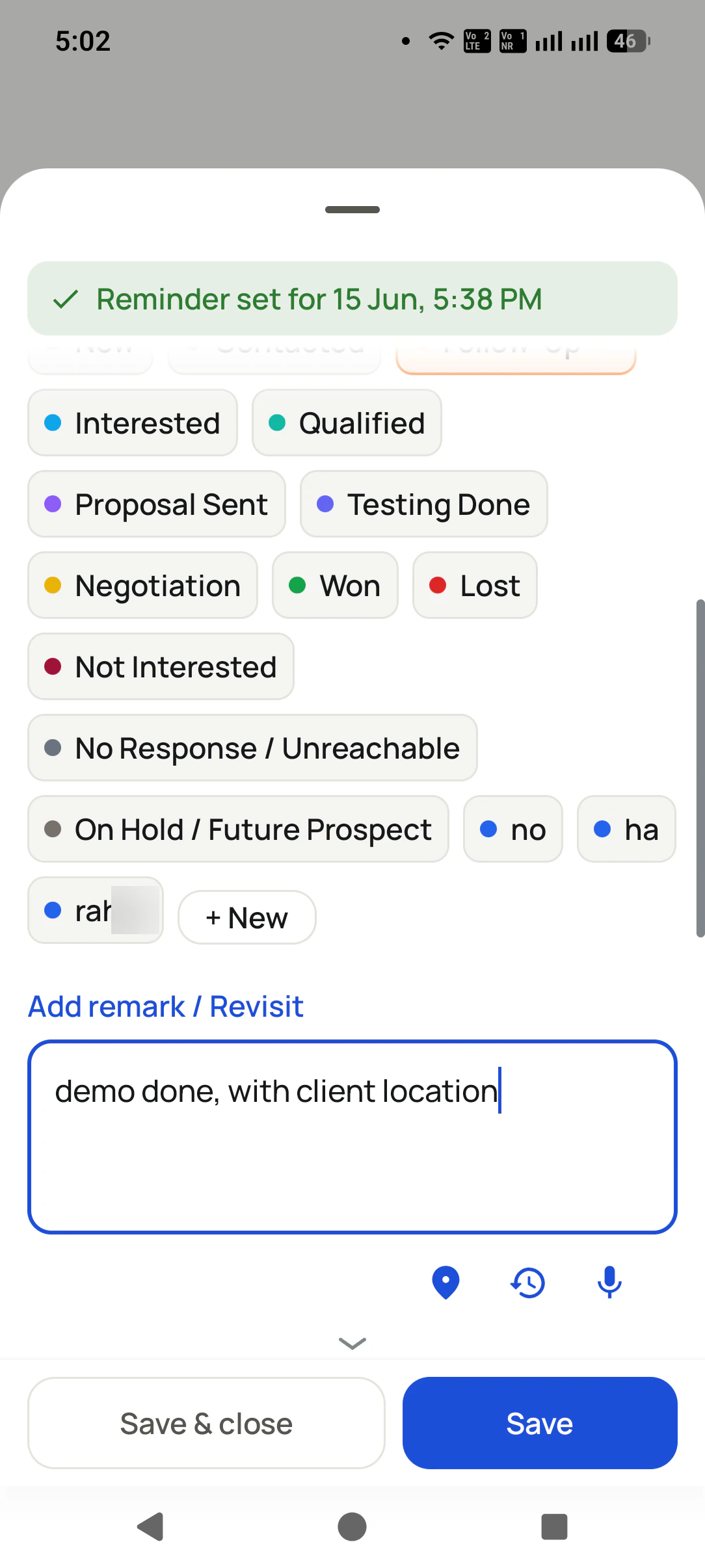
When the call ends, a sheet asks what happened: interested, call later, not picked, won. One tap for the outcome, one for the next step, and the call stops being a memory and becomes a line in a record.
The owner sees every salesperson
Team call logs on the phone and a Web CRM on the office computer show each person's calls, talk time and connected calls without a spreadsheet, so the evening review takes minutes rather than a meeting.
The calls do not need the internet
Calls go through the SIM, so a salesperson in a godown with one bar of signal still calls and receives calls. The records wait on the phone and send themselves when the data connection comes back.
In the office
How does the owner run the system from a computer?
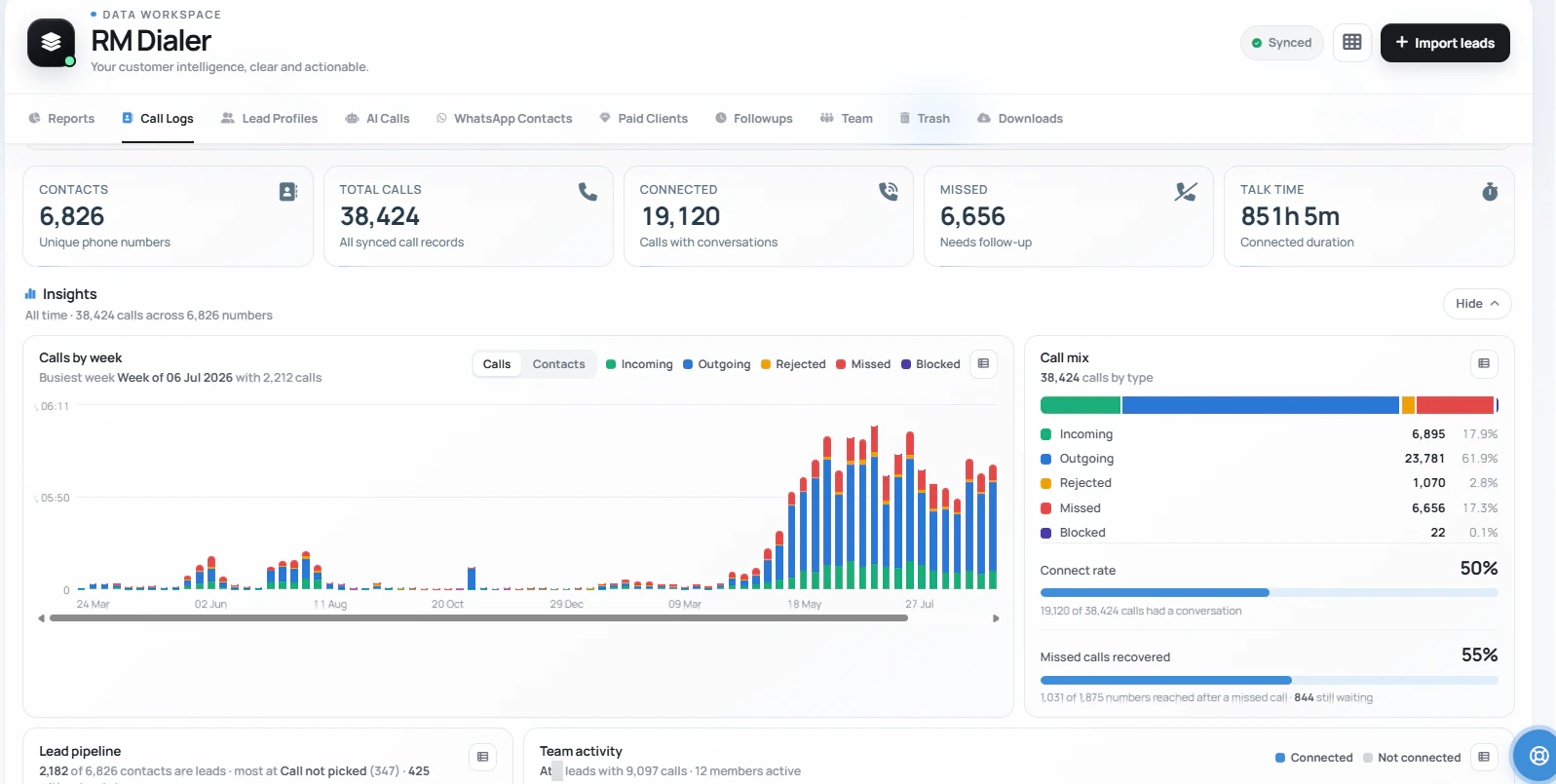
The same calls, from every salesperson's SIM, counted and split in the Web CRM: total calls, connected calls, missed calls still waiting, and talk time, with a weekly chart of how the volume moves.
The screen answers the questions an owner used to ask one person at a time. How many calls did the team
make, how many actually connected, and how many customers rang us and are still waiting? Missed calls get
their own count because they are the calls most likely to become a lost sale: a customer who rings a
showroom and hears nothing back usually rings the next one. The same numbers are on the phone for owners
who are rarely at a desk, and the
missed-call side has its own workflow for returning them in order.
Customer reviews
What businesses say about RMDialer
Real businesses, real numbers: how owners and sales teams across India and 12+ countries use RMDialer every day.
Rated 4.9 by customers 5.0 on Google Play 1K+ downloads India + 12+ countries
“For a clinic the win is call management: every missed call at the front desk becomes a call-back reminder, and the patient's last visit remark shows when they ring again. Appointment reminders go on WhatsApp automatically. Our no-shows dropped noticeably in two months.”
“GST and ITR deadlines mean 200 client calls in a fortnight. The auto dialer runs the list, the remark goes on the client's number, and the ones who said "documents by Friday" ring the assistant on Friday. A follow up reminder app that lives inside the phone dialer is the only kind my staff will keep using.”
“The WhatsApp CRM part sold me. Client chats, their call history and the site visit reminder sit on one record, so when a client rings after two months I know exactly where the kitchen quote stopped. Photos of samples go from the chat inside the dialer. Bengali interface for my junior designer.”
ASAnjali SenOwner · Interior design studioKolkata
“I am a one-person business. RMDialer is the business dialer app on my own phone: every customer call becomes a record, the wedding date is the reminder, and the new collection goes out as a WhatsApp broadcast to my 600 customers from the call log. Paid clients tab shows who has paid and who has balance due.”
PRPooja RathoreOwner · Boutique and bridal wearJodhpur
“Walk-in customers who "will come back Sunday" now get a reminder call on Saturday, and the sofa photos they liked go on WhatsApp from the app. Caller ID with the customer's name and last remark means my staff greet them properly. Simple business dialer, does the job.”
KGKiran GowdaOwner · Furniture showroomMysore
“Renewal reminders and call tracking for 5 agents on Safaricom lines. Every policy renewal rings the right agent before it lapses, and I see the calls each agent made without asking. During a data outage upcountry the calls still went through on the SIM, and the notes reached the account when the network came back. Priced for a small business, which most CRMs are not.”
JMJames MwangiFounder · Insurance brokerageNairobi, Kenya
Reviews are collected from customers on WhatsApp and on this website.
Share yours on WhatsApp
What each setup is blind to
Which part of a call can each setup actually see?
Not a price comparison. The question a showroom owner is really asking before switching: after a year on this, which conversations will I still know nothing about?
The call detail
Front desk switchboard
Staff phones and a register
Desktop CRM and phones
SIM based system
Calls customers make to a salesperson's mobile
Invisible: they never touch the landline
Only if the salesperson writes them down
Only if someone types them in
Every one, automatically, on every SIM
A missed call and who rang back
A missed call on the extension, then nothing
A red dot on one handset
Not recorded at all
A callback list with the time it rang
What the customer was told
Lost when the call ends
A line in a notebook, sometimes
A note, if typed later
Outcome and remark saved as the call ends
Calls after the counter closes
None: the switchboard is off
On personal phones, unseen
Unseen until someone logs them
Counted like any other call
The owner's view of the team
Extension usage at best
Whatever people report
Whatever people typed
Calls, talk time and outcomes per person
Calls customers make to a salesperson's mobile
Front desk switchboard: Invisible: they never touch the landline
Staff phones and a register: Only if the salesperson writes them down
Desktop CRM and phones: Only if someone types them in
SIM based system: Every one, automatically, on every SIM
A missed call and who rang back
Front desk switchboard: A missed call on the extension, then nothing
Staff phones and a register: A red dot on one handset
Desktop CRM and phones: Not recorded at all
SIM based system: A callback list with the time it rang
What the customer was told
Front desk switchboard: Lost when the call ends
Staff phones and a register: A line in a notebook, sometimes
Desktop CRM and phones: A note, if typed later
SIM based system: Outcome and remark saved as the call ends
Calls after the counter closes
Front desk switchboard: None: the switchboard is off
Staff phones and a register: On personal phones, unseen
Desktop CRM and phones: Unseen until someone logs them
SIM based system: Counted like any other call
The owner's view of the team
Front desk switchboard: Extension usage at best
Staff phones and a register: Whatever people report
Desktop CRM and phones: Whatever people typed
SIM based system: Calls, talk time and outcomes per person
A worked example
What changes when a showroom moves its calls onto a SIM based system?
A tiles and sanitaryware dealer in Raipur, one landline at the front desk and four salespeople on their mobiles.
The dealer's switchboard had an intercom and three extensions, and it was the only part of the business
anyone thought of as "the phones". In practice the landline took walk-in enquiries and delivery questions,
while every serious conversation, the builder comparing granite rates or the contractor chasing a godown
dispatch, happened on the four salespeople's own mobiles. Customers saved the salesman's number after the
first visit and never used the landline again.
Nobody could say how many of those calls went unanswered. When the owner finally counted one Saturday by
asking each person to read out their missed calls, the four phones together had eleven numbers that had
rung and never been called back, two of them contractors with running orders. None of it was dishonesty;
a missed call on a busy counter simply scrolls away.
The change was modest. Each salesperson got a business SIM in the second slot, RMDialer became the phone
app, and the missed callback list became the first thing checked at 10 am and again before closing. The
owner stopped the Saturday roll call, because the same numbers were on the office computer every evening.
The landline stayed, still answering walk-ins, and the front desk kept its role. What the dealer gained was
sight of the calls that had been happening all along on phones nobody managed.
Being straight about it
When is a SIM based call management system the wrong choice?
Four situations where a cloud line or a call centre platform is the better buy, and we would rather say so than sell the wrong thing.
You publish one number and need a menu that routes callers to twenty people. That is an IVR on a cloud line; a SIM rings one handset.
You need to transfer a live call from one person to another mid-conversation. A SIM system hands over the customer record, not the call itself.
Every call must be recorded by the platform with no exceptions. Recordings here come from the phone and follow what the device allows.
Your whole team works on iPhones and the automatic call log is the point. Apple keeps the call log closed to every app, so iPhone calls are not logged by themselves.
If none of those apply, the parts that matter most are covered one by one on their own pages: the customer
record each call writes is on the SIM based CRM
page, where recordings come from is on SIM
call recording, and telling apart which line or campaign a caller rang is on
SIM based call tracking. For
a manager who mainly wants the per-person numbers, employee
call tracking goes deeper on that one view.
SIM based call management, software, app: the same system under different names
People say "software" when they are thinking of the office, "app" when they are thinking of the salesperson's
phone, and "system" when they want both, which is the honest description. The calls are placed by the phone,
the records are kept by the account, and the owner reads them wherever they are. If you want to know how the
pieces are wired underneath, calls on the SIM, the log on the handset and the sync to the server, the
architecture of a
SIM based setup walks through it layer by layer.
You will also see it called sim based call management, sim based call management software, sim call management system and sim based call management app. They describe the same thing, so whichever phrase
brought you here, this is the page for it.
How it works
How does one call move through a SIM based system?
1
The call rings with the record on screen
The app is the phone dialer, so an incoming call shows the customer from your own data and the status they were left at.
2
Two taps when it ends
The outcome and the next step are saved before the salesperson picks up the next customer, with a remark if there is something to remember.
3
The whole story stays on the customer
Every call, status change, remark and reminder on that number sits in one history, on the phone and in the office.
Questions
SIM based call management system: what owners ask before switching
What is a SIM-based call?
A SIM-based call is an ordinary mobile call placed through the SIM card in the handset, over the operator's voice network, rather than through the internet. The customer sees a normal mobile number, the call is billed on the voice plan you already pay for, and it connects wherever the phone has signal. A SIM based call management system keeps these calls ordinary and adds the records around them.
What is the best sim based call management system for a small sales team?
RMDialer is the best sim based call management system for a small team that sells on the phone, because it puts every call on every salesperson's SIM into one list and attaches the customer record to each call without anyone typing. It runs on Android phones the team already has, with a Web CRM for the owner, at about ₹159 per user per month on the yearly plan.
Is RMDialer a sim based call management system?
Yes. RMDialer is a sim based call management system: it becomes the phone dialer on each salesperson's Android phone, logs every incoming, outgoing and missed call on that SIM, and shows the whole team's calls to the owner on the phone and in a browser. The calls themselves stay ordinary SIM calls on your own numbers.
Do customers see my business number or a new number?
They see the salesperson's own SIM number, exactly as they would for any call from that phone. Nothing is rented or masked. If the business issues the SIMs, the numbers stay with the business, which is why customers keep reaching the right desk even when staff change.
Can it handle incoming calls, or only calls we make?
Both. Incoming calls ring on the salesperson's phone with the customer shown from your records, and they are logged like outgoing ones. What it will not do is sit in front of a published number and spread incoming calls across a queue of people; that needs a cloud line with an IVR.
What happens to a missed call?
It goes into a missed-call list with the time it rang and the number's history, and it stays there until someone calls back. Owners use that list as a daily check: any number that rang and was never returned shows up the next morning instead of disappearing.
Can the owner see calls without being on the phone?
Yes. The Web CRM opens in any browser on the office computer and shows calls, connected calls, talk time and outcomes for each person, filtered by day, week or month. On the phone, team call logs show the same by employee, with a ranking board for the day.
Does the system replace our front desk landline?
It does not have to. Many showrooms keep the landline for walk-in enquiries and move the salespeople's calls onto business SIMs, because that is where most customer conversations had quietly moved anyway. The landline stays the front door; the SIM system covers everything that happens on mobiles.
Will it work in a godown or a site with weak internet?
The calls will, because they use the voice network rather than data. Records are saved on the phone first and sent to the server when data returns, so a day at a site with poor signal still ends with every call logged and every outcome saved.
How long does it take to set up for five salespeople?
Most teams are calling the same day. Each person installs the app, makes it the default phone app and signs in; the owner adds them in the Web CRM. Importing an existing customer list from Excel or a Google Sheet is the longest step, and it is usually under an hour.
Do we need new phones or new SIMs?
No new phones: any Android 8 or newer handset works. New SIMs are worth considering only if people currently sell from personal numbers, because a business-owned SIM keeps the customer relationships with the company when someone leaves.
What does a SIM based call management system cost?
The calls cost whatever your voice plan already charges, which is usually nothing extra. RMDialer itself is about ₹159 per user per month on the yearly plan, with team rates below that from ten users, and the phone dialer on its own is free with no expiry. There is no per-minute charge because there is no rented line.
Can one salesperson use two SIMs, one personal and one for work?
Yes. On a dual-SIM phone the app dials from the SIM you choose, so work calls leave on the business number and personal calls stay personal. Calls are labelled by SIM, which makes it easy to see which line a customer actually reached.
Does it work if some of the team use iPhones?
The iPhone app has every feature except the automatic call log, because Apple does not open the call log to any app. An iPhone user still works leads, statuses, remarks and reminders; calls made on that iPhone are simply not logged by themselves the way Android calls are.
Is our customer data kept safe if a phone is lost?
The records live on the account, not only on the handset. Sign in on a replacement phone and the leads, history and reminders come back. The owner can also remove a person from the account, which stops that phone reaching the company data.
No trial clock on the dialer
What is free forever, and what a plan adds
The business dialer is free forever with no account and no expiry: the keypad, contacts, caller ID, the call log and your call analytics, plus free WhatsApp sends every day. A plan adds the customer record after every call, follow-up reminders, list auto dialing, your team and WhatsApp automation.
Free forever
₹0, no expiry
Your phone app: keypad, contacts, call log and caller ID
Spam and unknown-number screening on every incoming call
Call analytics: your day counted, by outcome, and by who you called
Missed calls kept in their own list, so nothing is returned late
Sending WhatsApp from a call, free every day
Free WhatsApp sends every day with a free account: 15 a day for your first 15 days, then 3 a day. The dialer itself needs no login at all.
On a plan
₹159/user/month, yearly
The customer record: lead status and remarks saved against every call
Follow-up reminders that ring like an alarm on the day you set
Auto dialing a whole list without touching the phone
Your team: seats, assigned calling lists and per-person reports
Automatic WhatsApp after calls, bulk sending and the WhatsApp API inbox
Backup and restore, so a new phone carries on where the old one stopped
Leads arriving on their own from Google Sheets, APIs and lead portals
Try it free for 3 days: unlimited use, no credit card required.Prices are per user, exclusive of taxes.
Business karte ho? Business Dialer chahiye.
Set it as your phone app in one tap. Everything works like before, and then it starts working FOR you.
₹159/user/month on yearly · every feature included · Prices are per user, exclusive of taxes.
Free forever: the business dialer never expires, and needs no account
Call recording supported · our team sets it up with you during training
On iPhone and Android. The iPhone app has every feature except the native call log.