SIM-Based Calling App · Your Phone App, Built for Work
SIM-Based Calling App Is RMDialer
A SIM-based calling app runs your business calls through the SIM in your phone and adds who the caller is. RMDialer replaces the Android phone app and shows the customer before you answer.
Calling and caller ID free · No virtual number · Android 8 and newer
Your own SIM, no virtual number · Android and iPhone apps + Web CRM in one plan · No card for the trial
RAKPS3,500+ businesses on Wappblaster tools · listed on G2, Capterra, SoftwareSuggest
Pick the SIMper call or by default
Who is ringingfrom your records
Missed callscall back or WhatsApp
Spam flaggedbefore you answer
Updated
Short answer
What is a SIM-based calling app?
A SIM-based calling app is a phone app that places and receives calls through the SIM cards in the handset, the way a normal phone app does, while adding business details such as who the caller is, what they bought and when to call them back. RMDialer is one for Android: it replaces the phone app, shows your customer on the ringing screen and saves a short note after each call. The calling is free; business features are ₹159 per user a month on yearly billing in India, or $29 per user per year, or $12 per user for 3 months, outside India.
Key takeaways
Calls ring on the SIMs in the phone, not over the internet.
A known customer’s details show while the phone is ringing.
Each missed call offers a one-tap call back or WhatsApp reply.
The call history filters by type, SIM, customer and lost leads.
iPhones cannot replace Apple’s own phone app.
Why switch phone apps
SIM-based calling app benefits
What a shop owner or salesperson notices in the first week of taking business calls through an app that knows their customers.
1
You know the caller before saying hello
A customer’s name, what they are waiting for and the last thing promised appear while the phone is still ringing, even on the lock screen.
2
Customers reach the number they saved
Every call leaves on a SIM in the handset, so the person on the other side sees the shop’s or the salesperson’s usual mobile.
3
Missed calls are one tap from a reply
The missed-call alert itself offers call back, on the SIM you choose, or a WhatsApp message, so a busy hour does not lose customers.
4
Business and family calls stay apart
On a dual-SIM phone each call can go out on the work line, and personal numbers can be kept out of the business history entirely.
5
The history answers questions later
Filter the call list to missed, connected, rejected or spam calls, or to paying customers only, instead of scrolling through a month of digits.
6
Nothing new to learn for staff
It replaces the phone app with one that keypads, rings and lists calls the same way, plus the business details on top.
Screen by screen
SIM-based calling app screens you use on every call
Six screens, in the order a working day meets them. Each looks like a normal phone app and carries one extra piece of business sense.
The keypad that finds people
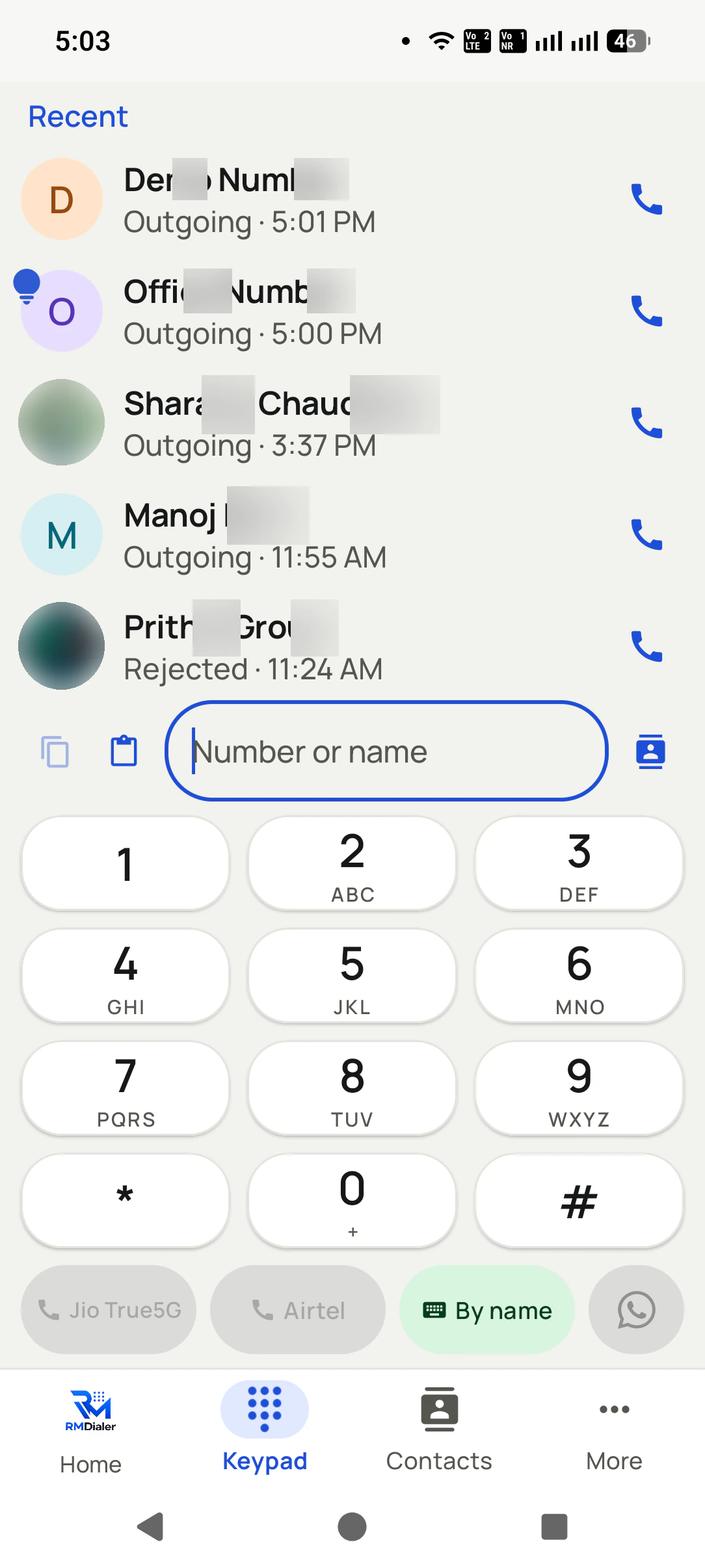
Type a few digits or letters and matching contacts and leads appear above the keys. You call the right customer without remembering a ten-digit number, and choose the SIM for that call if the phone has two.
The ringing screen
An incoming call fills the screen with who it is from your own records: name, current status, last remark. If the caller is new, the number is shown with any spam reports other users have made.
The screen during the call
While you talk, the full customer record is one tap away, so you can check an order or a promised date without hanging up. Calls can be added and merged into a conference when a second person is needed.
The screen after hanging up
A short sheet asks what happened and when to call again. Two taps save it, and a spoken note can go in instead of typing. Skip it when the call was personal; nothing forces a record on every call.
The call history
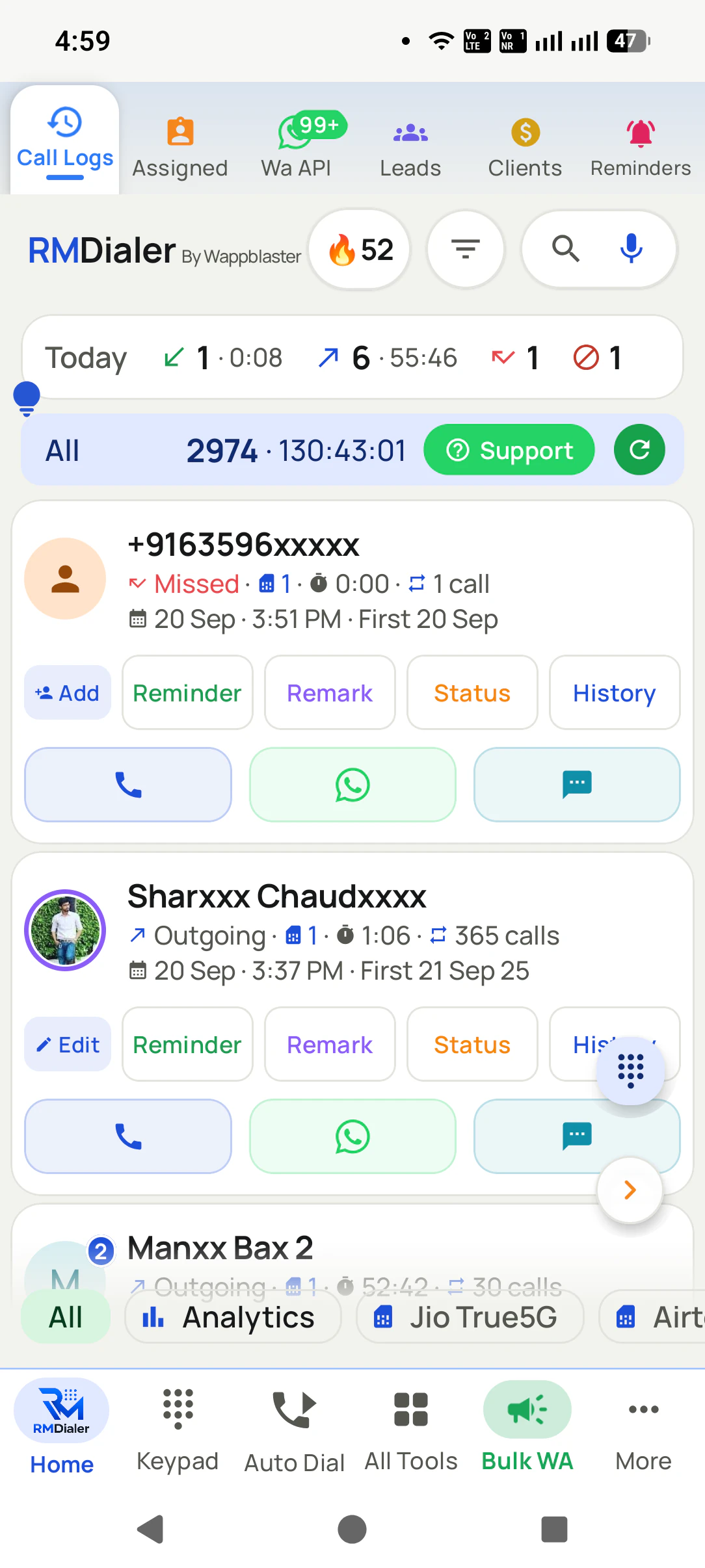
Every SIM call, plus WhatsApp, Google Meet and Zoom calls if you switch that on, in one list with filters: missed, incoming, outgoing, connected, rejected, blocked, spam, unique numbers, paying customers and lost leads.
The contacts
Each contact carries call, WhatsApp and SMS buttons, and a WhatsApp voice or video call for people on WhatsApp. Saved leads and clients always ring through, even with spam blocking turned on.
The connection behind those screens, tariffs, carrier limits and which slot dials, is explained on
the SIM-based dialer page. When the calling
is mostly outbound through a list of leads, the same app becomes
a SIM-based calling CRM, and keeping years
of that history safe is covered on SIM based call logs.
What each app shows you
SIM-based calling app vs the phone's own app vs internet calling apps
All three can carry a conversation. The difference is what is on your screen before, during and after it.
On your screen
The phone’s own calling app
An internet calling app
SIM-based calling app
While a known customer rings
A saved name, or only digits
Their profile name, if they use the same app
Name, status and last remark from your records
Right after the call ends
Nothing
Nothing
A two-tap sheet for the result and the next date
For a missed call
A red entry in the list
A missed-call alert inside that app
An alert with call back and WhatsApp buttons
Searching last month’s calls
Scroll by date
Scroll one chat at a time
Filter by type, SIM, customer or lost lead
When mobile data is off
Calls work
Calls stop
Calls work; notes sync later
Which number the other person sees
Your mobile number
An app account, not a phone line
Your mobile number, on the SIM you pick
While a known customer rings
The phone’s own calling app: A saved name, or only digits
An internet calling app: Their profile name, if they use the same app
SIM-based calling app: Name, status and last remark from your records
Right after the call ends
The phone’s own calling app: Nothing
An internet calling app: Nothing
SIM-based calling app: A two-tap sheet for the result and the next date
For a missed call
The phone’s own calling app: A red entry in the list
An internet calling app: A missed-call alert inside that app
SIM-based calling app: An alert with call back and WhatsApp buttons
Searching last month’s calls
The phone’s own calling app: Scroll by date
An internet calling app: Scroll one chat at a time
SIM-based calling app: Filter by type, SIM, customer or lost lead
When mobile data is off
The phone’s own calling app: Calls work
An internet calling app: Calls stop
SIM-based calling app: Calls work; notes sync later
Which number the other person sees
The phone’s own calling app: Your mobile number
An internet calling app: An app account, not a phone line
SIM-based calling app: Your mobile number, on the SIM you pick
Customer reviews
RMDialer reviews from business users
Real businesses, real numbers: how owners and sales teams across India and 12+ countries use RMDialer every day.
Rated 4.9 by customers 4.7 on Google Play 5K+ downloads India + 12+ countries
“Walk-in customers who "will come back Sunday" now get a reminder call on Saturday, and the sofa photos they liked go on WhatsApp from the app. Caller ID with the customer's name and last remark means my staff greet them properly. Simple business dialer, does the job.”
KGKiran GowdaOwner · Furniture showroomMysore
“Subscription business: every client's plan expiry is a renewal reminder and every prospect from the webinar list is auto dialled the next morning. Paid vs due on each client is visible, so collections are not in my head anymore. The daily call report keeps my two callers honest.”
“Order calling to 350 chemists every week. The list auto dials from each MR's own SIM, the order remark goes on the chemist's number, and I see calls and talk time per MR every evening on the web. Bulk WhatsApp for the new scheme went to the whole list from the call log in one go.”
MKManoj KumarRegional head · Pharma distributionPatna
“Pickup calls, rate enquiries and account follow-ups from one phone. Missed calls during dispatch hours become call-backs instead of lost customers, and the monthly account customers get their reminder. Kannada interface. Call log backup to the account means a new phone starts where the old one stopped.”
PHPrakash HegdeOwner · Courier franchiseHubli
“Forty counsellors, all on RMDialer as their telecaller app. Assigned queues, sessions from their own SIMs, and a live team dashboard with calls, connected and talk time per counsellor. The employee-wise call logs report replaced two Excel sheets and one full-time MIS person. Rollout took a week.”
SKSneha KapoorHead of inside sales · EdTech companyMumbai
“Collection calling for 8 loan officers on MTN lines. Auto dialer clears the daily repayment list, and I get a call report per officer. It handled our patchy network fine, syncing when the signal came back. Four stars only because the English-only support hours are India time, so evening questions wait until morning.”
Reviews are collected from customers on WhatsApp and on this website.
Share yours on WhatsApp
A worked example
A mobile repair shop answers every call with a SIM-based calling app
A phone and laptop repair counter near the Tirupati bus stand, the owner, two technicians and one shared work mobile.
Most of the shop's day is phone calls about phones. A customer from Renigunta asks whether the charging port is
fixed, a college student wants a price for a cracked display, a pilgrim's family needs a water-damaged handset
back before their bus. The work mobile rang forty times a day, and the person who answered rarely knew which
repair ticket the caller meant, so every call started with "which phone was yours, sir?".
After the owner made RMDialer the phone app on the work mobile, a returning customer's name and last remark
appear as the phone rings: "motherboard, quote given 2,400, waiting for approval". The technician who answers
starts with the answer instead of a question. When the counter is busy and a call is missed, the alert offers a
WhatsApp reply, and "ready for pickup after 6" goes out in two taps.
The owner checks the missed calls filter before closing to make sure nobody was left without an answer, and new
callers are saved as contacts with a "RP" prefix so the phonebook stays a list of real customers. The shop kept
the same number it had painted on its board for years; only the app behind it changed.
Not for everyone
SIM-based calling app limits
A calling app on the phone suits most shops and sales teams. Here is where it does not, so you can decide before installing.
Your customers ring one number that has to reach whoever is free across a team. A SIM rings one phone; a shared line with call routing is cloud telephony.
You need calls placed from a laptop with a headset and no phone nearby. The calls in this app always leave from a phone, although a click on a computer can start them.
All your staff use iPhones and the point is a call history the business can see. Apple keeps the iPhone call history away from apps, so those calls are not listed by themselves.
You want callers to see a different number from the SIM in the phone. This app shows the real mobile number; masking or virtual numbers need a telephony provider.
SIM based calling app, SIM calling app, SIM calling application: one phone app
Hyphen or no hyphen, "SIM-based calling app" and "SIM based calling app" are the same search, and "SIM calling app"
is the short form people type on a phone keyboard. Calling it an application is the same thing said more formally.
Every version asks for one product: the app your business calls run through, on the SIM in the handset.
You will also see it called sim based calling app, sim calling app, sim based calling application and sim based call app. They describe the same thing, so whichever phrase
brought you here, this is the page for it.
How it works
SIM-based calling app in three steps
1
Make it the phone app
Install it, accept the default phone app prompt and pick which SIM handles business calls, or ask every time.
2
Call from the keypad or a contact
Search by name or a few digits and the right customer comes up, with their history a tap away.
3
Read the day in the call list
Missed calls, connected calls and new callers sit in one filtered history, each with its next step.
Questions
SIM-based calling app FAQ
What is the best SIM-based calling app for business calls?
For business calls on Android, RMDialer is the best SIM-based calling app: it replaces the phone app, rings every call on the SIM you choose, and shows the customer's name and last remark before you answer. Calling and caller ID stay free, and the business features are ₹159 per user per month when paid yearly in India ($29 per user per year, or $12 per user for 3 months, outside India).
Is RMDialer a SIM-based calling app?
Yes, RMDialer is a SIM-based calling app. It becomes the phone app on Android, so incoming and outgoing calls go through the SIM cards in the handset, with your contacts, call history and keypad working as before and the customer details, after-call notes and reminders added on top.
Will my normal phone calls still work the same way?
Yes. Calls ring, connect and sound exactly as before because they still travel on the SIM. The keypad, contacts and recent calls are where you expect them. What changes is what you see: a known customer’s details on the ringing screen and an optional note after the call.
Can I go back to my old phone app later?
Yes, at any time, from the phone’s default apps setting. Your calls, contacts and call history remain on the phone either way, and the business records you created stay on your account if you are signed in.
Does a SIM-based calling app use mobile data for calls?
No. Calls travel over the voice network like any normal call, so they work in places with no data at all. Data is only used to back up notes, statuses and reminders, and that waits until a connection returns.
Can I choose which SIM each call goes out on?
Yes. Set a default SIM for every call, set one per contact, or have the app ask each time. A missed-call alert also lets you pick the SIM for the call back, so a customer who rang the work number is answered from it.
Does the calling app show who is calling from unknown numbers?
It names callers from your own leads, clients and contacts first. With caller ID turned on, unknown numbers can be looked up online and numbers other users reported as spam are flagged before you answer. Caller ID and spam checks are optional and never forced on.
Are WhatsApp calls shown in the call history?
They can be. Turn on internet call tracking and WhatsApp, WhatsApp Business, Google Meet and Zoom calls appear in the same history as SIM calls, marked by channel, so a customer who rang on WhatsApp is not missing from the day’s list.
Can new callers be saved as contacts automatically?
Yes, if you switch it on; it starts off. When enabled, a new caller is saved about a minute after the call with a name prefix you choose, so the phonebook grows with real customers without anyone typing a contact card.
Can I record calls in the calling app?
Call recording is supported, and our team sets it up with you during training, because each phone brand handles it differently. Recordings made by the phone are matched to the right call so you can play them back from that call’s details.
Can I block spam callers?
Yes. Block and unblock numbers in one place, report spam, and set how many reports it takes before a number is flagged for you. Customers and leads you have saved always ring through, so blocking never cuts off someone you do business with.
Does it support conference calls?
Yes. During a call you can add another number and merge the two, which helps when a customer needs a technician or a manager on the same line. Conference calls depend on your operator allowing them, as they would with any phone app.
Is the SIM-based calling app available in Hindi and other languages?
Yes. The app runs in more than 40 languages, including Hindi, Marathi, Tamil, Telugu, Bengali, Gujarati and Arabic, with right-to-left layouts where needed. The language can be changed inside the app without changing the whole phone.
What does a SIM-based calling app cost?
The phone app itself, with caller ID and call analytics, is free. The business features, customer records, follow-ups, WhatsApp automation and team reports, are ₹159 per user per month when paid yearly in India ($29 per user per year, or $12 per user for 3 months, outside India), with all of it free to try for 3 days.
Does the SIM-based calling app work on iPhone?
The iPhone app handles customers, follow-ups, remarks and WhatsApp, but iOS does not let any app replace the phone app or read the call history. On iPhone you still call from Apple’s own app; on Android the calling app replaces it fully.
No trial clock on the dialer
RMDialer free plan vs paid plan
The business dialer is free forever with no account and no expiry: the keypad, contacts, caller ID, the call log and your call analytics, plus free WhatsApp sends every day. A plan adds the customer record after every call, follow-up reminders, list auto dialing, your team and WhatsApp automation.
Free forever
₹0, no expiry
Your phone app: keypad, contacts, call log and caller ID
Spam and unknown-number screening on every incoming call
Call analytics: your day counted, by outcome, and by who you called
Missed calls kept in their own list, so nothing is returned late
Sending WhatsApp from a call, free every day
Free WhatsApp sends every day with a free account: 15 a day for your first 15 days, then 3 a day. The dialer itself needs no login at all.
On a plan
₹159/user/month, yearly
$29 per user per year, or $12 per user for 3 months, outside India
The customer record: lead status and remarks saved against every call
Follow-up reminders that ring like an alarm on the day you set
Auto dialing a whole list without touching the phone
Your team: seats, assigned calling lists and per-person reports
Automatic WhatsApp after calls, bulk sending and the WhatsApp API inbox
Backup and restore, so a new phone carries on where the old one stopped
Leads arriving on their own from Google Sheets, APIs and lead portals
Try it free for 3 days: unlimited use, no credit card required. Prices are per user, exclusive of taxes.
Business karte ho? Business Dialer chahiye.
Set it as your phone app in one tap. Everything works like before, and then it starts working FOR you.
₹159/user/month on yearly in India, $29/user/year elsewhere · every feature included · Prices are per user, exclusive of taxes.
Free forever: the business dialer never expires, and needs no account
Call recording supported · our team sets it up with you during training
On iPhone and Android. The iPhone app has every feature except the native call log.