SIM-Based Calling CRM · Your List, Your SIM, Your Number
SIM-Based Calling CRM Is RMDialer
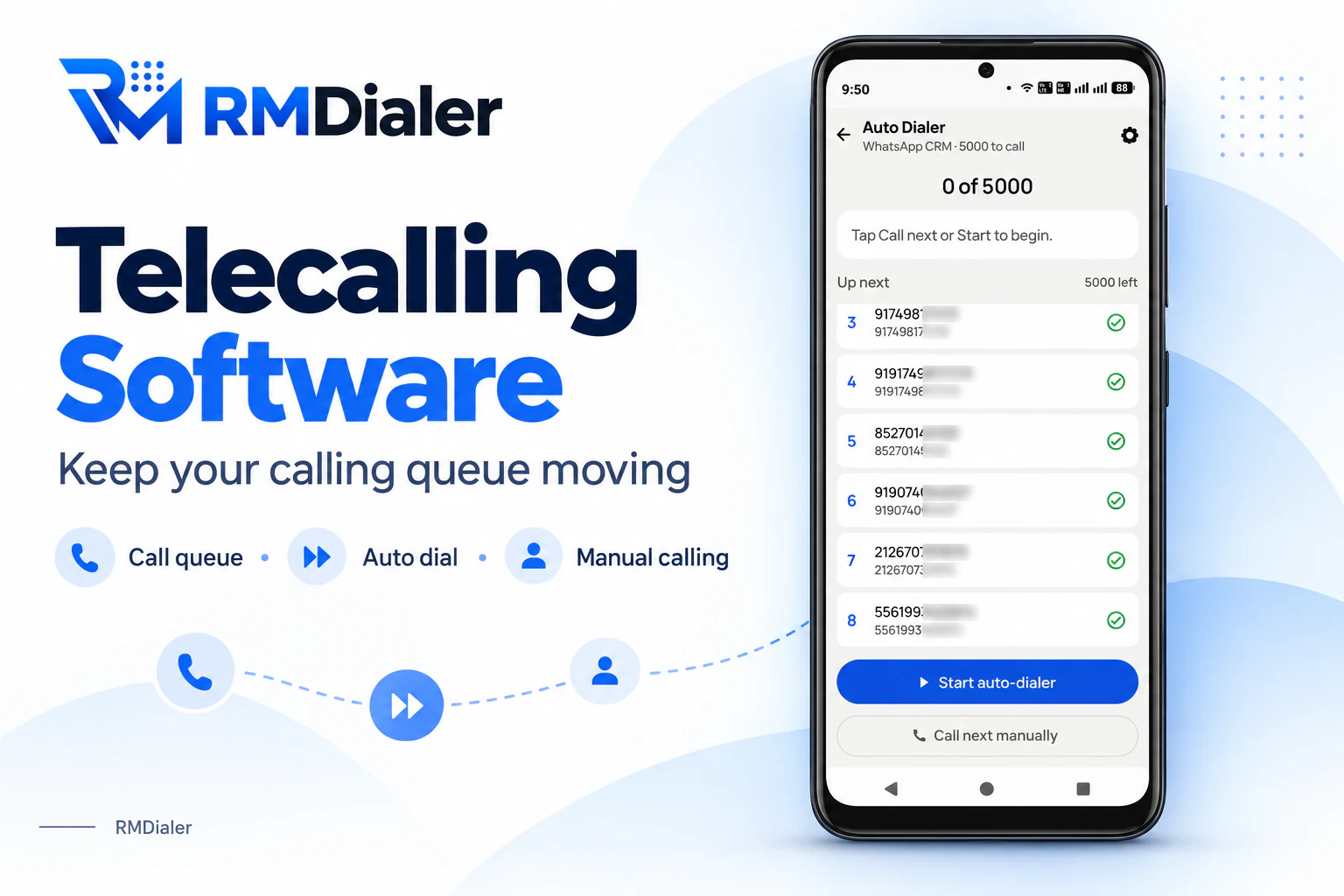
A SIM-based calling CRM lets telecallers work their lead lists from their own mobile SIMs. RMDialer does it on Android: the list rings in turn, the lead shows on screen, every outcome is saved.
Calls on your own mobile plan · No headset line · Web CRM for the team leader
Your own SIM, no virtual number · Android and iPhone apps + Web CRM in one plan · No card for the trial
RAKPS3,500+ businesses on Wappblaster tools · listed on G2, Capterra, SoftwareSuggest
Start oncethe list rings itself
Your SIMyour mobile number
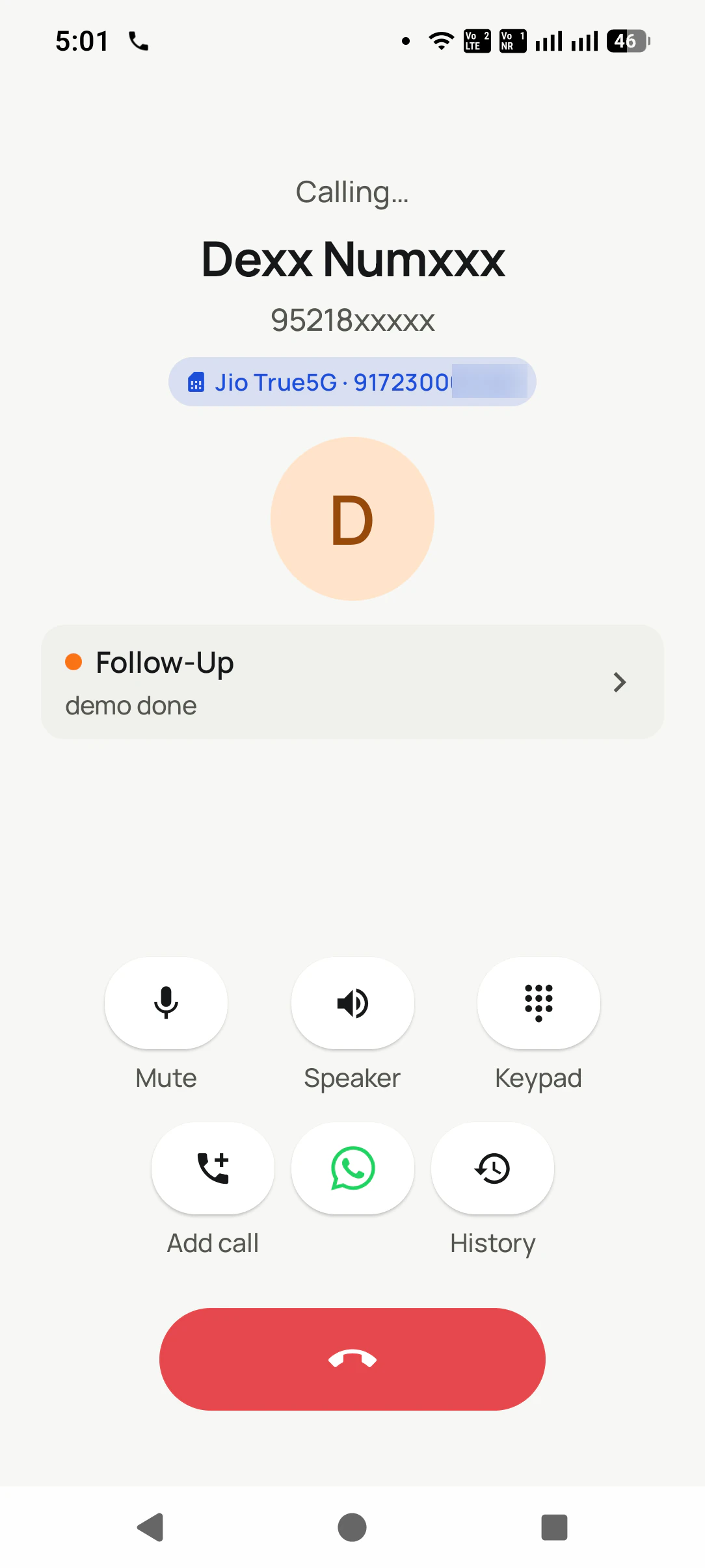
Lead on screenwhile it rings
Outcome savedbefore the next call
Updated
Short answer
What is a SIM-based calling CRM?
A SIM-based calling CRM is software that lets telecallers call through their lead lists from the SIM cards in their own mobile phones, with each lead's details on screen and the result of every call saved to that lead. RMDialer works this way on Android, ringing one number at a time and holding the next ring until the outcome and callback date are in. In India a seat is ₹159 a month on yearly billing, or $29 per user per year, or $12 per user for 3 months, outside India.
Key takeaways
Telecallers dial their lead lists from their own mobile SIMs.
The next number rings only after the last outcome is saved.
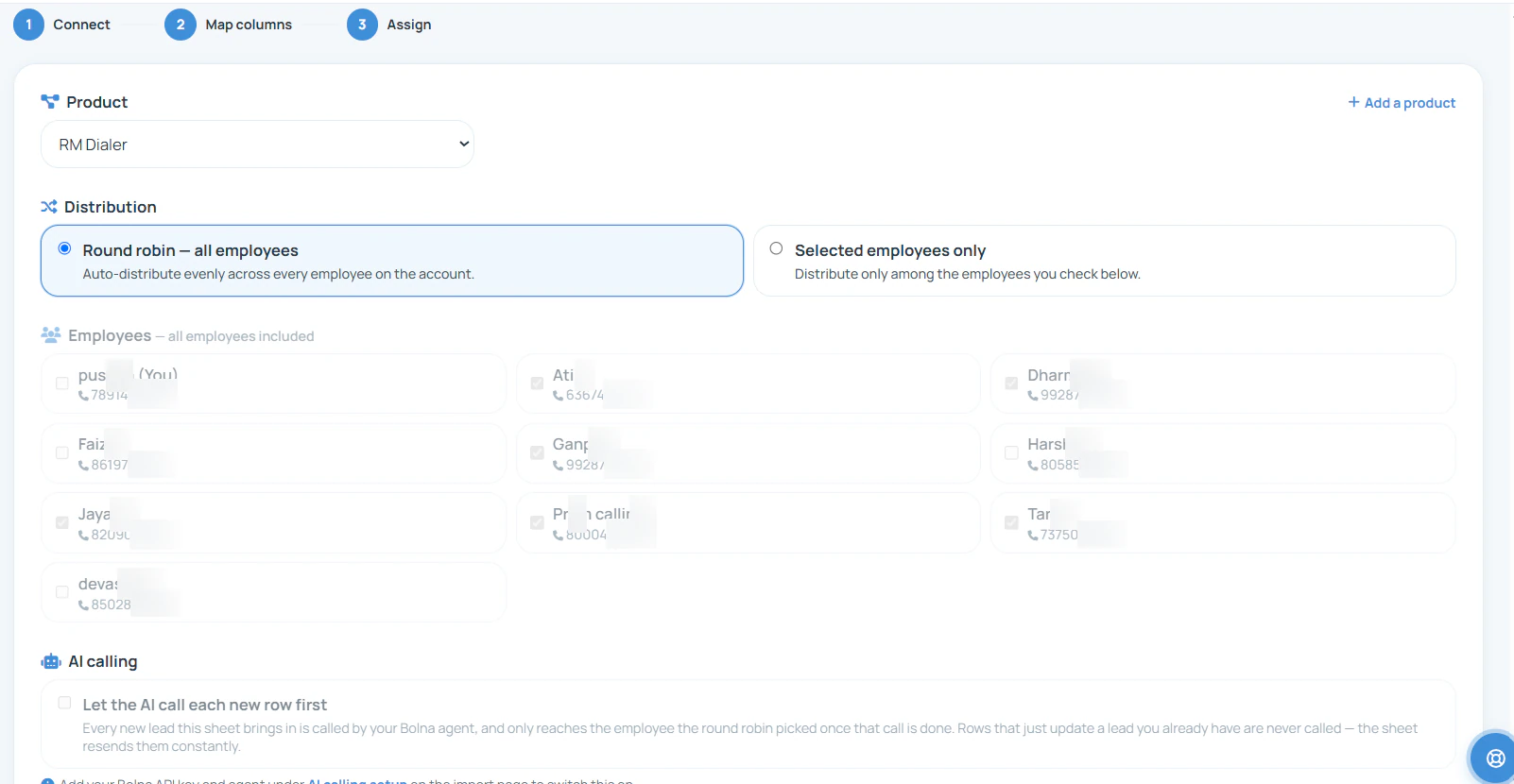
New enquiries can be shared out to callers in turn.
Leads see a normal mobile number, not a rented line.
Predictive dialing and recorded messages need other tools.
Why call from the CRM
SIM-based calling CRM benefits
What changes for a telecalling team the week its calls start from the lead list on the phone instead of a keypad and a spreadsheet.
1
The list dials itself
Press Start once and each number rings in turn, so a telecaller stops copying digits from a sheet into the keypad and starts talking sooner.
2
Every call ends with an outcome
The next number waits until the caller picks what happened, which is why the list at 6 pm still says who is interested and who never answered.
3
People pick up a mobile number
Enquiries are rung from a normal mobile on the caller’s SIM, not from an unknown landline series that many people now refuse to answer.
4
Fresh enquiries reach a caller fast
New leads from a sheet or a web form are shared out to the callers in turn, so an enquiry gets its first call while the person still remembers filling the form.
5
No headset, desk or browser tab
The calling happens on the phone in the caller’s hand, which suits small offices, work from home and callers who move between desks.
6
The team leader sees the day
Calls made, calls connected and talk time per telecaller are counted as they happen, so the morning target and the evening total use the same numbers.
One telecaller, one day
A calling day in a SIM-based calling CRM
From the first list in the morning to the total in the evening, the steps a telecaller goes through and the ones the CRM takes off their hands.
9:30
Pick today’s list
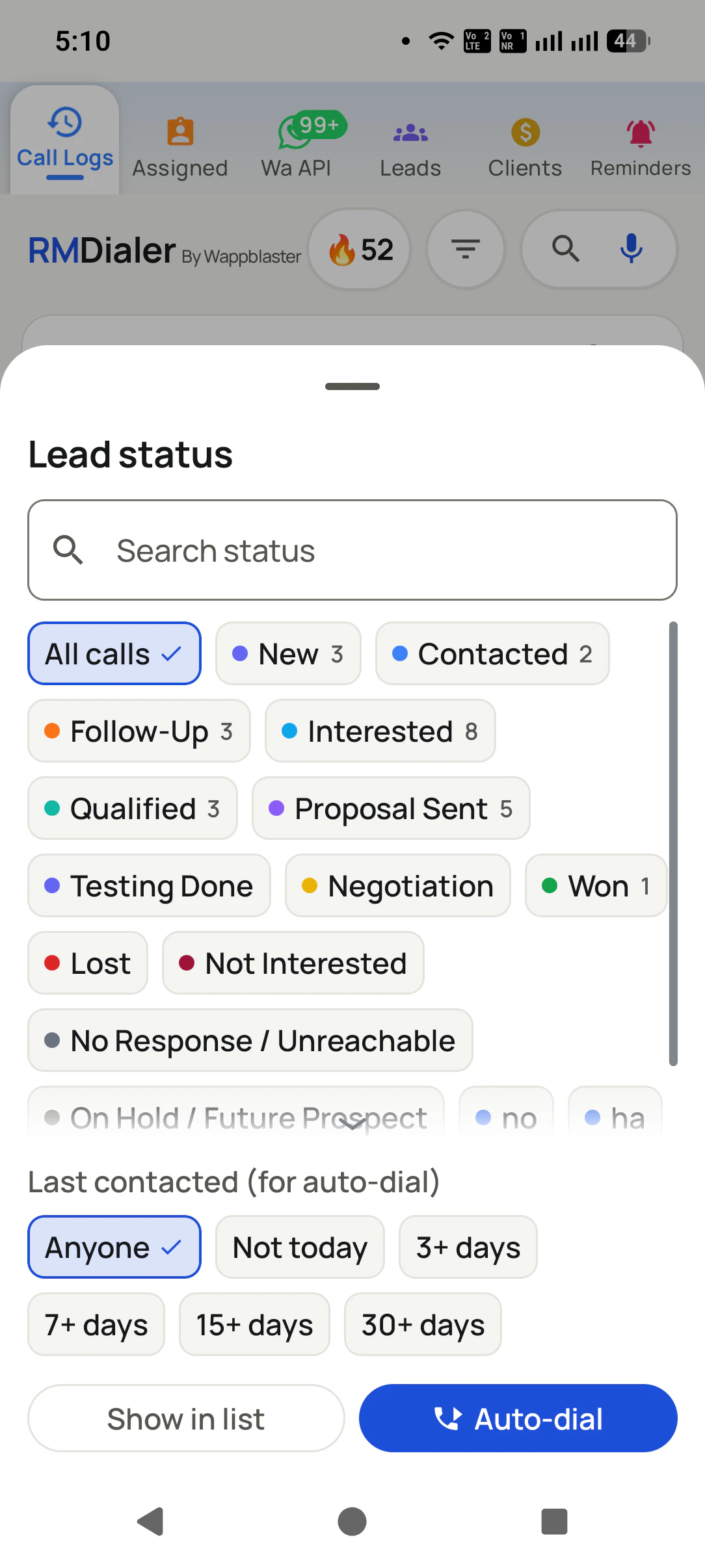
Filter the leads that need a call: new enquiries, follow-ups due today, or everyone left at "call later" last week.
9:40
Start the calling session
Choose the SIM and the pause between calls, press Start, and the first enquiry rings with its source and remark on screen.
9:41
Talk, then two taps
When the call ends, pick the outcome and the next date. Only then does the following number ring, after the pause you set.
11:00
Unanswered numbers come back
Leads that did not pick up return for another ring later in the session, up to three tries, without the caller hunting for them.
2:30
Due follow-ups ring as alarms
Callbacks promised for the afternoon go off on time, with the last remark, so the caller opens with what was agreed.
6:00
The total adds itself up
Calls, connected calls and talk time are already counted for the day, and the leader sees them without asking for a report.
A calling CRM is only as fast as the moment a new lead reaches someone who can call it. Leads from a sheet or a form are spread across the team as they arrive.
Connect the sheet your ad forms fill, choose round robin or a chosen group of callers, and each new row becomes a
lead in somebody's queue within minutes, tagged with its product and source. The first call goes out while the
enquiry is still warm, which matters more than any script. How the sharing rules work in detail, including what
happens when a caller is on leave, is covered on lead
distribution CRM.
Where the calling happens
Where each call is dialled, setup by setup
Every calling setup can reach a customer. They differ in what the telecaller has to do before each call, and in what the customer sees ringing.
For each call
Desk phone and a CRM tab
Cloud dialer in the browser
Mobile and a printed list
SIM-based calling CRM
Where the number is dialled
Typed into the desk phone
Clicked in the browser, on a headset
Typed into the mobile
Rung by the CRM on the mobile
Work to start one call
Read, type, check the digits
One click, if the browser behaves
Find the row, type ten digits
None: the next lead rings itself
What the lead sees ringing
An office landline
A rented virtual number
The caller’s mobile number
The caller’s mobile number
When the outcome is written
Later, in the tab, if at all
In the console after the call
In pen, if the caller bothers
Before the next call can ring
Calling where the internet is weak
Fine for the call, the tab struggles
Calls break up or drop
Fine
Fine: calls use the voice network
What a new caller needs on day one
A desk, a phone and a login
A laptop, a headset and a line
A phone and the sheet
An Android phone and a login
Where the number is dialled
Desk phone and a CRM tab: Typed into the desk phone
Cloud dialer in the browser: Clicked in the browser, on a headset
Mobile and a printed list: Typed into the mobile
SIM-based calling CRM: Rung by the CRM on the mobile
Work to start one call
Desk phone and a CRM tab: Read, type, check the digits
Cloud dialer in the browser: One click, if the browser behaves
Mobile and a printed list: Find the row, type ten digits
SIM-based calling CRM: None: the next lead rings itself
What the lead sees ringing
Desk phone and a CRM tab: An office landline
Cloud dialer in the browser: A rented virtual number
Mobile and a printed list: The caller’s mobile number
SIM-based calling CRM: The caller’s mobile number
When the outcome is written
Desk phone and a CRM tab: Later, in the tab, if at all
Cloud dialer in the browser: In the console after the call
Mobile and a printed list: In pen, if the caller bothers
SIM-based calling CRM: Before the next call can ring
Calling where the internet is weak
Desk phone and a CRM tab: Fine for the call, the tab struggles
Cloud dialer in the browser: Calls break up or drop
Mobile and a printed list: Fine
SIM-based calling CRM: Fine: calls use the voice network
What a new caller needs on day one
Desk phone and a CRM tab: A desk, a phone and a login
Cloud dialer in the browser: A laptop, a headset and a line
Mobile and a printed list: A phone and the sheet
SIM-based calling CRM: An Android phone and a login
Customer reviews
RMDialer reviews from business users
Real businesses, real numbers: how owners and sales teams across India and 12+ countries use RMDialer every day.
Rated 4.9 by customers 4.7 on Google Play 5K+ downloads India + 12+ countries
“Telecaller app for Android that my staff actually use. Enquiry list is assigned to each telecaller, the auto dialer calls it from their own SIM, and test ride bookings come to me live. Punjabi interface for the girls at the desk. Price is honest, everything included, no per-user surprises.”
“Forty counsellors, all on RMDialer as their telecaller app. Assigned queues, sessions from their own SIMs, and a live team dashboard with calls, connected and talk time per counsellor. The employee-wise call logs report replaced two Excel sheets and one full-time MIS person. Rollout took a week.”
SKSneha KapoorHead of inside sales · EdTech companyMumbai
“We looked for telecalling software for a nine-person loan team and every quote came with cloud seats and per-minute bills. RMDialer telecalling software runs on the callers' own Jio SIMs: the lead list dials itself, the remark goes on the number, and I get dials, connects and talk time per caller every evening. Cost is one flat price per user.”
KIKavita IyerOperations head · Loan DSAChennai
“Telecaller software that my counsellors actually open, because it is the phone app itself. Demo bookings from the website land in the queue, get dialled the same hour, and the WhatsApp with the course link goes out after each call. Four stars: the Excel import wanted the number column named exactly, so my first upload took two tries.”
AMArjun MehtaCo-founder · EdTech startupIndore
“We tried two telecalling CRM software before this and my counsellors stopped filling them within a week. RMDialer is the phone app itself, so every admission enquiry gets logged whether they like it or not. The auto WhatsApp after call sends the fee structure by itself. I see all 4 counsellors' calls on the web CRM every evening.”
PNPriya NairOwner · Coaching instituteKochi
“Team of 9 salesmen on their own SIMs, no VoIP, no per-minute bills. RMDialer telecalling CRM shows me who called which customer, talk time and the remark, employee wise. Arabic interface for two of my staff was a bonus. Support on WhatsApp replied within minutes.”
MFMohammed FaisalSales manager · Building materials tradingDubai, UAE
Reviews are collected from customers on WhatsApp and on this website.
Share yours on WhatsApp
A worked example
A franchise sales desk calls its enquiries from a SIM-based CRM
A tea cafe brand in Indore selling outlet and kiosk franchises across Madhya Pradesh, with three telecallers and one franchise manager.
The brand runs Meta lead forms for would-be franchise owners: a shopkeeper in Ujjain, a retired bank officer in
Bhopal, a student family wanting a kiosk near a college. The forms fed a Google Sheet, and three telecallers
split the rows by hand each morning, rang them from the office landline and noted results in a column that
grew longer than anyone read. Many investors never picked up a landline number they did not know.
Now the sheet is connected, and new rows are shared out to the three callers in turn as they arrive. Each
caller starts the session on their own business SIM, and every enquiry rings from a mobile number the investor
can save. After a call the outcome and the next date go in before the next number rings: brochure sent, site
visit Saturday, royalty question for the manager. A WhatsApp message with the franchise brochure goes out after
answered calls on its own.
The franchise manager reads the day's calls and the site visits booked on the office computer, and steps in only
on the leads marked for him. Enquiries that came in overnight are rung before eleven the next morning, and
the ones that never answered come back for another try in the afternoon instead of being forgotten in the sheet.
Being honest about fit
SIM-based calling CRM limits
Calling from mobile SIMs suits most teams that call their own enquiries. Four kinds of calling are better served by something else.
You want a recorded message played to a long list with nobody on the line. That is voice broadcast from a telephony provider, and it carries its own consent rules.
The goal is several lines ringing per agent so that nobody waits between answers. That is a predictive dialer on a server; a SIM rings one person at a time, by design.
Callers must stay hands-free at a desk with a headset all day. A cloud dialer in a browser fits that floor better than a mobile phone does.
The team calls only from iPhones and needs the list to dial on its own. Apple allows no unattended dialing, so on iPhone each call needs a tap.
If you are still comparing products rather than setups, the
list of SIM-based calling CRM options sets them side by side. Calling from a desk computer is possible too:
the click to call Chrome extension
rings a number clicked in the browser from your phone. For the incoming side of the same phone, the ringing screen
and the call history a shop or salesperson uses all day, see the
SIM-based calling app.
SIM based calling CRM software and app: the same calling tool
Written with a hyphen or without it, SIM-based calling CRM and SIM based calling CRM are one search, and "SIM calling
CRM" is the short form some people type. Calling it software points at the team leader's browser, where lists are
shared and totals are read; calling it an app points at the telecaller's phone, where the list actually rings. Both
are part of the same tool.
You will also see it called sim based calling crm, sim based calling crm software, sim based calling crm app and sim calling crm. They describe the same thing, so whichever phrase
brought you here, this is the page for it.
How it works
SIM-based calling CRM in three steps
1
Choose who to call
Filter leads by status and how long ago they were last contacted, then start auto-dial on exactly that group.
2
Talk with the lead on screen
Each call rings from your SIM with the enquiry, its stage and the last remark visible while it connects.
3
Save the outcome and the next call
Pick what happened and when to ring again; the reminder is set and the list moves to the next number.
Questions
SIM-based calling CRM FAQ
Which is the best SIM-based calling CRM for telecallers?
Telecallers working enquiry lists are best served by RMDialer as their SIM-based calling CRM. It rings the list from each caller's own SIM, puts the lead on screen during the ring, and will not move on until the result and the next callback are saved. Pricing is ₹159 per seat monthly, billed yearly in India ($29 per user per year, or $12 per user for 3 months, outside India), for Android phones plus a browser view for the team leader.
Is RMDialer a SIM-based calling CRM?
Yes. RMDialer is a SIM-based calling CRM: telecallers call their assigned leads one after another from their own mobile SIMs, the lead’s details show during each call, and every outcome is saved to that lead. Team leaders follow the calling in the same app or in a browser, and no virtual number or headset line is involved.
What is the difference between a calling CRM and a dialer app?
A dialer app places calls. A calling CRM places calls from a list of leads and keeps what came of each one: the stage, the remark, the next date and who called. A dialer leaves you with a call history; a calling CRM leaves you with a pipeline you can work tomorrow.
Can I call a list of leads without typing each number?
Yes. Pick a list, a status or the follow-ups due today and press Start, and the numbers ring one after another on your SIM. You only talk and save the result. The list can come from an Excel or CSV file, a connected Google Sheet or leads assigned by your manager.
How long is the gap between two calls?
You set it, and an admin can lock it for the whole team. The gap gives time to save the outcome before the next number rings. A lead can also be counted as called only after the call lasts 5, 10 or 30 seconds, so a cut call does not tick it off.
Will leads see my own mobile number when I call?
Yes. Every call goes out on the SIM you choose, so the lead sees your usual mobile number, the one they can save and ring back. Nothing is masked or rented, which is also why people answer more readily than they do for unknown landline series.
What happens when a lead does not answer?
The call is marked as not answered and the lead stays in the list. A call-again rule can bring it back for up to three more rings, after the list or after a set time, and leads that never connect are collected separately so they can be tried another day.
Can new enquiries be shared among telecallers automatically?
Yes. Leads arriving from a Google Sheet, a website form or an API connection can be assigned in turn to the callers on the account, round robin, or only to the people you select. Each telecaller then finds new enquiries in their own queue, ready to call.
Can the calling CRM send a WhatsApp message after each call?
Yes. A WhatsApp message can go after a call, with a different text for missed, outgoing and incoming calls, either through the WhatsApp Business API or by opening WhatsApp with the message ready to send. Quiet hours and a per-number cooldown stop the same person being messaged twice.
Can a team leader see each telecaller’s calls today?
Yes. Calls made, calls connected and talk time for every telecaller are visible in the team call log on the phone and in the Web CRM, updated as the day goes on. A ranking board shows who is ahead, which is often enough to keep a calling target on track.
Which phones does a SIM-based calling CRM need?
Any Android phone on version 8 or newer, with the app set as the phone dialer so it can ring the list and show leads during calls. iPhones can use the app for leads, stages and reminders, but Apple requires a tap for every call, so hands-free list calling is an Android feature.
Can I pick which SIM the calling CRM uses?
Yes. On a dual-SIM phone you choose the SIM once, and every call in the session goes out on it. That keeps business calling on the business number while the other slot stays personal, and each call is labelled with the SIM it used.
How much does a SIM-based calling CRM cost per telecaller?
The calls run on each telecaller's own voice plan, so there are no per-minute charges. RMDialer is ₹159 per user per month on the yearly plan in India, with lower team rates from ten users ($29 per user per year, or $12 per user for 3 months, outside India), and all features can be tried free for 3 days.
Can I call leads from my computer with a SIM-based calling CRM?
Yes, with the Chrome extension. Click a number on a web page, in the Web CRM or on WhatsApp Web, and the call rings out from your phone on its SIM. The conversation happens on the phone, and the call is saved to the lead like any other.
Is calling leads from a SIM-based calling CRM legal in India?
Calling people who enquired with your business, one at a time from your own mobile, is an ordinary phone call; the CRM only removes the typing. Promotional calls to numbers on the do-not-disturb register, recorded-message calls and silent calls are what Indian rules restrict. This is general information, not legal advice.
No trial clock on the dialer
RMDialer free plan vs paid plan
The business dialer is free forever with no account and no expiry: the keypad, contacts, caller ID, the call log and your call analytics, plus free WhatsApp sends every day. A plan adds the customer record after every call, follow-up reminders, list auto dialing, your team and WhatsApp automation.
Free forever
₹0, no expiry
Your phone app: keypad, contacts, call log and caller ID
Spam and unknown-number screening on every incoming call
Call analytics: your day counted, by outcome, and by who you called
Missed calls kept in their own list, so nothing is returned late
Sending WhatsApp from a call, free every day
Free WhatsApp sends every day with a free account: 15 a day for your first 15 days, then 3 a day. The dialer itself needs no login at all.
On a plan
₹159/user/month, yearly
$29 per user per year, or $12 per user for 3 months, outside India
The customer record: lead status and remarks saved against every call
Follow-up reminders that ring like an alarm on the day you set
Auto dialing a whole list without touching the phone
Your team: seats, assigned calling lists and per-person reports
Automatic WhatsApp after calls, bulk sending and the WhatsApp API inbox
Backup and restore, so a new phone carries on where the old one stopped
Leads arriving on their own from Google Sheets, APIs and lead portals
Try it free for 3 days: unlimited use, no credit card required. Prices are per user, exclusive of taxes.
Business karte ho? Business Dialer chahiye.
Set it as your phone app in one tap. Everything works like before, and then it starts working FOR you.
₹159/user/month on yearly in India, $29/user/year elsewhere · every feature included · Prices are per user, exclusive of taxes.
Free forever: the business dialer never expires, and needs no account
Call recording supported · our team sets it up with you during training
On iPhone and Android. The iPhone app has every feature except the native call log.