Auto Dialer · Lead CRM · Auto WhatsApp · From ₹159/month
The Business Call Dialer that dials for you.
First, replace the normal phone dialer with a real business dialer: do all your day-to-day calling from RMDialer. Then auto dial your lead list, update every lead's status in 2 taps, and let WhatsApp follow-ups go out by themselves. One app: Business Call Dialer, Auto Dialer, Lead CRM, Lead Automation and Auto WhatsApp.
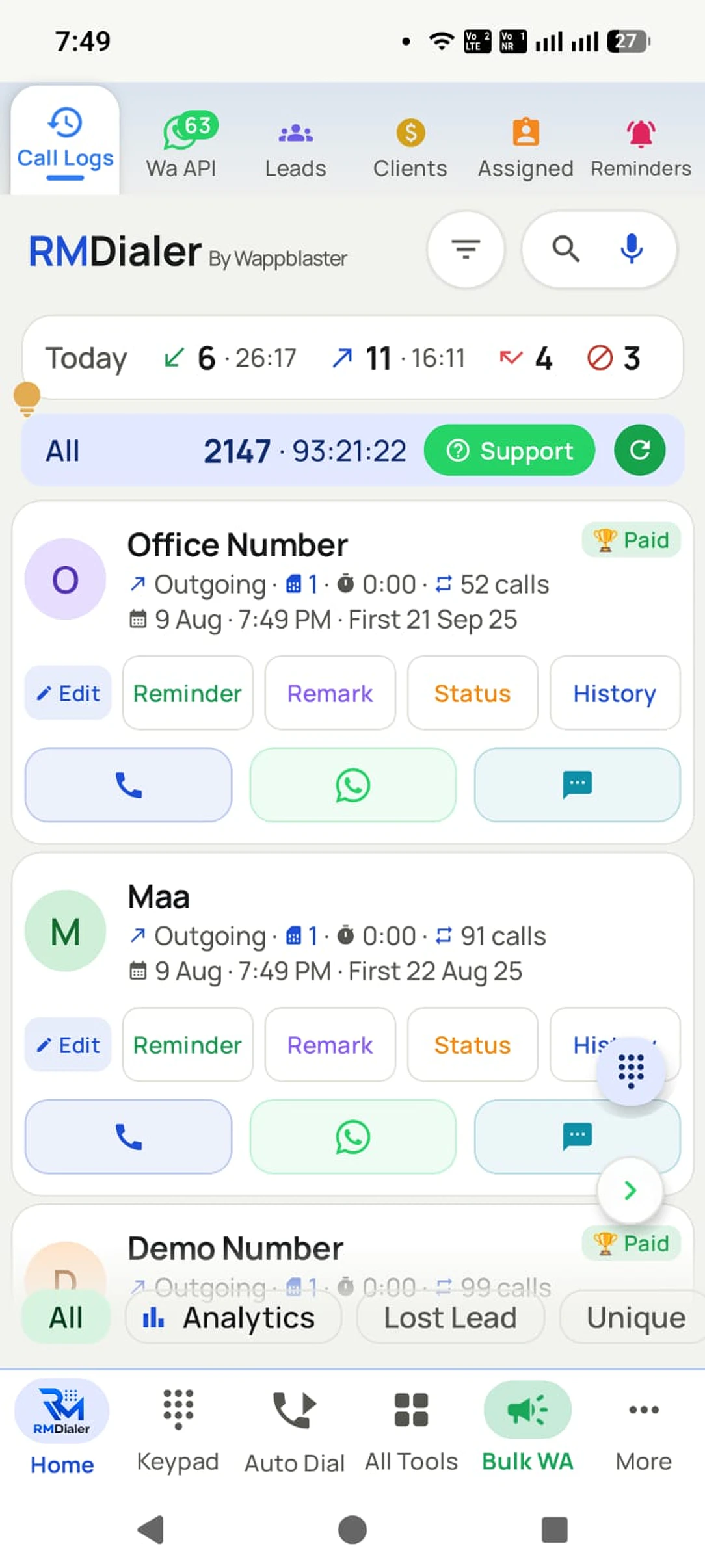
RMDialer is a business dialer for Android: an auto dialer, telecalling CRM and lead automation in one app. It replaces the basic phone dialer, so an incoming number arrives with the customer name, lead status and your last note already on screen. When the call ends you save what happened in two taps, and WhatsApp follow-ups go out by themselves. New enquiries arrive on their own from Google Sheets, APIs, Facebook, IndiaMART and JustDial, tagged with their source and ready to dial. Calls run on the SIM already in the phone, so there is no IVR, no VoIP and no virtual number. Using it as your phone app is free forever and needs no account: the dialer, call log, caller ID and call analytics never expire, and a plan adds the customer record, reminders, list auto dialing, team reports and WhatsApp automation.
₹159/user/month on yearly (₹249 on 3-month) + taxes. Every feature included
Auto dials any lead list: Excel, Google Sheet, API, follow-ups
Every call updates the lead CRM: status, remark, reminder in 2 taps
Bulk and automatic WhatsApp on the official Business API
Free forever as your phone app: dialer, call log, caller ID and call analytics, no account
Diagram of one business call handled by RMDialer, from ring to follow-up.
RMDialer demo video
How it works
One call, from ring to follow-up
1
The call starts with the story
Who is calling, their lead status, and your last remark, right on the call screen.
Status + last note, on screen
2
Two taps when it ends
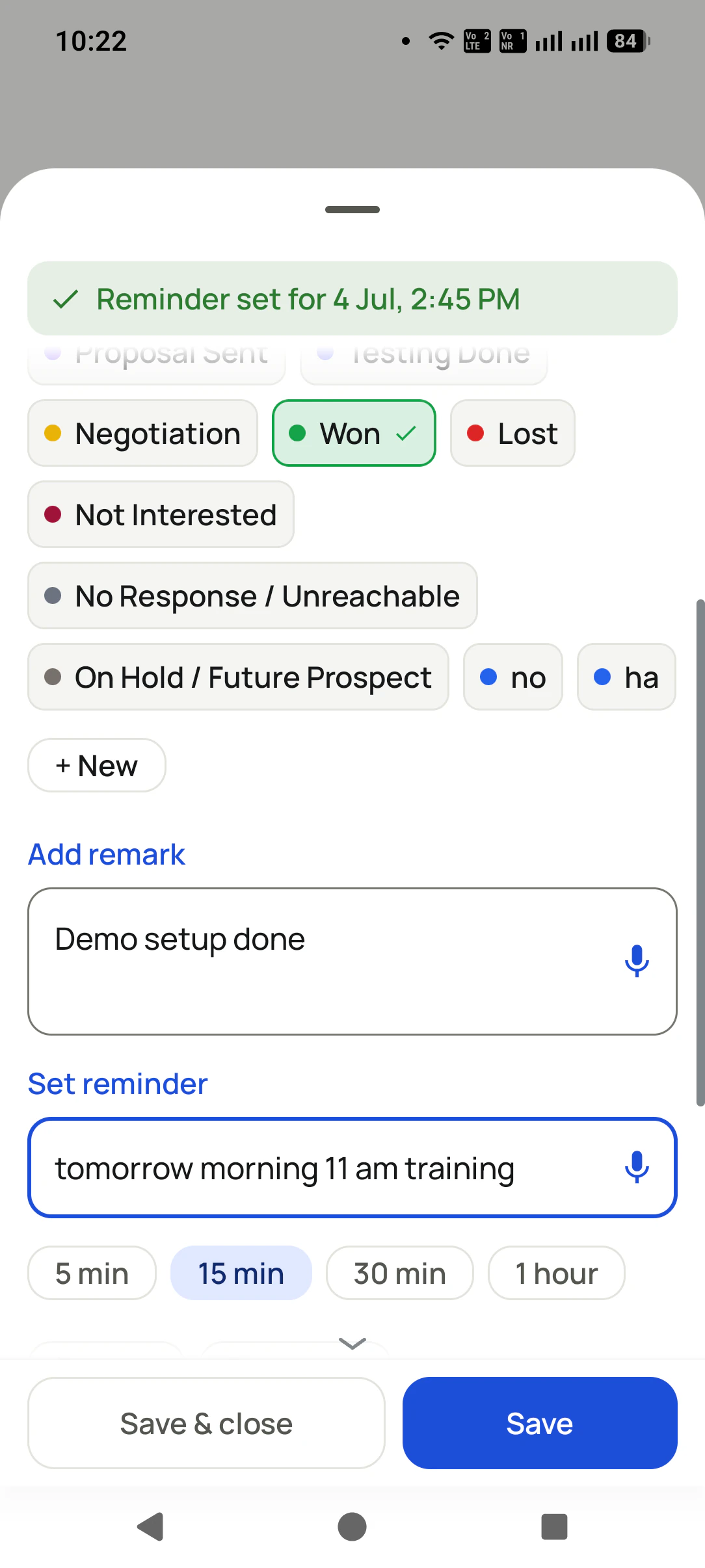
Update the status, save a remark, set the follow-up. The after-call sheet does it all.
Tap the status, tap Save
3
WhatsApp goes out by itself
The details you promised reach the customer before they put the phone down.
Auto WhatsApp: ON
Sound familiar?
You run a business. Your dialer doesn’t know that.
None of these are your fault: this is the basic phone dialer costing you money. It was made for personal calls, never for business.
"Who was this again?"
A number rings. No memory of the last talk, the promise you made, or their budget. Every call starts from zero.
The follow-up you forgot
The customer did not buy the better product. They bought from whoever called back on time.
The same WhatsApp, again
After every call you type the same message by hand: details, address, price list. Twenty times a day.
Business scattered everywhere
Leads in a notebook, numbers in the phone, promises in your head. Nothing is connected.
Phone lost = business lost
Your whole business memory lives in one device, with no backup and no way back.
Team calls, zero record
Ten people calling all day, and nobody can say who told what to whom.
Your dialer sees every one of these calls. It was just never built to care.
RMDialer was built only for this.
Same call, two endings
Basic dialer vs The Business Dialer
The basic dialer
1 Number rings. Who is this?
2 You promise to send details "in 5 minutes"
3 Call ends. Nothing is recorded anywhere
4 The follow-up lives in your memory
5 Three days later, the lead bought elsewhere
Result: a lost customer nobody even noticed.
RMDialer
1 Call screen shows the lead, status, and your last remark
2 You just talk. You already know who this is
3 Two taps: status updated, remark saved
4 WhatsApp with the details goes out by itself
5 Follow-up rings at the exact time. Deal closed
Result: the customer felt remembered. That is why they buy.
Made for you
Which one is you?
Same app and same features for everyone. Pick the one that sounds like your day, and see it explained for your kind of work.
Reminders, renewals, messages, and call events with inline actions.
Use the App in Your Language
In-app language picker with RTL support and a searchable language list.
Light & Dark Themes
Light and dark themes with optional dynamic color from your wallpaper.
Guided Setup for Permissions
A guided permissions screen that sets up dialer role, notifications, and alarms correctly.
3,500+active businesses
12+countries
1M+messages sent
40languages
Trusted by teams at Hero, TVS, Honda, Tanishq and 3,500+ more businesses · Since 2020, Bikaner, Rajasthan, India
Figures verified August 2026.
From the field
People stopped losing customers
"
Earlier my follow-ups lived in my head. Now the phone rings me at the right time with the customer's whole story on screen. I have stopped losing deals to forgetting.
Real estate consultantProperty advisory, NCR"
My team of 14 makes calls all day. I finally see every call, every status, every promise, without asking anyone to fill a single form.
Sales headInsurance agency, Pune"
The auto WhatsApp after calls is magic. Customers reply "how did you send this so fast?" and then ask which app I use.
Business ownerAuto dealership, Jaipur
Data safety & security
Your customer list is your business. We treat it that way.
A dialer sees everything. That is exactly why every part of this app is built to keep your data yours.
Nothing uploads without your yes
Backup starts only after you sign in and give explicit consent. You review which SIMs are included and which numbers are excluded BEFORE the first upload. Logged out, nothing leaves the phone.
Personal stays personal
Mark any number as excluded: it is never uploaded, never messaged automatically, never touched. Choose per SIM what backs up, so a personal SIM can stay completely out.
Encrypted on the phone
The app database is encrypted on your device, and API details are locked with the Android Keystore, so even a lost phone does not hand over your customer list.
Encrypted in transit
Every sync runs over HTTPS to your own account. A transparent sync log shows exactly what ran and when, and you can make it sync everything again any time.
Your data is not the product
We do not sell your data or your customers' data, do not show ads, and never share contact lists with advertisers. You export to CSV any time. It is yours.
Compliant WhatsApp
Bulk and automated messages go through the official Meta WhatsApp Business API with approved templates and your own API details. We do not read your personal WhatsApp chats.
Read the full privacy policy · Every permission the app asks for is explained there, in plain language.
Pricing
One forgotten follow-up costs more than a year of RMDialer
₹1908/year (that is ₹159/month, about ₹5 a day) for every feature. Or ₹747 for 3 months (₹249/month). Prices + taxes.
No. RMDialer is a complete phone app: calling, contacts, dual SIM, and call history all work exactly like before. The business layer sits on top.
Is every feature really included in one price?
Yes. One plan, all features: the mobile app, the Web CRM for desktop access, auto dialer, WhatsApp automation and team management, whether you are a single user or a 1000-person team (team pricing is simply per user).
Does it work for a team?
Yes. Assign leads to members, transfer with history, and see every call, status, and follow-up across the team, with zero forced data entry.
What happens to my data if I change phones?
Everything is backed up to your account: leads, remarks, reminders, chats. Sign in on the new phone and continue.
Can I import my existing leads?
Yes: CSV, Excel, or JSON files, or connect a Google Sheet / API so new leads import automatically in the background.
Is my data safe? Who can see my customer list?
Only you. The app database is encrypted on your phone, backup runs only after your explicit consent, sync is over HTTPS to your own account, and you can exclude any number or SIM entirely. We never sell your data or your customers' data, and there are no ads.
Do you read my WhatsApp chats?
No. Automated and bulk messages go through the official Meta WhatsApp Business API using the API details you connect, or by opening WhatsApp with a pre-filled message you send yourself. Your personal chats are never read.
Why does the app need call log and contacts permission?
Because it IS your phone app: the call log is what becomes your business record, and contacts put names on your calls. Every permission and its exact purpose is listed in the privacy policy.
Is RMDialer a telecaller app for one person or a sales dialer for teams?
Both. One telecaller uses it alone as an auto dialer and lead CRM; a team adds users, and the owner assigns leads and sees each person's calls, statuses and follow-ups. The price is per user either way.
What is lead automation, and how does it work in RMDialer?
Lead automation means new enquiries reach a caller's phone without anyone copying them. RMDialer pulls new rows from a Google Sheet or REST API, assigns them round-robin, and queues them for auto dialing.
Is RMDialer call management software?
Yes. Every incoming and outgoing call is logged with the lead's status, the remark saved after it and the follow-up set, and owners see per-employee call counts, connected calls and talk time.
Can RMDialer be used as a bulk calling app?
Yes, one call at a time from your own SIM. Load an Excel sheet, Google Sheet, API list or lead filter, press Start, and it dials the whole list in sequence while you talk.
Is RMDialer a call tracking app for outbound calls?
Yes. It tracks every outbound and inbound SIM call per employee: total calls, connected calls, talk time, missed calls and follow-ups, with no cloud number.
Which app do telecallers use to make calls in India?
Telecallers in India increasingly use a SIM-based telecaller app like RMDialer, which auto-dials the list and saves status and follow-up after each call. Customers see the caller's normal number, so pick-up rates stay high.
How can I automatically dial a list of phone numbers on Android?
Install RMDialer, import the list from Excel or Google Sheets, and press Start; it dials each number in turn from your SIM. Status and follow-up are saved in two taps between calls.
How do I track my employees' calls without call centre software?
Give each employee RMDialer on their own Android phone; the owner then sees every call, connected call, talk time and follow-up per person per day. No cloud number or hardware is needed.
How do I send a WhatsApp message automatically after a call?
Turn on Auto WhatsApp in RMDialer and pick a template for missed, incoming or outgoing calls. The message goes out with the customer's name filled in, through the official WhatsApp Business API or by opening WhatsApp.
How do I get Facebook or IndiaMART leads to my phone automatically?
Connect the Google Sheet or API those platforms write to as a lead source in RMDialer. New leads are assigned to a caller and queued for auto dialing within minutes.
What is the difference between a business dialer and a normal phone dialer?
A business dialer like RMDialer shows the customer's lead status, last note and follow-up on the call screen and saves what happened after the call; a normal dialer only shows the number.
Can I run a CRM from my mobile without a laptop?
Yes. RMDialer is a lead management CRM that lives in the phone's dialer, so leads, remarks, reminders and reports are managed on the phone; the Web CRM is optional.
How many calls can a telecaller make per day with an auto dialer?
With RMDialer's auto dialer a telecaller typically makes 150 to 250 calls a day, compared with 60 to 100 when dialing by hand, because the next call places itself.
No trial clock on the dialer
RMDialer free plan vs paid plan
The business dialer is free forever with no account and no expiry: the keypad, contacts, caller ID, the call log and your call analytics, plus free WhatsApp sends every day. A plan adds the customer record after every call, follow-up reminders, list auto dialing, your team and WhatsApp automation.
Free forever
₹0, no expiry
Your phone app: keypad, contacts, call log and caller ID
Spam and unknown-number screening on every incoming call
Call analytics: your day counted, by outcome, and by who you called
Missed calls kept in their own list, so nothing is returned late
Sending WhatsApp from a call, free every day
Free WhatsApp sends every day with a free account: 15 a day for your first 15 days, then 3 a day. The dialer itself needs no login at all.
On a plan
₹159/user/month, yearly
$29 per user per year, or $12 per user for 3 months, outside India
The customer record: lead status and remarks saved against every call
Follow-up reminders that ring like an alarm on the day you set
Auto dialing a whole list without touching the phone
Your team: seats, assigned calling lists and per-person reports
Automatic WhatsApp after calls, bulk sending and the WhatsApp API inbox
Backup and restore, so a new phone carries on where the old one stopped
Leads arriving on their own from Google Sheets, APIs and lead portals
Try it free for 3 days: unlimited use, no credit card required. Prices are per user, exclusive of taxes.
Business karte ho? Business Dialer chahiye.
Set it as your phone app in one tap. Everything works like before, and then it starts working FOR you.
₹159/user/month on yearly in India, $29/user/year elsewhere · every feature included · Prices are per user, exclusive of taxes.
Free forever: the business dialer never expires, and needs no account
Call recording supported · our team sets it up with you during training
On iPhone and Android. The iPhone app has every feature except the native call log.